What matters when choosing
For off-campus study, establish whether the difficulty lies with the incoming broadband service, Wi-Fi coverage, one computer or access to a dependable fixed connection. Ofcom advises that Wi-Fi can affect a speed-test result, so a wired comparison is useful when you can reach the router.
| Concern |
What to check |
Who this matters to |
| Broadband or Wi-Fi? |
Compare Ethernet and Wi-Fi results at different times where a wired test is possible; ask the account holder about service problems. |
If study access is slow even near the router, I need to know whether new Wi-Fi equipment could address it before buying anything. Around 33% of consumers put identifying the connection problem first. |
| One weak room |
Check for a usable router signal and a socket between the router and study space before placing an extender. |
When my bedroom is the weak spot but the connection works elsewhere, reaching that room is my priority; around 25% of consumers make room-level coverage their primary concern. |
| Several weak rooms |
Confirm account-holder agreement, space and power for mesh nodes, and how the system connects to existing equipment. |
If more than one room needs coverage, I need a household arrangement that its account holder can manage. This is the main concern for around 17% of consumers. |
| Access away from fixed broadband |
Check the intended mobile network’s indoor coverage, then its SIM allowance and tethering terms. |
Without dependable access to the fixed connection, I need to know whether mobile data will work where and when I study; around 17% of consumers prioritise an independent connection. |
| One computer’s Wi-Fi |
Compare devices in the same location, then check the computer’s USB and operating-system compatibility. |
If my computer alone struggles at a desk where other devices connect, I would rather address that device than change the household network. Around 8% of consumers put a device-specific fix first. |
Joybuy product choices
These products cover a weak study room, a wired desk connection, one computer’s Wi-Fi, multi-room household coverage and portable mobile access. Choose the route that matches the fault and the network changes you are able to make.
 No image available
TP-Link RE220BE BE3600 Wi-Fi 7 Range Extender
Consider an extender when the study room has weak coverage but there is a usable signal nearer the router. Position it where it can still receive that signal; it will not repair a slow broadband line.
RE220BE, BE3600 and Wi-Fi 7 identify this variant. If mesh integration matters, confirm compatibility with the existing router before buying.
View on Joybuy
 No image available
HOCO HB42 4-in-1 USB Gigabit Ethernet Adapter, 0.2 m, black
A wired option for a study computer that can reach the router or an active Ethernet port. It can help separate a Wi-Fi problem from a broadband problem, but it does not extend wireless coverage.
The product name specifies three USB 3.0 connections and an RJ45 LAN connection. Check your computer’s USB connection and whether you need a separate Ethernet cable.
View on Joybuy
 No image available
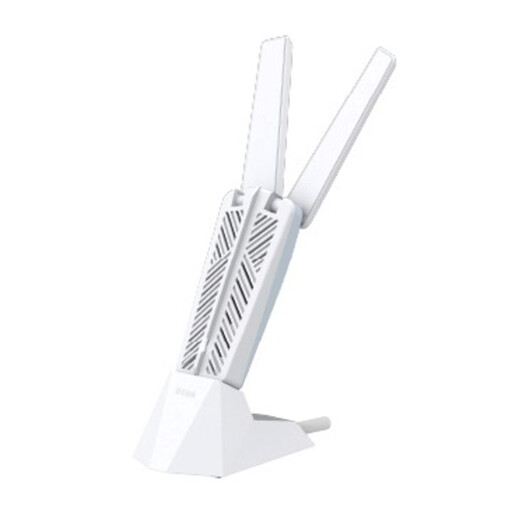
D-Link AE65U BE6500 Wi-Fi 7 USB Adapter
Consider a USB Wi-Fi adapter if this computer struggles while other devices connect acceptably in the same place. It will not improve the broadband line or coverage for other devices.
AE65U, BE6500 and Wi-Fi 7 identify this variant. Check the intended computer’s operating system and USB port, as well as the router features you intend to use.
View on Joybuy
 No image available
NETGEAR Orbi 370 RBE373 WiFi 7 Mesh System, 3-Pack
A mesh system is relevant when coverage is weak across several rooms and the broadband account holder agrees to manage the household setup. It cannot improve a slow incoming broadband connection.
This dual-band BE3600 variant is a three-pack; its product name specifies 2.5 Gbps Ethernet. Check compatibility with the existing modem, gateway and broadband service, and allow suitable positions and power sockets for the units.
View on Joybuy
 No image available
D-Link F530 5G NR AX3000 Wi-Fi 6 Mobile Hotspot
A portable route when the fixed household connection is unavailable or not under your control. Its usefulness for study depends on reception where you work and the terms of your SIM plan.
The product name identifies 5G NR and Wi-Fi 6. Before relying on it, check supported UK network bands and operator compatibility, indoor coverage, the data allowance and tethering terms.
View on Joybuy
Common questions
How can I tell whether I need Wi-Fi equipment or help with the broadband connection?
Compare a computer’s wired Ethernet connection with Wi-Fi where you can reach the router, and repeat the checks at different times. Ofcom notes that Wi-Fi can slow the result seen in a speed test; if the wired connection also struggles, ask the account holder to investigate the service rather than expecting an extender or mesh system to fix the line.
Can I set up mesh Wi-Fi in rented accommodation?
A plug-in mesh setup depends on the broadband account holder’s agreement and the household’s arrangements, while physical works require separate consideration. Check tenancy terms and house rules before changing equipment; for fixed fibre works in a block of flats, Openreach says permission from the freeholder or managing agent is needed.
When could a mobile hotspot work for study?
A hotspot is worth considering when fixed broadband is unavailable or unreliable and the intended mobile network works at your study location. Check Ofcom’s location-based coverage predictions, then the SIM allowance, tethering terms and actual reception in the room and at the times you need it.
Will a USB Wi-Fi adapter fix every slow connection?
No: it addresses one computer’s Wi-Fi connection, so it is most relevant when other devices work better in the same location. It cannot improve the broadband line or router placement; ASUS also states that the full Wi-Fi 6 benefits of its USB-AX56 require a Wi-Fi 6-compatible router.


