One-room signal fixers
If Wi-Fi works near the router but is weak in one room, a targeted extender may be worth considering if it can be placed where it still receives a usable signal. Which? describes extenders as a way to reach a particular area.


Before buying equipment for one weak room, check that the connection works near the router and that there is no reported outage: Ofcom notes that Wi-Fi cannot outperform the broadband service feeding it. Which? describes an extender as a targeted option when it can receive a usable signal, while mesh is intended for wider coverage and powerline depends on the home’s wiring. Placement, backhaul, compatibility and the exact product’s security and support information all affect the choice.
If Wi-Fi works near the router but is weak in one room, a targeted extender may be worth considering if it can be placed where it still receives a usable signal. Which? describes extenders as a way to reach a particular area.
If several rooms or floors have weak coverage, compare mesh systems and how their units can be positioned and connected. Ofcom notes that mesh can suit larger homes with weak-signal areas, but adding too many units can make issues worse.
If walls or distance make a wireless connection difficult, consider whether existing electrical wiring could carry a powerline connection or whether Ethernet can reach the room for an access point. Manufacturers note that powerline results depend on the home’s wiring.
Start by checking whether the problem is with local Wi-Fi or the incoming broadband service, then match the equipment to the affected rooms and the connection available between units. Ofcom notes that home Wi-Fi cannot outperform the broadband service feeding it, and Which? describes an extender as a targeted coverage option.
Consider it when: One room is weak and there is a position between it and the router where the extender still receives a usable signal.
Trade-off: Wireless repeating can affect speed and responsiveness; moving an extender into a dead zone does not provide a usable link back to the router.
Consider it when: Several rooms or floors need coverage and you can position units so they connect to one another.
Trade-off: Multiple units may add expense and setup work; Ofcom cautions that adding too many mesh units can make issues worse.
Consider it when: Wireless links are obstructed, Ethernet is impractical and the intended sockets can communicate over the home’s electrical wiring.
Trade-off: Results depend on the wiring and electrical layout, and the rate on the box is not necessarily the throughput a device will receive.
Consider it when: Ethernet can reach the weak area and you want to provide Wi-Fi there without relying on a wireless link back to the router.
Trade-off: Cable routing, power, mounting and network management need to suit the exact model and installation.
| Concern | What to check when buying | Who this matters to |
|---|---|---|
| Fixing one weak room | Compare the connection near the router with the affected room; identify a position where an extender still receives a usable signal. | If the connection is fine near the router but weak in one room, I want a targeted fix rather than extra whole-home units. Around 42% of consumers prioritise single-room coverage. |
| Coverage across rooms | Map the affected rooms, walls and possible unit positions; check whether the exact mesh kit supports wired backhaul if Ethernet is available. | When several rooms or floors have weak coverage, I need units that can connect while reaching the areas in use. Around 25% of consumers prioritise multi-room coverage. |
| Reaching a room through wiring | Check the intended wall sockets and adapter compatibility; choose a kit with a Wi-Fi unit if wireless access is needed in the destination room. | If walls obstruct a wireless link and running Ethernet is impractical, I would consider using existing electrical wiring. Around 17% of consumers prioritise a powerline connection. |
| A cable-fed Wi-Fi point | Confirm the Ethernet route, the model’s power and mounting requirements, and whether its management setup suits your network. | Where Ethernet reaches the room, I would prefer a cable-fed Wi-Fi point to relying on wireless backhaul. Around 16% of consumers prioritise a wired access point. |
Extending the local Wi-Fi signal cannot make the broadband service feeding it faster.
Check the connection near the router and look for a reported outage before choosing equipment.
Walls, wireless backhaul and electrical wiring can affect the connection you experience. TP-Link distinguishes a powerline link rate from actual throughput.
Compare the stated specifications carefully and check the connection at the intended location during setup rather than assuming a particular speed.
For example, TP-Link specifies that RE705X mesh use requires an EasyMesh-compatible router, while devolo says Magic 2 WiFi next does not support its dLAN-series adapters.
Check the exact interoperability standard and product family before combining equipment.
A mismatch may mean replacing adapters or changing the network setup.
A wired access point and a plug-in extender can require different installation and power arrangements.
Check the included accessories, power method and management requirements for the exact model.
A wired installation may also involve cabling or a suitable power adapter, depending on the model.
Its RE705X extender, Deco X50 mesh system and TL-WPA8631P KIT powerline Wi-Fi kit represent different ways to extend a home network.
Its home-networking range includes Orbi mesh systems and Wi-Fi range extenders, offering different routes to wider or more targeted coverage.
Its Magic powerline Wi-Fi line is an option to consider when a wireless link is difficult and using existing electrical wiring is practical.
The U6+ is a ceiling-mounted access point to consider when a wired installation can reach the area that needs Wi-Fi.
The products below cover mesh Wi-Fi for several rooms and targeted Wi-Fi extenders for a weak area; some extenders also offer Ethernet or access-point modes.
 Image unavailable
A three-unit mesh setup for households looking to extend coverage across several rooms.
The listing describes one router and two satellites, dual-band Wi-Fi 7 and Ethernet ports on the units. It requires an existing modem or gateway; coverage varies with network traffic, connected devices, building materials and environmental conditions.
 Image unavailable
Consider it for a weak room that is still within reach of the router’s signal.
The listing describes a Gigabit Ethernet port and access-point mode. EasyMesh use requires a compatible router, and the extender needs to be placed within range of the existing signal.
 Image unavailable
A three-unit mesh system to consider when weak coverage affects multiple rooms.
The listing describes combined wireless and wired backhaul and compatibility with earlier Wi-Fi generations.
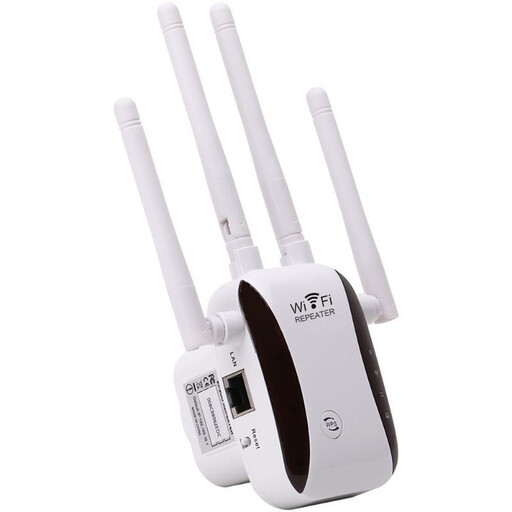 Image unavailable
Consider it when you need to extend an existing Wi-Fi network to a weak-coverage area.
The description lists access-point, relay, router and client modes.
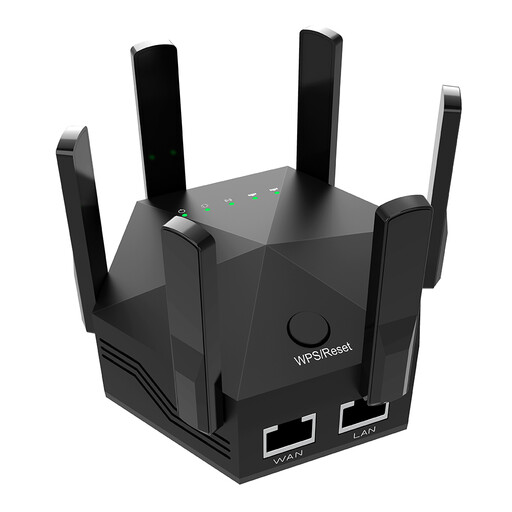 Image unavailable
Consider it for an indoor weak-coverage area where the device can extend an existing wireless network.
The title lists dual-band Wi-Fi, 1200Mbps, six adjustable antennas and a UK plug. The description lists two Ethernet ports and specifies indoor use.
Check whether devices also struggle near the router and whether an outage is reported before choosing equipment. Ofcom notes that home Wi-Fi cannot outperform the broadband service feeding it, so a weak connection near the router may not be a room-coverage problem.
Place an extender where it can still receive the router’s signal, rather than deep in a dead zone. For mesh, plan positions that let the units connect while reaching the affected rooms; Ofcom cautions that adding too many mesh units can make issues worse.
The sockets alone cannot guarantee the result: wiring layout, wiring condition and electrical interference can affect the link. TP-Link recommends direct wall outlets rather than power strips, so check performance at the intended sockets during setup.
Check the exact product’s published security-issue reporting contact and minimum security-update period, as well as how updates are provided. The applicable UK guidance can depend on the product and where it is supplied, so do not assume the same provisions apply to every device.
Confirm that Ethernet can reach the intended room and check the exact model’s power, mounting and management requirements. Ubiquiti lists a PoE adapter accessory for its U6+ access point, so check which accessories are included and what the installation needs.