Buying priorities
Start with the type of check you need at home, then confirm how the monitor connects, who can access it and what support applies to connected features.
| Priority |
What to check |
Your needs |
| Local operation |
Check whether the parent unit and camera work without Wi-Fi or internet; confirm the stated indoor-use guidance, range alerts and camera placement instructions. |
I want to hear or see my child from another room even when broadband is unavailable, unreliable or intentionally not used. |
| Audio or video |
Choose audio-only only if sound is enough. For video, check the parent display, night vision, camera positioning and whether the viewing area can be adjusted. |
I need to decide whether hearing activity is sufficient or whether I need visual confirmation of the cot or room. |
| Privacy and shared access |
Review app permissions, information collection, privacy settings, administrator roles and guest access. Use an invited-user option where the model provides one. |
I want another carer to have appropriate access without sharing full account control. |
| Connected-model support |
For a relevant UK connectable product, find the manufacturer’s statement for the exact model or version and confirm its minimum security-update period. Check router-band requirements for app features. |
I need remote app access, but I also want to know how long the connected product is stated to receive important security updates. The National Cyber Security Centre notes that baby monitors are among the affected smart-device examples. |
| Safe everyday use |
Follow the manufacturer’s placement instructions, keep controls and cables out of reach, and treat alerts as home-monitoring information rather than medical protection. |
I want a monitor that supports practical checks without replacing adult supervision. |
Joybuy product options
These Joybuy options focus on local parent-unit and audio-monitor routes for checking on a child from another room at home.
 No image available
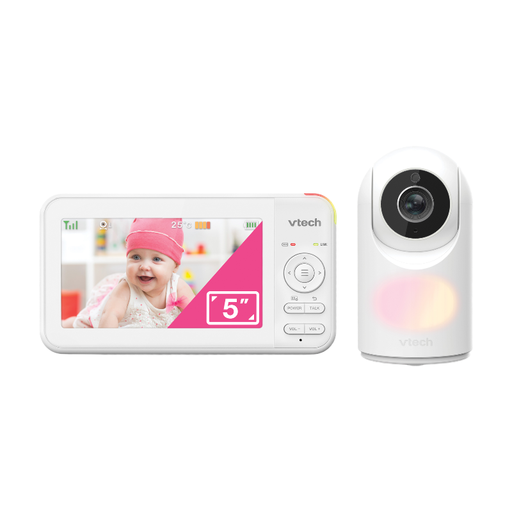
VTech VM5467 Pan & Tilt Video Baby Monitor, 5-inch
A local video-monitor option for at-home visual checks from another room using its listed dedicated parent display and camera.
Listed features include a 5-inch colour screen, remote pan and tilt, 2x zoom, night vision and two-way intercom. Check practical indoor signal after setup, as the stated range may vary through walls and floors. Keep camera and cords at least 1 metre from the crib as stated in the listing, and continue adult supervision.
Joybuy
 No image available
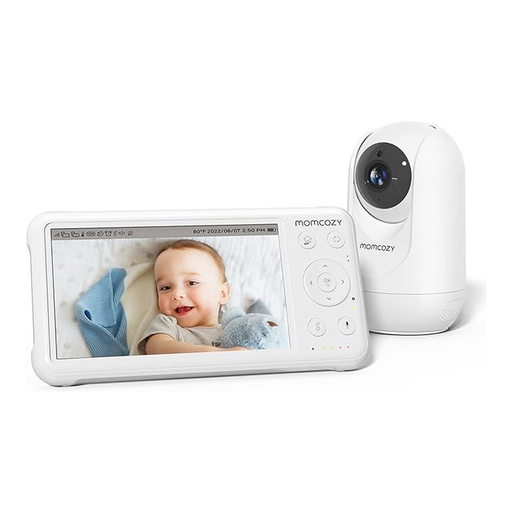
Momcozy BM01 1080P HD Video Baby Monitor with Wall Mount
This model is listed as a plug-and-play local video-monitoring option that does not require Wi-Fi.
Listed features include a 5-inch display, 1080p video, 360-degree coverage, infrared night vision, VOX alerts, two-way communication and a 5000 mAh battery. The listing states up to 11.5 hours of continuous operation and a 960 ft range; check actual runtime and indoor signal for your home, and maintain direct supervision.
Joybuy
 No image available
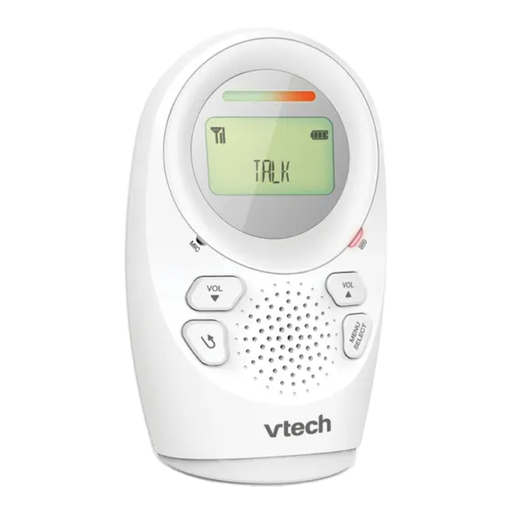
VTech DM1212 Digital Audio Baby Monitor
An audio-only local route for households that need to hear activity from another room rather than view a video feed.
The listing describes DECT audio monitoring, a secure private connection, two-way talk, a portable rechargeable parent unit, vibrating sound alerts and a 2-inch LCD display. It has no listed camera or video feed, and the mains-powered baby unit needs a safe socket location with cords out of a child’s reach.
Joybuy
Frequently asked questions
Does a UK Wi-Fi baby monitor need a stated security-update period?
For a relevant consumer connectable product supplied to UK consumers, the manufacturer must state the minimum length of time for important security updates. Check the manufacturer’s statement of compliance or equivalent support information for the exact product version rather than assuming another model from the same brand has the same period. This requirement is described by GOV.UK and the National Cyber Security Centre.
Can a connected baby monitor work when home internet is unavailable?
Some hybrid models can continue through a dedicated parent display. Philips Avent states that specified connected models can be monitored on a dedicated display without Wi-Fi, while their app setup has separate requirements including 2.4 GHz router compatibility. Check the exact model because this is not universal to connected monitors.
How should access be shared with a co-parent, grandparent or babysitter?
Use the monitor’s intended guest or invited-user feature where available instead of sharing the administrator login. For specified Philips connected models, guest users have limited rights and cannot alter the account; the administrator can remove access when necessary.
What permissions should be reviewed during connected-monitor setup?
Review what information the app asks to collect, whether it is needed for the function you want, who it may be shared with and which phone permissions are granted. The ICO advises smart-product buyers to review these choices during setup and in privacy settings afterwards.
Can a baby monitor prevent SIDS or replace supervision?
No. The Lullaby Trust states that there is no research showing monitors prevent SIDS and that a monitor can never replace a parent or carer’s supervision. Buy for practical home monitoring rather than medical monitoring or safety protection.


