Who is this for?
The useful router features depend on where the encoder, cameras and control devices will sit during the concert.
Wired live-production users
Your computer or encoder stays near the broadband connection. An Ethernet path and suitable wired ports matter more to this setup than a headline Wi-Fi speed; Ofcom recommends Ethernet for a faster, more reliable computer connection.
Multi-room concert-stream setups
Your camera or control positions extend across rooms or floors. Check connectivity where each device will operate: Ofcom notes that placement and building materials affect Wi-Fi coverage.
Busy-home or small-venue streamers
Other people may be streaming, downloading or making video calls on the same connection. Ofcom advises checking for data-heavy activity, while YouTube Help recommends testing the upload bitrate for the intended stream.
What matters when choosing?
Start with the upload connection and the encoder’s link to the router. Then decide whether one router reaches every production position and how much competing network activity the event will involve.
| Concern |
What to check |
Who this matters to |
| Upload and encoder connection |
Test upload from an Ethernet-connected computer at the venue. Check that the encoder can connect by cable and that the chosen stream setting is sustainable. |
If my encoder is fixed in place, I need its connection to stay steady throughout the performance; around 42% of consumers put upload stability and the encoder path first. |
| Coverage at production positions |
Mark the router, camera and control positions, then check whether one router reaches them or mesh nodes and a wired backhaul are needed. |
With cameras or controls in separate rooms, I need connectivity at those positions, not just beside the router; coverage comes first for around 33% of consumers. |
| Shared-network capacity |
Count devices active during the concert and check wired-port needs for fixed equipment. Plan to reduce competing data-heavy activity. |
When others use the connection during my stream, I need to manage that competition as well as connect my own devices; around 25% of consumers prioritise shared-network capacity. |
Multi-gig ports are relevant when the broadband hand-off or wired equipment can use them; they do not raise the service’s upload rate. Wi-Fi 7 features also depend on compatible devices and conditions at the venue. YouTube Help recommends testing upload bitrate, and Ofcom notes that Wi-Fi cannot outperform the broadband service.
Relevant brands to consider
These model lines illustrate different equipment choices; brand specifications do not establish stream performance in a particular venue.
TP-Link
The Archer BE230 is a single-router option for a nearby wired encoder; the Deco BE65 is a mesh option for positions spread across the venue.
- TP-Link lists dual-band Wi-Fi 7, Multi-Link Operation, two 2.5 Gbps ports and EasyMesh compatibility for the Archer BE230. It lists tri-band Wi-Fi 7, four 2.5 Gbps ports per unit and combined wired and wireless backhaul for the Deco BE65.
- EasyMesh compatibility does not mean additional nodes are included. Client compatibility, building layout and broadband upload still affect the choice.
ASUS
The RT-BE86U is relevant to fixed production setups considering several fast wired connections or a separately configured backup connection.
- ASUS lists a 10 Gbps WAN/LAN port, four 2.5 Gbps LAN ports, multi-WAN support and USB mobile tethering for this model.
- The broadband hand-off, encoder equipment and any mobile service must suit the intended configuration; these features cannot guarantee an uninterrupted stream.
NETGEAR
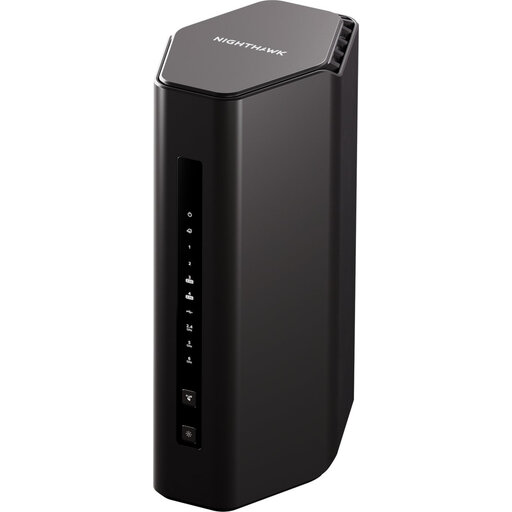
The Nighthawk RS300 is a single-router Wi-Fi 7 option; the Orbi 370 RBE373 product shown below takes a three-unit mesh approach.
- NETGEAR lists a 2.5 Gbps internet port for the Nighthawk RS300.
- Manufacturer coverage and device-capacity figures are not a guarantee for a concert setup. Check the RS300’s wired-port arrangement and the ongoing terms of optional Armor features.
Joybuy products for different setups
These choices include three-unit mesh systems for production positions spread across rooms and single routers for a fixed setup where the encoder can be wired. Choose between those layouts only after checking the venue’s upload connection and the position of each device.
 No image available
NETGEAR Orbi 370 RBE373 Wi-Fi 7 Mesh System, 3-Pack
Consider this three-unit system when concert equipment needs connectivity in separated areas. Its stated configuration is dual-band BE3600 Wi-Fi 7 with 2.5 Gbps Ethernet; check how the wired connections fit your encoder and node positions.
Test coverage at the venue and confirm that its broadband hand-off works with the system before relying on it for the stream.
View on Joybuy
 No image available
TP-Link Deco BE25 Wi-Fi 7 Mesh System, 3-Pack
Consider this three-pack when the camera or control positions are spread across rooms. Plan where each unit would sit and check the available Ethernet connections against the encoder and any intended wired backhaul.
Test the proposed node positions and the venue’s broadband upload with the intended stream settings.
View on Joybuy
 No image available
TP-Link Deco BE22 BE3600 Wi-Fi 7 Mesh System, 3-Pack
This three-unit mesh system is a route to consider when production positions span rooms or floors. Check that its wired connections suit the encoder, broadband hand-off and any planned connection between nodes.
Device-capacity claims cannot establish stream stability at your venue; test the layout and upload connection with the other event devices active.
View on Joybuy
 No image available
TP-Link Archer BE230 BE3600 Dual-Band Wi-Fi 7 Router
Consider this single router for a compact setup with a wired encoder near the broadband connection. TP-Link lists a 2.5 Gbps WAN port, a 2.5 Gbps LAN port and EasyMesh compatibility for the Archer BE230.
Compatible additional equipment would be needed to extend it into a mesh setup. Wi-Fi 7 features depend on the client devices, and the router cannot increase the broadband upload rate.
View on Joybuy
 No image available
NETGEAR Nighthawk RS300 BE9300 Wi-Fi 7 Router
Consider this single router for a fixed production position where you can arrange a wired encoder connection. NETGEAR lists a 2.5 Gbps internet port for the RS300; check the remaining port arrangement against your equipment before buying.
NETGEAR’s stated device capacity does not guarantee performance during a shared-network stream. Check the ongoing terms of optional Armor features and test the venue’s upload under event-like load.
View on Joybuy
Frequently asked questions
Will a faster router fix a concert stream that drops out?
Not if the broadband upload is the limiting factor. Ofcom notes that Wi-Fi cannot outperform the broadband service, so test upload over Ethernet first; if it cannot sustain the intended stream settings, adjust those settings or investigate the service before replacing the router.
Should the streaming computer use Ethernet?
Use Ethernet where the computer or encoder can be wired to the router. Ofcom recommends it for a faster, more reliable computer connection, although you still need to test the broadband upload and the complete stream.
When does mesh make more sense than one router?
Consider mesh when cameras or controls in separate areas cannot receive a dependable signal from a centrally placed router. Ofcom notes that placement, walls and interference affect Wi-Fi; check node positions and use Ethernet between nodes where feasible.
What should I test before the concert starts?
Run the intended stream configuration with comparable sound and movement, and watch its connection health while other event devices are active. YouTube Help recommends testing before streaming, and Ofcom advises checking whether other devices are using the connection for data-heavy tasks.


