Who needs a different connection?
Jisc reported that three out of five respondents in its 2024/25 survey of more than 15,000 UK higher-education students had trouble connecting to Wi-Fi on or off campus. That figure does not identify the cause of a connection problem in a particular student home.
Students with a weak signal in one room
If Wi-Fi works near the router but falters at a bedroom desk, the choice is between extending a usable signal and bringing a wired connection closer. TP-Link's guidance for its RE330 illustrates both extender and Ethernet-fed access-point modes, though features vary by model.
Households that slow down when everyone is online
If calls or downloads suffer mainly when several residents are using the connection, compare wired and Wi-Fi performance before treating it as a coverage problem. Ofcom advises checking simultaneous data-heavy use as well as the broadband service.
Students working at a fixed desk
If one laptop or desktop needs a steadier local connection, a cable to the router may address that device's Wi-Fi variability without changing wireless coverage for the rest of the household. Ofcom recommends Ethernet when checking a connection directly at the router.
What should you check before buying?
Start by comparing a connection at the router with Wi-Fi in the affected rooms, then decide whether the main need is broader coverage, one local fix or a wired desk connection. Ofcom advises testing at different times and checking whether other users are placing heavy demands on the connection.
| Concern |
What to check when buying |
Who this matters to |
| Broadband or Wi-Fi? |
Compare repeated Ethernet tests at the router with Wi-Fi in the affected room; note whether slowdowns coincide with heavy shared use. |
If calls slow down even near the router, I want to know whether the service or simultaneous use is the issue before adding equipment. Around 33% of consumers would put that diagnosis first. |
| Several weak rooms |
Check where coverage drops and whether mesh units can be positioned with a viable connection to the network. |
When bedrooms in different parts of the home lose Wi-Fi, I need coverage beyond a single weak spot. Around 25% of consumers would make multi-room coverage their primary concern. |
| One weak study area |
Check for a usable router signal where an extender would sit, or a practical Ethernet route for an access point. |
If only my study corner has poor reception, I would rather address that location than change the whole network. Roughly 25% of consumers would prioritise one weak area. |
| A fixed study device |
Check for a spare router LAN port, a safe temporary cable route and an Ethernet port or suitable adapter on the device. |
For an important call or upload at my desk, I want to avoid an unreliable local wireless link. Around 17% of consumers would put a wired study connection first. |
Joybuy products for different Wi-Fi needs
These choices cover multi-room mesh, an extender for a local weak spot and a router change. They are alternatives for different problems: check the broadband connection first, and confirm the household's provider setup before changing network equipment.
 No image available
TP-Link Deco BE22 BE3600 Wi-Fi 7 mesh system, 3-pack
Consider this three-unit mesh system when several rooms have weak Wi-Fi but the broadband connection at the router is adequate.
Its title specifies a BE3600 Wi-Fi 7 system. Confirm how it would connect to the household's provider hub before buying.
View on Joybuy
 No image available
TP-Link RE220BE BE3600 Wi-Fi 7 range extender
Consider an extender for one weak room only if it can be placed where the router's signal is still usable.
This is a BE3600 Wi-Fi 7 range extender. If you intend to use a wired access-point setup, check the exact operating mode and whether a temporary cable can reach the area.
View on Joybuy
 No image available
NETGEAR Orbi 370 RBE373 BE3600 WiFi 7 mesh system, 3-pack
This three-pack is another mesh option for persistent gaps in several rooms, subject to where its units can be placed.
The product name specifies dual-band WiFi 7 and 2.5Gbps Ethernet. Confirm that its router can work with the household's existing modem or gateway; coverage will also depend on the home's layout.
View on Joybuy
 No image available
TP-Link Deco BE65 BE9300 tri-band Wi-Fi 7 mesh system, 3-pack
Consider this three-pack if several rooms need coverage and a tri-band mesh configuration is part of the household's requirements.
The product name specifies BE9300 and Wi-Fi 7. Check the exact unit placement, ports and provider-hub setup before choosing it.
View on Joybuy
 No image available
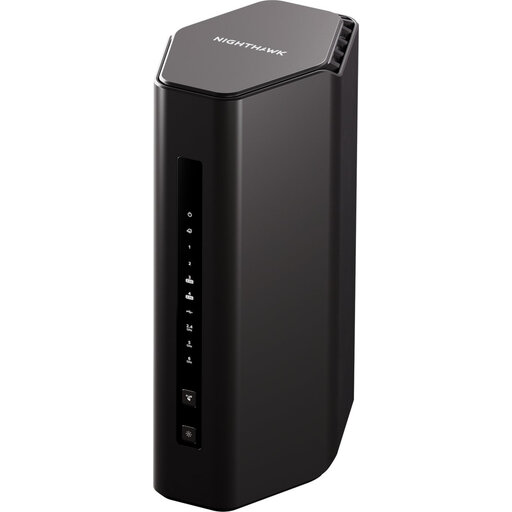
5PT NIGHTHAWK RS300 BE9300 Wi-Fi 7 router
This router is relevant if the account holder is considering a router change rather than adding mesh or an extender.
Its product name identifies an RS300 BE9300 Wi-Fi 7 router. Check its connection requirements against the provider's service and hub before changing the existing setup.
View on Joybuy
Frequently asked questions
How can we tell whether the broadband service or Wi-Fi is causing the slowdown?
Compare tests made by Ethernet at the router with Wi-Fi tests in the affected room, repeating them at different times. Ofcom also advises checking whether other household members are undertaking data-heavy tasks; if the wired connection remains poor or the provider reports a fault, contact the provider before buying coverage equipment.
Will mesh make a slow broadband connection faster?
No: mesh addresses local Wi-Fi coverage, not the speed of the broadband service. Ofcom states that Wi-Fi cannot outperform that service, so check the connection at the router before choosing mesh for weak rooms.
Can we use our own router or mesh system with the provider hub?
That depends on the service, hub and intended setup. BT Business makes customer-owned router use conditional on compatibility, and eero documents particular constraints with Vodafone UK hubs. Check the exact equipment and obtain access to the relevant settings before buying.
Who should agree before we change the household network?
Agree any changes with the broadband account holder or whoever administers the connection before changing router settings, Wi-Fi credentials or supplied equipment. If an accommodation provider manages the network, ask them about the proposed change; check the tenancy or house terms before routing cables or making any alteration to the property.
Is an access point different from a Wi-Fi extender?
Yes. A wireless extender depends on a usable signal from the router, whereas an Ethernet-fed access point creates Wi-Fi from a wired connection at the remote location. TP-Link specifies both modes for its RE330; check the modes and ports of the exact device you intend to buy.


