Choose a self-contained Wi-Fi speaker if you need to play children’s songs without connecting separate audio equipment; choose a network streamer if you already have compatible powered speakers or a stereo. In an open-plan flat, check the music service and child-account controls alongside the playback volume limit. Multi-room playback matters chiefly if you also want music beyond the main living area.
Which setup suits your household?
Families starting without audio equipment
If the main living space needs its own device for children’s songs, a self-contained Wi-Fi speaker avoids assembling a streamer, amplifier and speakers. Check its everyday app and on-device controls, as well as whether it offers a maximum-volume setting.
Families keeping an existing stereo
A network streamer can add playback from supported services to powered speakers or an existing amplifier and passive speakers. Before choosing one, match the streamer’s outputs to the inputs on the equipment you intend to keep.
Parents prioritising controlled playback
Look at both the player’s volume settings and the music account a child will use. Spotify says its managed accounts start with explicit content and video disabled; those account controls are separate from any volume limit offered by an audio device.
What should you check before buying?
Decide whether you need a complete speaker or a way to connect equipment you already own, then check how the household will select songs and control playback.
| Concern |
What to check |
Who this matters to |
| A complete setup |
Check for built-in speakers; a standalone streamer needs compatible audio equipment. |
If I have no stereo, I want one device that can play songs in the shared living area without assembling a separate system. Around 36% of consumers put a complete setup first. |
| Controlled playback |
Confirm support for the intended music account and a configurable volume ceiling; check account content settings separately. |
When children can request songs or adjust playback, I want to manage both what they can hear and how high the volume can go. For around 29% of consumers, controlled playback is the primary concern. |
| Keeping existing speakers |
Match a streamer’s outputs to powered-speaker inputs or to an amplifier or receiver used with passive speakers. |
I already have speakers I want to keep, so adding streaming matters more to me than buying another speaker. That is the main need for around 21% of consumers. |
| Sound in other areas |
Check whether additional compatible players can play in sync and have separate volume controls. |
If songs need to reach another room as well as the open-plan space, I care about grouping devices rather than simply turning up one speaker. Around 14% of consumers prioritise multi-room playback. |
Common buying mistakes
-
Mistaking a streamer for a speaker
WiiM describes the Pro as a streamer, not an amplifier; Bluesound describes the NODE as a device to connect to a stereo or powered speakers. Neither is a complete one-box speaker for a household starting without audio equipment.
List the speakers, amplifier or receiver and available inputs you already have before comparing streamers. If there is no suitable system to connect, compare self-contained speakers instead.
A streamer setup may also require powered speakers, or an amplifier and passive speakers, plus suitable cables.
-
Expecting the speaker to filter songs
Music-account settings determine which content a service permits. Spotify says managed accounts start with explicit content and video disabled; a speaker’s appearance does not replace those controls.
Set up the intended child account, then check that the chosen player supports the service and account you plan to use.
-
Leaving the volume limit until later
App and on-device controls can make it easy to raise the volume in a shared space. Sonos documents per-product volume limits, while WiiM documents a Volume Limit setting for its devices; the controls available depend on the system chosen.
Configure an appropriate ceiling during setup and check the result with the connected speakers at ordinary listening times. For a streamer, consider the amplifier’s settings as well.
Relevant brands to consider
Sonos
For households considering a self-contained speaker, the Era 100 combines Wi-Fi, Bluetooth, AirPlay 2, app control and touch controls.
- Sonos documents per-product volume limits and grouping compatible products to play the same content in sync.
- Era 100 has built-in voice control. Sonos identifies Era 100 SL as an option without it; either choice keeps you within that speaker ecosystem for grouped playback.
WiiM
WiiM Pro is a network streamer for a household keeping powered speakers or an amplifier and passive speakers. WiiM lists AirPlay 2, Google Cast and supported music-service connections.
- WiiM documents a Volume Limit setting for configuring playback.
- WiiM Pro is not an amplifier or speaker. Check connections and the controls on the equipment attached to it.
Bluesound
Bluesound NODE is a streamer for an existing stereo or powered-speaker setup. Bluesound lists HDMI eARC, AirPlay 2 and connections to other Bluesound players.
- Its connection options are relevant if the existing system needs a particular input or the household plans to add compatible multi-room players.
- NODE is not a one-box speaker; it needs suitable audio equipment to produce sound.
Joybuy speaker options
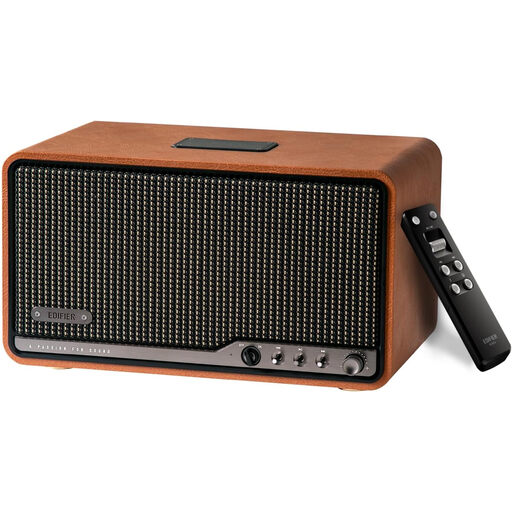
This tabletop speaker is an option for households looking for a standalone device in the main living area. Check its music-account compatibility, volume controls and power arrangement against your intended setup before choosing it.
 No image available
Edifier S300 wireless multi-room tabletop speaker, brown
A standalone tabletop speaker to consider for children’s songs in the main living area, rather than a streamer that needs separate speakers.
Check whether its controls allow you to set a maximum volume and whether it works with your chosen music service and child account. Confirm its power arrangement before deciding where to put it; the product warning calls for placement out of children’s reach.
View on Joybuy
Questions about playback and controls
Do I need a network streamer or a Wi-Fi speaker?
Choose a self-contained Wi-Fi speaker if you need a device that produces sound without a separate stereo. A network streamer makes sense when you already have compatible powered speakers or an amplifier and passive speakers; WiiM describes the Pro as a streamer rather than an amplifier, and Bluesound describes the NODE as connecting to existing audio equipment.
How can I stop children turning the music up too high?
Set a suitable maximum volume where your audio system provides that control, and check it during normal listening. Sonos documents a per-product limit on a 0–100 control scale, and WiiM documents a Volume Limit setting; with a streamer, the connected amplifier and speakers also affect the final listening level.
Will the audio player itself restrict unsuitable songs?
No: use the music service’s account controls rather than relying on the player alone. Spotify says its managed accounts start with explicit content and video disabled; before buying a player, confirm that it supports the service and account arrangement your household intends to use.


