What to consider before choosing
Start by checking the connection near the router, then decide whether the main challenge is reaching several rooms, crossing a difficult wall or fixing one weak area.
| Concern |
What to check when buying |
Who this matters to |
| Coverage across several rooms |
Map affected rooms and check possible node locations and Ethernet routes. |
When several rooms or floors need coverage, I want a layout that can reach them without relying on a weak link. Around 28% of consumers put multi-room coverage first. |
| Getting past solid walls |
Check whether Ethernet can reach a useful point; for powerline, check socket and circuit suitability. |
If walls obstruct the wireless link, I need a practical way to connect the router area to the room beyond them. Around 22% of consumers prioritise getting a link across those barriers. |
| Fixing one weak room |
Test for usable Wi-Fi at the intended extender position and check whether the mode is repeating or Ethernet-fed access point. |
When only one room is affected, I want a targeted fix rather than more equipment than the layout needs. Around 22% of consumers put a single-room solution first. |
| Keeping the existing ISP router |
Check the exact router, available Ethernet connection, system setup mode and any provider add-on conditions. |
If I want to keep my existing gateway, I need to know how extra coverage equipment connects and what network features remain available. Around 17% of consumers prioritise gateway compatibility. |
| Avoiding an unnecessary device |
Compare the connection near the router with the affected room, and try a clearer router position where practical. |
Before buying, I want to know whether the broadband or router is already struggling close by. Around 11% of consumers put checking the underlying problem first. |
Joybuy products for home Wi-Fi coverage
These Joybuy listings cover multi-room mesh, a targeted extender and router-based options for improving in-home Wi-Fi. Check the connection near the router first, and match the equipment to the rooms and connection routes you need.
 No image available
NETGEAR Orbi 370 RBE373 WiFi 7 Mesh System, 3-Pack, Dual-Band BE3600, 2.5Gbps Ethernet, White
The three-unit mesh setup is intended for households seeking coverage across several rooms.
The description identifies one router and two satellites, with dual-band Wi-Fi and 2.5Gbps Ethernet ports on the router and satellites. A high-speed internet connection and an existing modem or gateway are required.
Joybuy
 No image available
TP-Link RE220BE BE3600 Wi-Fi 7 Range Extender
Consider it for a targeted weak-room fix if the chosen extender position still receives the router’s Wi-Fi signal.
The description specifies range-extender and access-point modes, a 1Gbps Ethernet port and EasyMesh compatibility. EasyMesh roaming requires a compatible router.
Joybuy
 No image available
TP-Link Deco BE22, 3-Pack, BE3600 Whole Home Mesh Wi-Fi 7 System
The three-unit mesh system may suit households planning coverage across several rooms and able to connect the main unit to the existing router.
The description specifies wired and wireless combined backhaul. TP-Link says the main Deco unit must connect to the existing router or modem by Ethernet; Deco does not support wireless repeater mode.
Joybuy
 No image available
D-Link BE9500 Wi-Fi 7 Smart Mesh Router M95
This router-based option may be relevant if you are considering replacing or repositioning router equipment.
The description specifies tri-band Wi-Fi and 2.5-Gigabit WAN and LAN ports. It says the mesh network can be expanded with compatible AQUILA PRO AI routers or extenders.
Joybuy
 No image available
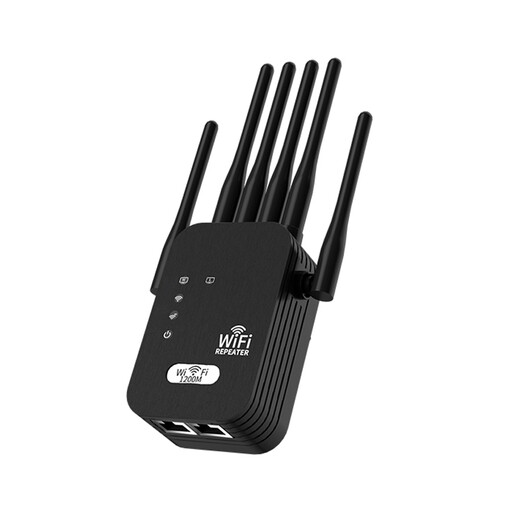
Signal Booster, 5G Extension, Wi-Fi, 1200M, 6-wire, Black, UK Standard
The description presents it as an extender for an existing wireless network, so it needs to be positioned where that network’s signal is usable.
The description specifies dual-band Wi-Fi, six external antennas and a UK plug. It also notes that wall thickness and interference can affect achievable speed.
Joybuy
Wi-Fi coverage FAQs
Will mesh fix slow broadband in every room?
No: mesh cannot make the broadband service feeding it faster. Ofcom advises checking the service and Wi-Fi near the router before buying coverage equipment if the connection is poor there too.
Can I keep my ISP-supplied router with retail mesh?
For TP-Link Deco, yes: its documented access-point mode connects the main Deco to the existing router by Ethernet and leaves that router acting as the gateway. Deco does not wirelessly repeat the existing router, and access-point mode removes some Deco gateway features. Check the instructions for the exact system you are considering.
Where should I place a Wi-Fi extender?
Place it between the router and the weak room, where it can still receive the router’s signal. Check the connection in the target room afterwards, and make sure devices connect to the intended Wi-Fi network.
Do powerline adapters provide Wi-Fi automatically?
No. TP-Link distinguishes TL-WPA models, which broadcast Wi-Fi, from TL-PA models, which provide Ethernet only. Its setup guidance also says paired adapters need to be on the same electrical circuit, so check the functions of the exact kit and the electrical link in your home.
What should I check before choosing a broadband-provider Wi-Fi add-on?
Check eligibility, required hub equipment, coverage terms and any ongoing charge for your package. BT says Complete Wi-Fi requires a Smart Hub, while Sky describes WiFi Max as an add-on for eligible packages; their conditions are provider-specific.


