Check the upload speed available at your address and test the connection over Ethernet before replacing the router: a new router cannot increase the upload capacity of your broadband service. For a compact workspace with wired design equipment, consider a standalone router with suitable ports; if collaborators work across rooms or floors and Wi-Fi coverage is the problem, consider mesh with a reliable connection between its nodes. Advertised wireless rates are not promised speeds for an individual cloud upload.
Who this is for
Small studios with wired design equipment
If the main workstation, network storage or switch can connect by Ethernet in one room, the wired path deserves attention alongside Wi-Fi for colleagues’ devices. Check the ports throughout that path, not just on the router.
Collaborators working in different rooms
Walls, floors and distance can make the wireless link a constraint even when the broadband service is adequate. Ofcom identifies in-home Wi-Fi as a potential performance bottleneck, making coverage and mesh-node placement relevant to this layout.
Teams unsure what is slowing uploads
Before choosing more wireless capacity, compare the service available at the address with a speed test made over Ethernet. Ofcom advises using a wired connection for a more accurate broadband speed test because Wi-Fi can slow the measured signal.
What matters when choosing
Decide whether the constraint is the broadband upload service, the wireless coverage between rooms or a wired workstation path. That distinction matters more than choosing by the largest Wi-Fi number on a box.
Standalone router for a compact workspace
Choose it when: the main design devices can be wired and Wi-Fi already reaches the working area reliably.
Trade-off: extra port capacity does not fix weak coverage elsewhere or increase the broadband service’s upload capacity.
Mesh for separated work areas
Choose it when: collaborators upload from different rooms or floors and the wireless path is the limiting factor.
Trade-off: nodes need suitable positions and a dependable link between them; Ethernet between nodes is worth considering where practical.
| Concern |
What to check |
Who this matters to |
| Broadband upload capacity |
Check the address-specific upload estimate and your provider’s service information, then run an Ethernet speed test. |
When large drafts leave the studio slowly, I need to know whether the internet connection is the constraint before replacing local equipment; around 40% of consumers put upload capacity first. |
| Wireless coverage across rooms |
Identify the rooms with weak connections and check proposed node placement, backhaul options and device compatibility. |
If colleagues work beyond the main router’s reliable range, I need their rooms to stay connected during uploads; coverage is the primary concern for around 40% of consumers. |
| Wired workflow and upkeep |
Count the required WAN and LAN ports, check connected equipment’s port speeds and review the router’s update process. |
With fixed design equipment on Ethernet, I need suitable connections and a router I can keep updated; around 20% of consumers prioritise that wired workflow and its upkeep. |
Buying pitfalls
-
Equating the box’s Wi-Fi rate with cloud-upload speed
A wireless specification does not override the upload capacity supplied by the broadband service. A faster-rated router may leave an internet-connection bottleneck unchanged.
Check the upload service available at your address and test over Ethernet before deciding that Wi-Fi needs replacing. Ofcom recommends an Ethernet-connected device for a more accurate broadband speed test.
-
Expecting one router to cover every floor
Ofcom notes that the link between a router and devices around a property can become a bottleneck. A mesh system addresses a different problem from simply adding ports in the main room, but its nodes still need suitable placement and a reliable inter-node link.
Map where contributors work. If coverage is weak across rooms, compare mesh layouts and consider Ethernet between node locations where practical.
Connecting or positioning the nodes may involve cabling or installation work.
-
Buying multi-gig ports without checking the wired path
A higher-speed router port alone does not establish a higher-speed connection to a workstation or storage device. The connected ports and cabling must suit the intended link.
Check the router, switch, workstation and storage connections before choosing ports for a defined local workflow.
Using higher Ethernet link rates may call for changes to other network equipment or cabling.
-
Treating router security as a one-time setup
The National Cyber Security Centre explains that software patches address known flaws that attackers could exploit.
Set a unique administrator password, check how firmware updates are delivered and review the manufacturer’s support policy before purchase.
Brands to consider
TP-Link
TP-Link’s UK Deco BE65 specification is relevant to a multi-room Wi-Fi 7 mesh layout: it lists 2.4 GHz, 5 GHz and 6 GHz bands, four 2.5 Gbps ports and wired and wireless backhaul options.
- Those stated connections give teams options for placing nodes and connecting wired equipment.
- Its aggregate 9.3 Gbps Wi-Fi specification is not a single-device or internet-upload speed. Check the exact hardware variant, client devices and broadband service.
NETGEAR
NETGEAR describes its Orbi 770 line as a tri-band Wi-Fi 7 mesh route with enhanced backhaul and 2.5 Gig internet and wired connectivity.
- The Orbi 770 specifications are relevant when selecting a multi-node layout for separated work areas.
- NETGEAR’s coverage and device-count statements are manufacturer claims, not assured results in a particular building. Check the terms of any optional protection service.
ASUS
ASUS lists the RT-BE86U as a standalone Wi-Fi 7 router with a 10G WAN/LAN port and four 2.5G-capable ports, a specification worth considering for a compact workspace with wired devices.
- Its listed port layout offers connection choices for a workstation, switch or network storage, subject to compatible equipment.
- ASUS lists 2.4 GHz and 5 GHz operating frequencies for this model, not 6 GHz. Local port speeds do not determine the broadband upload speed.
Joybuy product choices
These choices cover multi-unit mesh systems for separated work areas and standalone routers to consider for a more compact workspace. Compare the exact variant and connections you need before choosing; a router purchase will not increase your broadband service’s upload capacity.
 No image available
TP-Link Deco BE65 BE9300 Wi-Fi 7 Mesh System, 3-Pack
Consider this three-unit mesh system when collaborators work in separate rooms. The product title specifies tri-band Wi-Fi 7; if particular Ethernet ports, backhaul features or 6 GHz support are essential, confirm that the delivered hardware variant has them.
View on Joybuy
 No image available
NETGEAR Orbi 370 RBE373 Wi-Fi 7 Mesh System, 3-Pack
Consider this three-unit mesh system for work areas spread across rooms. Its product title specifies dual-band BE3600 Wi-Fi 7 and 2.5 Gbps Ethernet; it is the Orbi 370, not the Orbi 770 discussed in the brand section.
View on Joybuy
 No image available
TP-Link Deco BE22 BE3600 Wi-Fi 7 Mesh System, 3-Pack
This three-pack is another mesh-format choice for collaborators in different rooms. Check the exact unit’s Ethernet ports, supported bands and node-connection options against your layout before relying on a particular wired workflow.
View on Joybuy
 No image available
TP-Link BE9300 Tri-Band Wi-Fi 7 Router
Consider this standalone router when the workspace is compact rather than assuming that mesh nodes are part of the setup. If wired design equipment drives the decision, confirm the exact model’s WAN and LAN port layout and the connections available on your other devices.
View on Joybuy
 No image available
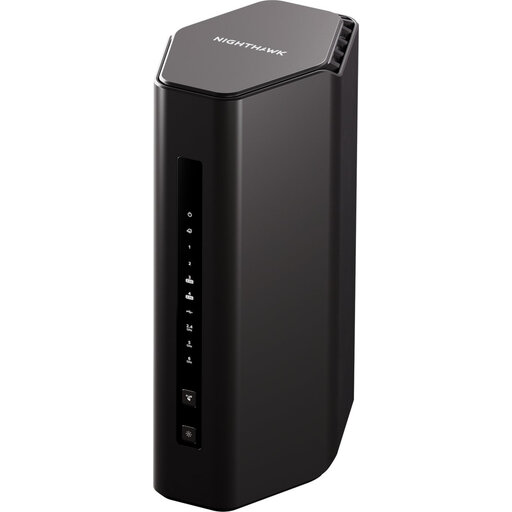
NETGEAR Nighthawk RS300 BE9300 Wi-Fi 7 Router
This standalone router is a choice to examine for a compact workspace with wired equipment. Check the RS300’s exact WAN and LAN port configuration before planning connections, and do not assume that separate mesh satellites are included.
View on Joybuy
Common questions
Will a new router speed up uploads on a broadband plan with limited upload capacity?
Not if the broadband service is the constraint: a router cannot create additional upstream capacity. Check the upload speed available at your address and your provider’s service information, then test over Ethernet where possible; Ofcom advises that Wi-Fi can slow the signal measured in a speed test.
Should several collaborators use one router or a mesh system?
A standalone router can suit a compact workspace where the main devices are wired and wireless coverage is already reliable; mesh is worth considering when collaborators work across rooms or floors with weak coverage. For mesh, plan node positions and check whether Ethernet can connect the nodes rather than relying on the router’s headline Wi-Fi rate.
Will every device use a Wi-Fi 7 router’s 6 GHz features?
No: the router and the connecting device both need to support the features you intend to use. Check the exact router model’s bands and each device’s compatibility; a product labelled Wi-Fi 7 should not be assumed to offer a 6 GHz band.
What security tasks remain after the router is installed?
Set a unique router administrator password and keep its firmware updated. Review guest access and remote-management settings for your workspace; the National Cyber Security Centre explains that updates can patch known flaws attackers might exploit.


