Hosts using a bright shared living room
You need a large image the group can see when daylight or normal room lighting cannot be fully controlled.


If daylight or room lighting will remain on, shortlist projectors with clearly stated brightness specifications; in a room you can darken, give more weight to 4K/HDR compatibility and the picture you want from wildlife footage. Either way, measure the projector position and farthest seat, then check how you will stream the series and make dialogue audible across the group.
You need a large image the group can see when daylight or normal room lighting cannot be fully controlled.
You can darken the room and want to pay particular attention to fine textures, colour and darker scenes.
You need the image to fit the available wall and projector position, with workable connections for your video source and sound setup.
Start with room light and the seats furthest from the screen. Then check picture detail and whether the projector can be positioned and connected as planned.
| Concern | What to check | Who this matters to |
|---|---|---|
| Group visibility | Measure the farthest seat and note how much light will remain on. Compare brightness figures only when their measurement terms are comparable. | If I cannot darken the room, I need everyone to see an image large enough for their seat. Around 45% of consumers put group visibility first. |
| Wildlife picture detail | Check the exact model’s resolution and HDR formats against your playback source; consider picture controls for darker scenes. | When I can control the light, I want to follow fine textures and darker scenes without choosing on a 4K label alone. Picture detail comes first for around 33% of consumers. |
| Placement, source and sound | Check the model’s image size at your lens-to-screen distance, your streaming or HDMI route, and its audio outputs. | If the projector has only one practical position, I need the image, series and dialogue to work from there. Roughly 22% of consumers prioritise this setup need. |
A quoted image-size range does not tell you whether the projector can make the size you want from its available position or whether viewers at the back will be comfortable.
Measure the lens-to-screen distance and farthest seat, then use the exact model’s throw guidance. Epson United Kingdom suggests up to eight times the screen’s height as a planning distance for passive video viewing.
Brightness figures may use different stated measurement terms, while room lighting, screen surface and picture mode also affect what viewers see.
Keep the measurement term alongside each figure and compare models under relevant room-light and screen conditions rather than selecting the largest number.
A speaker specification alone cannot establish whether dialogue will be clear at the back of your particular room.
Check the exact projector’s audio-output options and plan how you would connect external sound if needed.
Built-in streaming does not establish that a particular app or account feature will work on every model.
Confirm your service on the exact projector and check whether you can use an external source instead. For a network-connected model, also check its security-update support information where applicable.
These model examples illustrate different specifications to check; a brand name alone does not determine suitability for your room.
The EH-TW7100 is a home-cinema example for buyers considering 4K/HDR specifications and placement adjustment.
The TK860i is a smart home-projector example for buyers considering a bright-room setup with built-in streaming.
The LX750-4KB is an example to investigate when room light, image size and placement flexibility are priorities.
These projectors offer different ways to set up a wildlife-series screening, including external-source connections and built-in streaming. Check each model against your room measurements and source before choosing.
 No image available
Consider this model if you plan to connect an external playback device and need to adjust the image position.
The product name states 1,200 ANSI lumens, Full HD 1080P, 4K support and horizontal and vertical keystone correction. Its 4K support should not be mistaken for native 4K resolution.
Confirm the achievable image size at your throw distance and how sound will reach the group.
 No image available
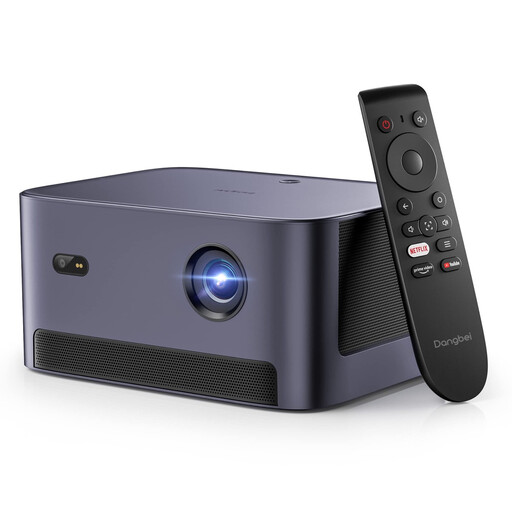
Consider this model for a room where you can control the light and want to investigate built-in streaming.
The product name states 540 ISO lumens, autofocus, keystone correction, Wi-Fi and Bluetooth. It lists Full HD 1080P rather than native 4K.
Confirm the apps and operating system on the exact unit, the image size at your available distance and your audio connection.
 No image available
Consider this model if adjustable placement and connections for an external source are priorities.
The product name states native 1080P with 4K support, autofocus, keystone correction and Wi-Fi 6; 4K support does not mean native 4K resolution.
Check the exact brightness specification, usable image size at your throw distance and audio setup before relying on it for group viewing.
Plan from the farthest seat, while checking that nearer viewers will also be comfortable. Epson United Kingdom says a distance of up to eight times the screen’s vertical height can suit passive video viewing; use this as a planning guideline, then check that the intended screen fits your room.
Measure the available lens-to-screen distance and compare it with the exact model’s throw specification for your intended image width. BenQ UK defines throw ratio as throw distance divided by image width, so a quoted maximum screen size alone cannot establish where the projector must sit.
Built-in streaming is useful when the exact projector supports your intended service and you prefer not to connect another device. Otherwise, check its connections and the requirements of your external streaming source; do not assume a smart-projector label guarantees a particular app.
A built-in speaker rating cannot tell you whether dialogue will be clear throughout your room. Check the seating layout and the exact projector’s audio outputs so you can use external sound if the group needs it.
For a network-connected projector covered by the UK consumer-connectable-product regime, check the manufacturer’s security-update support information and product documentation. The Department for Science, Innovation and Technology says the regime took effect on 29 April 2024; confirm its applicability to the specific model rather than assuming every projector is covered.