Choose the streaming device around your display, intended service and cinema-room connection, rather than its 4K label alone. A box with built-in Ethernet is worth considering where Wi-Fi is unreliable and a cable run is practical; a compact HDMI stick suits a simpler installation, but 4K HDR and Dolby Atmos still depend on the programme and connected equipment.
Who is this for?
Viewers focused on picture detail
If wildlife footage is the reason for upgrading, check the TV or projector, HDMI connection and programme format as well as the streamer. Roku notes that its Streaming Stick 4K cannot show 4K or HDR on a TV that does not support them.
Viewers with surround-sound equipment
If narration and natural ambience matter to you, check the programme's audio format and the connection to your receiver or soundbar. Amazon says Dolby Atmos on Fire TV Stick 4K Max requires select services and compatible equipment.
Viewers with difficult Wi-Fi coverage
If the cinema room is poorly served by Wi-Fi, a practical cable route may make built-in Ethernet useful. Google TV Streamer (4K) and the Apple TV 4K Wi-Fi + Ethernet model both list Gigabit Ethernet; Apple's Wi-Fi-only model does not.
What should you check?
Confirm what the display and intended service can deliver, then choose a network connection and installation style that work in your room.
| Concern | What to check | Who this matters to |
|---|
| 4K HDR picture |
Check the display's supported formats, the selected HDMI input and any receiver pass-through. Confirm the programme and service offer the quality you want. |
If wildlife images are my priority, I want the whole picture path to handle the programme's format, not just the streamer. Around 31% of consumers put picture compatibility first. |
| Surround sound |
Check the title's audio format and the connections to your TV, receiver or soundbar. |
When narration and natural sounds are central to viewing, I want to know what my sound system can actually play. Surround sound comes first for around 25% of consumers. |
| Network connection |
Check Wi-Fi reception in the cinema room or whether Ethernet cabling is practical. Wi-Fi 6E needs a compatible router. |
If the projector room has unreliable Wi-Fi, I would prioritise a workable connection before extra device features. Around 25% of consumers chiefly need network reliability. |
| Service and setup |
Confirm the intended programme and app are available, then check HDMI cabling, a free port and power requirements. |
When I want a straightforward start to viewing, app access and the physical installation matter most. That is the primary need for around 19% of consumers. |
Common buying mistakes
-
Relying on the 4K label alone
A 4K streamer cannot make an incompatible display show 4K HDR. The programme, service settings and HDMI path also affect what reaches the screen.
Check each part of the path before buying. For 4K viewing on Apple TV, Netflix Help Center specifies High streaming quality and a steady connection of at least 15 Mbps among its requirements.
-
Expecting Dolby Atmos on every programme
Device format support does not mean every title or connected sound system will play Atmos.
Check the intended title and service, then confirm your receiver or soundbar and its connection support the audio format.
-
Choosing Wi-Fi 6E without checking the room
A compatible router is needed for Wi-Fi 6E, while wireless reception at the cinema location still needs checking.
If a cable run is practical, compare built-in Ethernet with the accessory route required by the stick you are considering.
A wired stick installation may require a compatible Ethernet adaptor and cabling.
-
Overlooking cables and power
An existing HDMI cable may not meet a box's stated requirements, and a TV USB port may provide insufficient power for a stick.
Check box contents, cable requirements, spare HDMI ports and access to mains power. Apple says HDMI is sold separately for Apple TV 4K; Roku recommends wall power if TV USB power is insufficient for its Streaming Stick 4K.
Relevant brands to consider
Apple
Apple TV 4K is a set-top option for viewers who want Apple ecosystem integration.
- Apple lists Dolby Vision, HDR10+, HDR10, HLG and Dolby Atmos support.
- Gigabit Ethernet is specific to the Wi-Fi + Ethernet model; Apple says an HDMI cable is sold separately.
Google
Google TV Streamer (4K) is a set-top option with built-in wired networking.
- Google lists Gigabit Ethernet, 4K HDR at up to 60 FPS and Dolby Atmos support.
- Google specifies a certified HDMI 2.1 cable, sold separately.
Amazon Fire TV
Fire TV Stick 4K Max offers a compact HDMI-stick format.
- Amazon lists 4K Ultra HD, Dolby Vision, HDR10+ and Wi-Fi 6E support for this model.
- Wi-Fi 6E requires a compatible router; wired networking needs an adaptor, and Atmos depends on the service and connected equipment.
Roku
Roku Streaming Stick 4K connects directly to an HDMI display.
- Roku confirms 4K and HDR support for Streaming Stick 4K.
- The connected TV must support 4K or HDR to show those formats; wall power may be needed if its USB port provides insufficient power.
Joybuy streaming devices
These Roku sticks suit viewers considering a compact streaming device for the cinema room. Check the exact model's formats, intended app and wireless reception against your setup before choosing between them.
 No image available
Roku Streaming Stick 4K
Consider this model for a compact installation with a compatible 4K HDR display. Roku confirms 4K and HDR support for Streaming Stick 4K, but the display must support those formats to show them.
If surround sound is important, check this listing's exact audio formats alongside the intended title and connected sound system.
View on Joybuy
 No image available
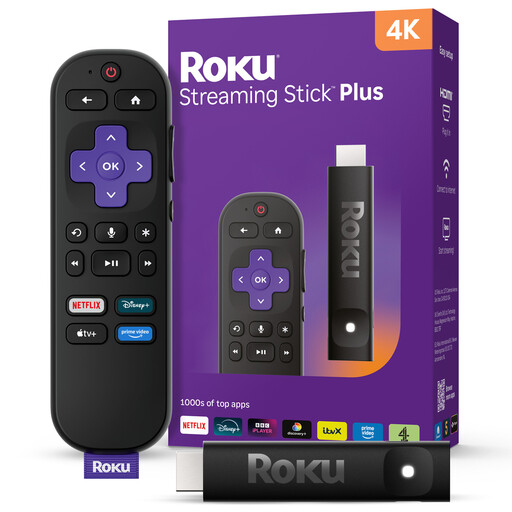
Roku Streaming Stick 4KPlus
Consider this 4K streaming stick if a compact device fits your installation. Before choosing it for wildlife programmes, check the exact model's HDR and audio formats, access to the intended app and wireless reception in the cinema room.
View on Joybuy
Frequently asked questions
Do I need a TV Licence to stream a wildlife series in the UK?
TV Licensing says you need to be covered by a TV Licence to watch live TV on a streaming service or anything on BBC iPlayer, including on-demand programmes. For a programme watched on demand through another service, check TV Licensing's guidance against how you intend to watch it.
Will a 4K streamer automatically show wildlife programmes in 4K HDR?
No. The programme and service must offer the format, and your display and HDMI path must support it. Netflix Help Center also specifies High streaming quality and a steady connection of at least 15 Mbps for 4K viewing on Apple TV.
What else do I need for Dolby Atmos?
Check that the programme and service offer Atmos and that your connected audio equipment supports it. Amazon says Atmos on Fire TV Stick 4K Max is available only on select services with compatible equipment.
Should I check for installation accessories before ordering?
Yes: check the device's cable requirements, available HDMI ports and nearby power. Apple says HDMI is sold separately for Apple TV 4K, Google specifies a separately sold certified HDMI 2.1 cable for Google TV Streamer, and Roku recommends wall power for Streaming Stick 4K when TV USB power is insufficient.


