What should you check before choosing?
Start with the existing PC’s upgrade eligibility, then check the software, connections and files that the next setup must accommodate.
Upgrade the existing PC
Choose when: Microsoft PC Health Check and Windows Update confirm eligibility, and your essential apps and devices will work with Windows 11.
Keep in mind: Microsoft says the upgrade is free for eligible devices, but meeting minimum requirements does not establish compatibility with every app or peripheral.
Buy a Windows 11 PC
Choose when: The old PC cannot take a supported upgrade and a chosen laptop or desktop meets your application, connection and storage needs.
Keep in mind: Microsoft’s PC-to-PC transfer does not move installed applications, saved passwords or sign-in credentials; Windows on ARM also calls for specific app and driver checks.
Use Consumer ESU temporarily
Choose when: An eligible personal Windows 10 version 22H2 PC needs a short transition while you prepare files and check a replacement.
Keep in mind: Microsoft limits Consumer ESU to critical and important security updates; it adds neither features nor technical support and ends on 12 October 2027.
| Priority |
What to check |
Your needs |
| Upgrade eligibility |
Run Microsoft PC Health Check and review Windows Update. Check the reason for an ineligible result before planning a replacement. |
If my current PC qualifies for Windows 11, I want to assess the free upgrade before changing devices. |
| Apps and peripherals |
List essential applications, printers, scanners and other connected devices. Confirm Windows 11 drivers, required ports and display connections; ask vendors specifically about Windows on ARM where relevant. |
My older software and connected devices need to remain usable, even if that changes which replacement configuration I choose. |
| Files and setup |
Measure the files you need to keep against the new PC’s storage. Plan a cloud or external-drive transfer and how you will reinstall applications and regain account access. |
I want to open my important files on the new PC before I retire the old one, without assuming programs or saved passwords will transfer. |
| ESU eligibility and timing |
For Microsoft’s Consumer ESU, confirm an eligible personal Windows 10 version 22H2 device and the enrolment requirements. Plan around the programme’s 12 October 2027 end date. |
If replacing my PC now would interrupt a necessary workflow, I need to know whether this limited, temporary security-update route applies to my device. |
Which brands offer relevant PC ranges?
A brand range can help you find configurations to compare, but the exact model and its connections determine whether it fits your existing setup.
Lenovo
Lenovo UK presents Windows 11 laptops and PCs, while Lenovo Support GB provides compatibility resources for supported Lenovo devices.
- Check the exact model against Lenovo’s support information if upgrading a Lenovo PC.
- For a replacement, confirm its operating-system configuration, ports and support for your peripherals; a brand-level listing does not settle those questions.
Dell
Dell UK lists laptop configurations with Windows 11 Home and Windows 11 Pro.
- The listed operating-system editions give shoppers a configuration detail to compare.
- Check the selected model’s connections and processor platform against older applications and peripherals.
HP
HP Store UK lists Windows 11 Home laptops with differing memory and storage configurations.
- Compare the stated memory and storage of individual models with your intended use and files.
- Confirm software and peripheral compatibility for the exact configuration rather than relying on the brand name.
Windows 11 replacement options on Joybuy
These laptops and the desktop are options for replacing a Windows 10 PC. Compare their stated configurations with the files, connections and applications you need; they do not determine whether your existing PC can upgrade or qualify for Consumer ESU.
 No image available
ASUS Vivobook 15 X1504VA, Core 5 120U, 24 GB, 1 TB SSD
For a laptop replacement, compare its 1 TB SSD with the files you plan to move. The listed configuration has a 15.6-inch display; check the Windows edition, required connections and support for your essential applications and peripherals.
View on Joybuy
 No image available
ASUS Vivobook 14 X1407QA-LY003W, Snapdragon X, 16 GB, 512 GB SSD
This 14-inch Snapdragon X laptop is a Windows on ARM option for a replacement. Before choosing it, confirm that essential older applications and peripheral drivers work on Windows on ARM, and compare its 512 GB SSD with the files you need to keep.
View on Joybuy
 No image available
Lenovo LOQ Essential 15ARP11, Ryzen 7 170, RTX 5050, 16 GB, 1 TB SSD
For a laptop replacement, this configuration states a 15.6-inch 144 Hz FHD display and a 1 TB SSD. Compare the storage with your files, and confirm its Windows edition, required connections and compatibility with existing apps and peripheral drivers.
View on Joybuy
 No image available
Acer Aspire Lite AL15-36P-C29Z, Intel N150, 8 GB, 128 GB SSD
This 15.6-inch Full HD Windows 11 Home laptop has a stated 128 GB SSD, so compare its capacity with your files and applications. Check whether the chosen configuration runs in S Mode and whether that permits the apps you need; confirm peripheral compatibility too.
View on Joybuy
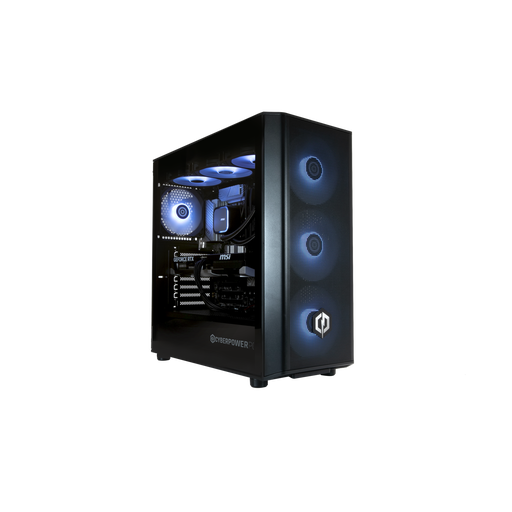 No image available
CyberPowerPC JOYB1010, Core Ultra 7 265KF, RTX 5070 12 GB, 32 GB, 1 TB SSD
For a desk-based replacement, this Windows 11 Home desktop has a stated 1 TB SSD. A monitor, keyboard and mouse are not included; check that your existing equipment connects and that essential applications and drivers are supported before ordering.
View on Joybuy
Common questions
Can I still use a Windows 10 PC after support ended?
Yes, it can still operate, but Microsoft ended free Windows 10 software updates, technical assistance and security fixes on 14 October 2025. An eligible personal device can receive critical and important security updates through Consumer ESU during a transition.
How can I tell whether I need a replacement?
Run Microsoft PC Health Check and review Windows Update eligibility first. Microsoft offers a free Windows 11 upgrade for eligible devices; if yours cannot take a supported upgrade, compare a compatible replacement with a temporary Consumer ESU route if the device qualifies.
Can I use Consumer ESU for a work PC?
Not for a commercial scenario. Microsoft’s Consumer ESU conditions also distinguish managed and joined devices, so check the device’s status rather than assuming a Windows 10 PC is consumer-eligible.
Will a new Windows PC bring over my applications and passwords?
No. Microsoft says its PC-to-PC transfer does not move installed applications, saved passwords or sign-in credentials. Back up your files, plan to reinstall the apps you need, and check your licences and account access before retiring the old PC.
What should I do with the old PC after moving my files?
Confirm that the transfer worked before removing personal information from the old PC. The UK Information Commissioner’s Office advises properly deleting personal data before selling or disposing of a device; afterwards, choose a suitable reuse or recycling route.


