For routine responsive-menu checks, choose a Windows or Mac laptop that can comfortably handle your browser, developer tools and study work; you do not need a Mac just to inspect a phone-sized viewport. Choose macOS if your work specifically requires Apple simulated devices or inspection of Safari on a connected iPhone or iPad. Whichever laptop you use, check the finished menu on a real target phone: Microsoft Learn describes desktop device emulation as an approximation, and Apple says its simulators do not reproduce every physical-device feature.
Who is this for?
Responsive-menu checkers
If you mainly inspect breakpoints, menu states and layout changes, desktop browser developer tools let you work through narrow viewports before trying the page on a phone. Microsoft Learn cautions that device emulation is only an approximation of a mobile device.
iPhone Safari testers
If your project calls for Apple simulated devices or inspection of a page running in Safari on a connected iPhone or iPad, Apple Developer documents those workflows on a Mac. You will still need a physical-device check for behaviour the simulator cannot reproduce.
Students sharing one laptop between study and debugging
If the same machine travels between your room and campus and also runs coursework alongside browser tools, check its exact memory, storage, size and required connections. Guidance from the University of York, the University of Warwick and the University of Hertfordshire treats these as relevant student-device choices.
What matters when choosing?
Decide whether your project needs Apple-specific testing tools before comparing laptop configurations. Then match the machine to your coursework and the way you will test on a real phone.
| Concern |
What to check |
Who this matters to |
| Checks on a real phone |
Confirm that your intended browser tools run on the laptop, and arrange access to a target phone for the final check. |
If a menu looks right in a desktop viewport, I still want to know how it behaves on a phone. Around 31% of consumers put real-device validation first. |
| iPhone and iPad Safari |
Decide whether you need Apple simulated devices or Safari inspection of a connected iPhone or iPad, rather than only responsive desktop-browser checks. |
When my project requires iPhone or iPad Safari debugging, I need tools that support that workflow. Around 31% of consumers make Apple-device testing their primary concern. |
| Study and multitasking |
Compare the exact RAM, SSD and screen configuration with your course requirements. University of York guidance lists 8GB RAM and 256GB SSD in its minimum specification for taught students; University of Warwick guidance recommends 16GB RAM and 512GB storage for a Windows device. |
I need coursework and browser developer tools open together without choosing a laptop solely for one web page. Roughly 23% of consumers prioritise the combined study workload. |
| Room setup and ports |
Match the exact laptop's display connections to your monitor and peripherals; check what its USB-C ports can do rather than assuming they all support video. |
If I work at a desk, space for the browser and code matters, and I want my existing connections to fit. About 15% of consumers put their desk setup first. |
Mistakes to avoid
-
Approving the menu after resizing a desktop browser
A narrow viewport is useful for finding layout problems, but Microsoft Learn says device emulation does not run the page on mobile hardware.
Use it while making changes, then open the finished menu in a browser on a target phone.
-
Buying a Mac just to see an iPhone-sized viewport
General responsive checks do not require macOS. Apple's Mac-based tools become relevant when simulated Apple devices or inspection of Safari on a connected iPhone or iPad are part of the work.
Check your project and course requirements before making the operating system your deciding factor.
-
Choosing by laptop family name alone
Memory, storage, displays and ports can differ between configurations in the same family, changing how well a particular listing fits study and desk use.
Compare the exact model's RAM, SSD, screen, connections and operating system with your course requirements.
-
Replacing an iPhone test with a simulator test
Apple says simulated devices do not reproduce every feature or performance characteristic of a physical device.
Use a simulator to check additional states during development, but keep a physical iPhone test when iPhone behaviour is a project requirement.
Brands and product lines to consider
Apple
MacBook Air is a route to the macOS tools Apple documents for simulated devices and inspection of Safari on a connected iPhone or iPad.
- Apple's UK MacBook Air specifications list a 13.6-inch display, 16GB unified memory and two Thunderbolt 4 ports for the specified configuration.
- Apple says its simulators do not replicate every physical-device feature or performance characteristic. Check the storage and other details of the configuration you intend to buy.
Lenovo
ThinkPad E14 Gen 6 is a 14-inch Intel laptop family to consider for Windows browser checks and study.
- Lenovo describes memory and storage in this family as upgradeable.
- Check the particular listing's memory, storage, display and ports; the family name does not identify its complete configuration.
ASUS
Zenbook 14 OLED UX3405 is a compact Windows range to consider if a 14-inch laptop and room-based monitor connections suit your setup.
- ASUS lists Thunderbolt 4, USB-A, HDMI and an audio connection for the UX3405 range.
- Confirm the chosen variant's memory, display and exact port behaviour, and consider whether an OLED or glossy display suits where you work.
Joybuy laptops for this task
These laptops offer Windows-oriented choices for browser-based mobile-menu checks and study, from compact models to larger desk-focused configurations. Compare their exact variants against your coursework and connections; none removes the need to check the menu on a real target phone.
 No image available
ASUS Vivobook 14 X1407QA-LY003W Copilot+ PC, Snapdragon X, 16GB RAM, 512GB SSD, Quiet Blue
A 14-inch choice for students combining browser checks with study work.
Check that required course applications work with this Snapdragon X configuration before buying.
View on Joybuy
 No image available
HP OmniBook Ultra Flip 14-fh0006na 2-in-1 Copilot+, 16GB RAM, 1TB SSD
The convertible design is an option if you want to use the same laptop in different study positions while making browser checks.
If graphics or screen refresh rate matters to your work, confirm those details for this exact configuration before buying.
View on Joybuy
 No image available
ASUS Zenbook DUO UX8406CA-QL135W, dual 14-inch OLED touch displays, Core Ultra 7 255H, 16GB RAM, 1TB SSD
Its dual-display format is worth considering if you want separate space for a browser and other study material at your desk.
Confirm the exact display resolution before buying: the product information gives conflicting resolution details.
View on Joybuy
 No image available
Lenovo LOQ Essential 15ARP11, Ryzen 7 170, 16GB RAM, 1TB SSD, GeForce RTX 5050, 15.6-inch FHD 144Hz
The 15.6-inch screen may suit a student-room desk if you prefer more laptop screen space while checking a menu.
The listed weight is 2.30kg; consider that carrying load if you regularly move between study locations.
View on Joybuy
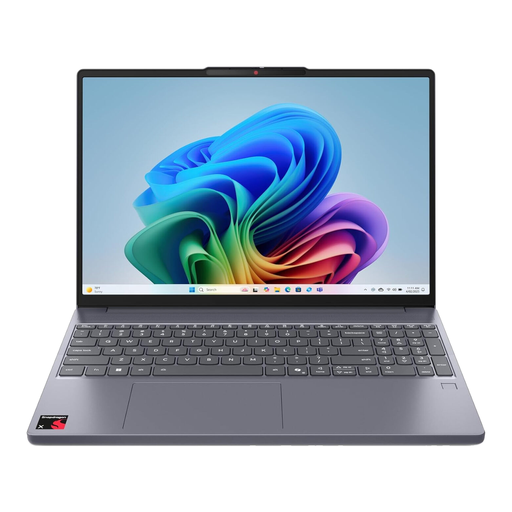 No image available
Lenovo IdeaPad Slim 3 15Q8X10, 83N30029UK, 15.3-inch, Qualcomm Snapdragon, 16GB RAM, 256GB SSD, Grey
This 15.3-inch option is for students weighing browser checks alongside their usual study applications.
Confirm that required course software works with its Snapdragon platform. The product information also uses both Slim 3 and Slim 5 naming for 15Q8X10, so confirm the exact model identity with the seller.
View on Joybuy
Common questions
Is browser device emulation enough to approve a mobile menu?
No: use it to find viewport and breakpoint problems, then check the finished menu on a real target phone and browser. Microsoft Learn describes desktop device emulation as a first approximation, not a test running on mobile hardware.
Do I need a MacBook to check an iPhone menu?
Not for general responsive layout checks in desktop browser tools. A Mac becomes relevant if you specifically need Apple simulated devices or Safari inspection of a connected iPhone or iPad, as documented by Apple Developer; a simulator still cannot replace every physical-device check.
How much memory and storage should I look for?
Start with your course's software requirements, then compare the exact laptop configuration with the applications you expect to run alongside browser developer tools. The University of York lists 8GB RAM and 256GB SSD in its minimum taught-student specification, while the University of Warwick recommends 16GB RAM and 512GB storage for a Windows device; neither figure overrides a course-specific requirement.
What should I check for a monitor in my student room?
Match the monitor's input to the exact laptop's video-output capabilities and any cable or adapter you plan to use. Port combinations vary by configuration, and a USB-C socket alone does not establish which display functions it supports.


