What to check before deciding
Start with the existing PC: establish whether it can upgrade, then decide whether a short ESU bridge or a replacement better suits the household’s timing and equipment.
| Priority |
What to check |
Your needs |
| Ongoing security updates |
Check whether Windows Update or PC Health Check confirms a Windows 11 upgrade. If using Consumer ESU, confirm Windows 10 version 22H2, the eligible edition, current updates and the required preparation package. |
I need an internet-connected household PC to follow a supported update route rather than relying on Windows 10 continuing to start normally. |
| Windows 11 eligibility |
Confirm a compatible 64-bit processor, at least 4 GB RAM, 64 GB storage, UEFI with Secure Boot capability and TPM 2.0. Check whether TPM or Secure Boot is disabled before treating the PC as incompatible. |
I want to know whether a settings change may make the current computer eligible, or whether replacement is the realistic option. |
| Backup and migration |
Back up folders and settings before changing devices. Check available OneDrive capacity or prepare external storage, then verify important files and account access on the new PC. |
My files, sign-ins and household settings need to be available before the old computer is reset, donated or recycled. |
| Apps and accessories |
Check important software with its publisher and confirm printer, display, USB, network and other peripheral compatibility. Compare the exact model’s ports, memory, storage, display and warranty rather than relying on a product family name. |
I need the replacement to work with the programs and connected equipment already used at home, not simply to carry a Windows 11 label. |
Joybuy product options
Joybuy options for households replacing a Windows 10 computer with a new Windows 11 laptop or desktop PC.
 No image available
ASUS Vivobook 15 X1504VA, Core 5 120U, 24 GB RAM, 1 TB SSD
A portable Windows 11 Home replacement for a household with substantial files or frequent multitasking.
15.6-inch FHD IPS display, 24 GB RAM, 1 TB SSD, Wi-Fi 6, HDMI and USB-A/USB-C ports are specified. Confirm required USB-C functions, display connections, software and peripheral compatibility before buying.
Joybuy
 No image available
Lenovo LOQ Essential 15ARP11, Ryzen 7 170, 16 GB RAM, 1 TB SSD
A Windows 11 Home laptop for a replacement setup that needs local capacity and varied wired connections.
It specifies a 15.6-inch 144Hz FHD display, 16 GB RAM, 1 TB SSD, HDMI 2.1, USB-C, two USB-A ports and Ethernet. At 2.30 kg, it may be less convenient for frequent carrying; check legacy applications and peripherals before migration.
Joybuy
 No image available
Lenovo IdeaPad Slim 3 83K7009MUK, Ryzen 5 7535HS, 24 GB RAM
A movable Windows 11 Home option for shared home, study and document-focused use.
The specified configuration includes a 15.3-inch WUXGA anti-glare display, 24 GB DDR5 RAM, 512 GB PCIe SSD, Wi-Fi 6, numeric keypad and privacy shutter. Verify required external-display ports, software, printers and licences before purchase.
Joybuy
 No image available
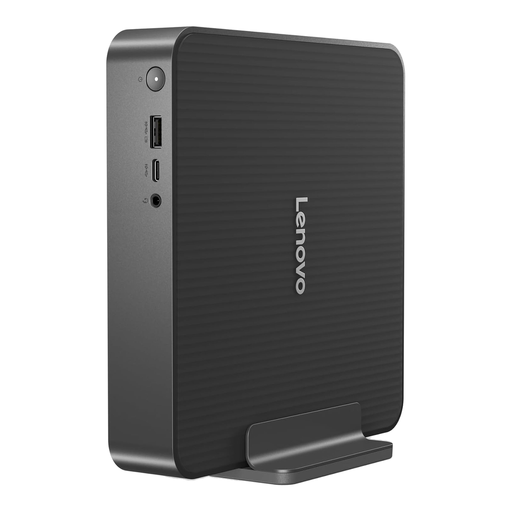
Lenovo IdeaCentre Mini PC 01IRH10R, Core 5, 16 GB RAM, 512 GB SSD
A compact Windows 11 Home desktop for a fixed shared workstation with limited desk space.
It specifies 16 GB RAM, a 512 GB NVMe SSD, Thunderbolt 4, USB-A and USB-C ports, Wi-Fi 7 and Bluetooth 5.4. The exact 91B2000XUK configuration lists monitor, keyboard and mouse as optional accessories.
Joybuy
 No image available
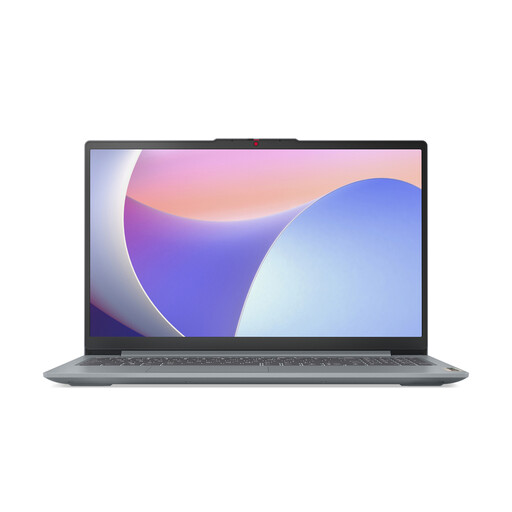
Lenovo IdeaPad Slim 3 15IAH8 83ER00G4UK, Core i5, 8 GB RAM
A Windows 11 Home laptop for everyday browser, document and home use with common wired connections.
The listed configuration has a 15.6-inch FHD anti-glare display, 8 GB RAM, 512 GB SSD, Wi-Fi 6, USB-A, USB-C and HDMI. Compare 8 GB RAM with the household’s multitasking needs and verify expected battery performance for intended use.
Joybuy
Frequently asked questions
Can a Windows 10 PC still be used after 14 October 2025?
Yes, it can still function, but Microsoft says it no longer receives free software updates, technical assistance or security fixes after that date. For a household PC used online, choose a supported Windows 11 route or assess Consumer ESU eligibility rather than treating continued operation as continued security support.
How long can a UK consumer use Windows 10 Consumer ESU?
Microsoft’s UK-facing Consumer ESU page says customers can enrol until the programme ends on 12 October 2027, with enrolled devices covered through that date. It is a temporary security-update route, not an extension of full Windows 10 support.
What must be true before Consumer ESU enrolment?
The device must run Windows 10 version 22H2 Home, Pro, Pro Education or Workstations edition, have the latest Windows update and the ESU Licensing Preparation Package, and use a non-child Microsoft account with administrator rights for enrolment. The ESU licence is associated with that Microsoft account.
What should be checked before buying a Windows 11 replacement computer?
Confirm the exact UK configuration has Windows 11, then check storage, memory, display, ports, wireless connectivity, included accessories and warranty. Microsoft describes Windows 11 minimum requirements as a compatibility threshold; check important apps, printers and peripherals with their publishers or manufacturers as they may have additional requirements.
What should be backed up before replacing the PC?
Back up the folders and settings the household needs, then verify that the backup has completed before changing devices. Microsoft says Windows Backup can cover selected folders, settings, many installed apps and Wi-Fi information; households with more than the included 5 GB OneDrive allowance may need additional cloud storage or an external drive.


