What matters when choosing?
For a computer that can connect directly to the router, Ofcom recommends Ethernet over Wi-Fi for a faster, more reliable device connection. The accessory to choose after that depends on what the device and desk are missing.
Direct Ethernet cable
Choose when: One fixed computer has RJ45 and can reach the router or a network point.
Trade-off: It needs a workable cable route and adds no charging, display or extra network ports.
USB Ethernet adapter
Choose when: A compatible laptop or tablet lacks RJ45 and needs one wired connection.
Trade-off: A basic adapter does not bring the desk’s other peripherals together through one connection.
Dock with Ethernet
Choose when: You want to reconnect Ethernet and compatible desk peripherals through one laptop connection.
Trade-off: Display and charging functions depend on the laptop, dock, cable and supported port capabilities.
Desktop network switch
Choose when: Several fixed devices need wired ports from one existing network connection.
Trade-off: A switch expands network ports but cannot give a USB-only laptop an Ethernet port by itself.
| Concern | What to check | Who this matters to |
|---|
| Dependable desk connection |
Check that the computer has RJ45, a router LAN port or network point is available, and a cable can reach it. |
When important calls or coursework happen at one desk, I want the computer’s connection to depend less on Wi-Fi. Around 36% of consumers put that connection need first. |
| Ethernet without RJ45 |
Match the adapter to the device’s USB port and operating system; check its stated Ethernet speed. |
My laptop or tablet has no RJ45 port, so I need a way to connect an Ethernet cable before adding other desk equipment. For around 29% of consumers, that missing port is the primary concern. |
| One-connection desk setup |
Compare the dock’s host compatibility, display support and charging capacity with the exact laptop and monitors. |
I reconnect a laptop to Ethernet and desk peripherals regularly, and want fewer separate connections to manage. That convenience comes first for around 21% of consumers. |
| Ports for several devices |
Count the required switch ports, including the connection back to the router, and check for Gigabit ports if needed. |
Several stationary devices need wired access from the same network point, rather than one device needing an adapter. Around 14% of consumers prioritise those additional network ports. |
Joybuy options for a wired desk
These products cover adapters and hubs for devices needing Ethernet or other desk connections, plus a switch for several fixed wired devices. For a computer that already has RJ45, a suitable cable may be all the desk needs; check the physical route and device compatibility before choosing additional equipment.
 No image available
V7 V7UC-U3CRJ45HDVG-BLK USB-C adapter
Consider this when a compatible USB-C desk device needs Ethernet alongside other connections.
The listed variant has Gigabit Ethernet, 4K HDMI, VGA, two USB 3.0 ports and up to 100W Power Delivery. Check the host’s video and charging capabilities against the adapter before relying on those functions.
Joybuy
 No image available
Baseus Metal Gleam Series II 10-in-1 USB-C hub, Cosmic Black
This hub is an option when a compatible laptop needs an RJ45 connection as well as display and USB connections at the desk.
Its listed ports include two HDMI outputs, USB-A, USB-C, RJ45, SD/TF readers and a USB-C Power Delivery input. Check the exact laptop’s video-output and charging support before planning a monitor or power setup around it.
Joybuy
 No image available
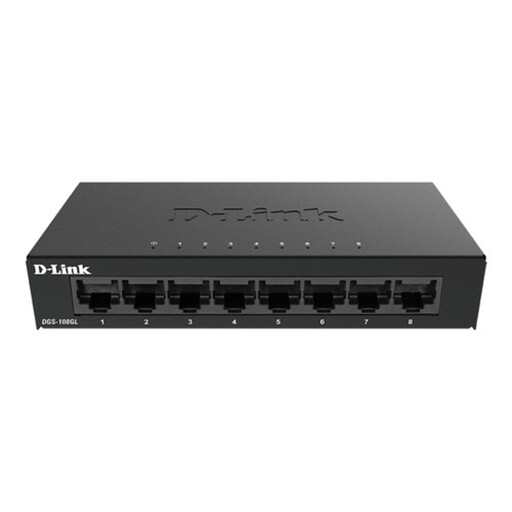
D-Link DGS-108GL eight-port Gigabit desktop switch
Consider a switch when several fixed devices need wired access from one router LAN port or network point.
This is an eight-port Gigabit unmanaged desktop switch. Count the connection back to the router among the ports you need; a laptop without RJ45 will also need an adapter or dock.
Joybuy
 No image available
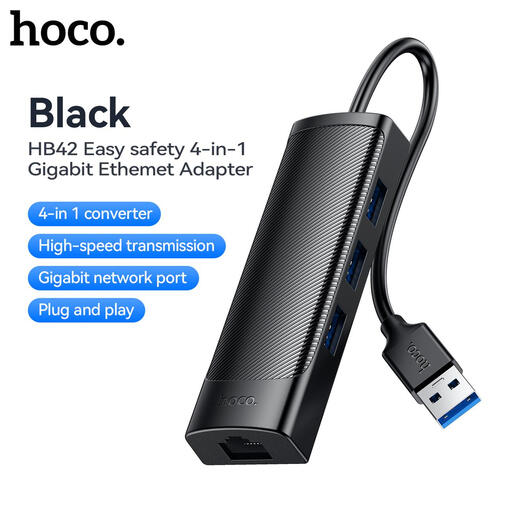
HOCO HB42 4-in-1 USB Gigabit Ethernet adapter, black
This is an option for a compatible computer that needs an RJ45 connection and additional USB-A ports.
The listed variant has three USB 3.0 ports and a 0.2 m attached cable. Check that the computer has a suitable USB-A port and that the adapter supports its operating system; do not assume its USB ports are suitable for charging high-power devices.
Joybuy
 No image available
USB-C multiport hub with 2 HDMI, DP, RJ45 and PD
Consider this type of hub when a compatible USB-C device needs an Ethernet connection alongside several desk peripherals.
The listed connections include two HDMI ports, DisplayPort, two USB 3.0 ports, two USB 2.0 ports, RJ45, Power Delivery, SD/TF and audio. Confirm the exact host’s display compatibility, required charging capacity and Ethernet speed before choosing it for those needs.
Joybuy
Questions about wired desk setups
When should I use Ethernet rather than improve Wi-Fi coverage?
Use a direct Ethernet connection when the computer stays at a desk and can reasonably reach the router. Ofcom advises that a computer connected directly by Ethernet should get a faster, more reliable connection than over Wi-Fi; improving wireless coverage instead addresses devices that need to connect around the home.
Will any USB-C port work with an Ethernet dock and monitors?
No: match the dock to the exact laptop or tablet, its supported USB-C or Thunderbolt functions, and the intended monitor setup. Dell’s guidance notes that a Thunderbolt dock needs a Thunderbolt port; also check display output, charging requirements and operating-system compatibility for the specific models.
How do I connect a small desk-side Ethernet switch?
Connect a switch port to a router LAN port or existing network point, then connect the fixed desk devices to the remaining ports. TP-Link describes plug-and-play operation for its cited unmanaged Gigabit model; count the router connection when deciding how many ports your desk requires.
Does a powered dock or switch need a particular product marking?
Check the rules applicable to the particular product and its destination rather than treating one marking as a universal answer. In guidance updated in August 2026, GOV.UK says Great Britain continues to recognise CE marking alongside or in place of UKCA marking for relevant products; Northern Ireland has a separate process. A marking does not establish compatibility with your laptop or network.
What support details should I check for an adapter or dock?
Check the exact model’s warranty terms, support route and any relevant driver or firmware information before buying. Confirm what is included with a powered dock and read the retailer’s applicable return terms separately; do not assume that terms for one model apply to another.


