A wired headset is a practical choice if you play historical adventures at one desk, have a compatible port and would rather avoid charging. Choose a headset with a dedicated 2.4 GHz gaming connection if moving around the home office matters more; Bluetooth can add phone convenience, but check whether the model switches between sources or plays them together. Fit, microphone controls and compatibility with your actual device deserve attention before surround processing or audio presets.
Who is this for?
Long-session story explorers
If you spend extended sessions following dialogue and exploring, consider stated weight and cushion material, but do not treat either as a promise of comfort. Head shape, glasses and warmth can change how a headset feels over time; check the seller’s return conditions before relying on it for long sessions.
Desk-based immersion seekers
If you mainly play at one PC or console, a compatible wired headset avoids charging and wireless setup, though its cable limits movement. RTINGS notes that wired headphones generally have little to no connection latency; the port and microphone connection still need to match your device.
Hybrid work-and-play users
If the same home-office headset will serve games, calls and phone audio, compare microphone controls and the way each model handles its gaming and Bluetooth connections. Check whether it switches sources or can play both at once rather than assuming those functions are equivalent.
What matters when choosing?
Start with the connection your gaming device can use, then weigh cable freedom against charging and consider how the headset will feel during a long session. The concerns below reflect different primary needs among consumers choosing a headset for historical adventures in a home office.
| Concern |
What to check |
Who this matters to |
| Comfort during long sessions |
Compare stated weight and cushion material; check fit and the seller’s return conditions. |
If I wear a headset through extended dialogue and exploration, pressure or warmth could make me stop using it even if I like its features. Around 42% of consumers put long-session comfort first. |
| Desk connection |
Match the headset’s connector or USB transmitter to your device; for wireless models, check charging requirements. |
At a fixed desk, I want game audio without an unwanted charging routine or a cable that gets in my way. Roughly 33% of consumers make the desk connection their primary concern. |
| Calls and voice chat |
Check microphone controls and whether Bluetooth switches sources or supports the audio behaviour you need. |
If I move between a game, calls and phone audio, I need to know how quickly I can change sources and control the microphone. About 25% of consumers place work-and-play flexibility first. |
Buying pitfalls
-
Assuming every wireless version works with every device
A headset family may have platform-specific versions, and a supplied USB transmitter or Bluetooth mode may not work in the same way on every PC, console and phone. Turtle Beach advises checking compatibility by model for its Stealth 600 Gen 3.
Compare the exact model suffix with your devices and available ports before ordering; do not rely on a broad ‘multiplatform’ description alone.
-
Treating Bluetooth and gaming wireless as interchangeable
Bluetooth may be convenient for phone audio, but a dedicated gaming transmitter or a wired connection is the more relevant option when connection latency matters. A headset having both modes does not mean they work simultaneously.
Check which connection carries game audio and whether the model switches between game and phone sources or mixes them.
-
Choosing surround processing without checking its conditions
Software-dependent features can vary by operating system and variant. Razer’s UK BlackShark V2 X page states a Windows 11 condition for its advertised 7.1 feature, while the Joybuy listing for a specific green variant states Windows 10 64-bit and activation requirements.
If surround processing affects your decision, check the exact model, supported operating system and activation steps rather than assuming the feature works on your gaming device.
-
Taking a comfort description as a guarantee of fit
Stated weight and cushion materials help narrow the choice, but they cannot establish how the headband or ear cups will feel on your head, particularly with glasses.
Use those details to shortlist headsets, then check the seller’s return conditions, including any conditions affecting a headset after opening or use.
Brands to consider
These product lines illustrate different connection and feature choices; a brand name alone cannot establish fit or compatibility for a particular headset.
Razer
The BlackShark V2 X range is relevant if you want to compare a lightweight wired headset for a fixed desk.
- Razer’s UK page states a 240 g design, memory-foam cushions, passive isolation and a cardioid microphone for the BlackShark V2 X.
- Check the exact variant and operating-system conditions for its advertised 7.1 feature; the manufacturer page and a Joybuy green-variant listing state different Windows requirements.
Turtle Beach
The Stealth 600 Gen 3 line is relevant if cable-free gaming and switching to Bluetooth audio are priorities.
- Turtle Beach lists 2.4 GHz wireless, Bluetooth 5.2, a flip-to-mute microphone and an up-to-80-hour battery claim for this line.
- Compatibility depends on the model and platform version, so confirm the exact edition and its supported devices.
SteelSeries
The Arctis Nova 5 is relevant if you want game-audio presets and a way to change between gaming and phone audio.
- SteelSeries describes game-audio presets, switching between 2.4 GHz and Bluetooth, and a 60-hour battery claim for the Arctis Nova 5.
- Switching sources is not the same as hearing game and phone audio together; confirm that behaviour if you need both at once.
Logitech G
The PRO X 2 LIGHTSPEED is relevant if you are comparing 2.4 GHz wireless, Bluetooth and 3.5 mm connection options.
- Logitech G lists up to 50 hours of battery life, a stated 30 m range and a choice of leatherette or velour memory-foam ear pads for this model.
- Connection options and cushion materials are useful specifications, not proof of better fit or clearer audio than another headset.
Joybuy headsets for this setup
These headsets cover wired choices for a fixed home-office desk and one wireless choice for moving around it. Match the connection and microphone requirements to your own PC or console before comparing comfort details.
 No image available
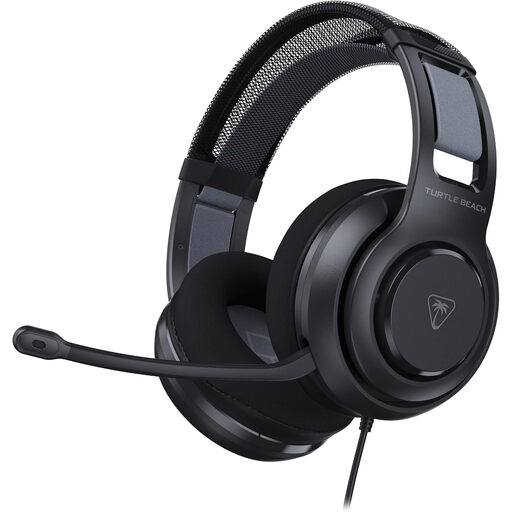
Turtle Beach Atlas 200 Headset, Black
Consider this for a fixed desk if your device can provide the connection and microphone support you need.
Check the fit with glasses and the seller’s return conditions if you expect to wear it for long sessions.
View on Joybuy
 No image available
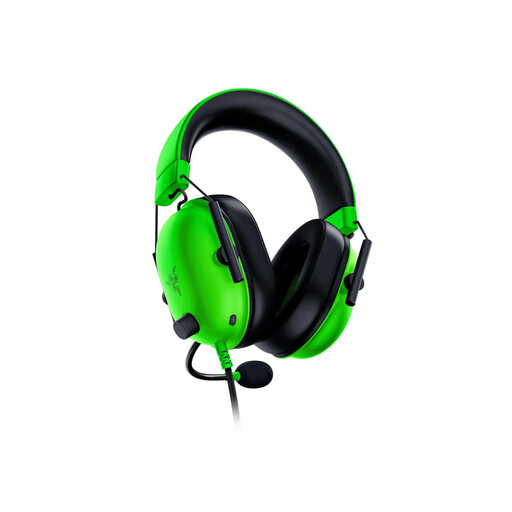
Razer BlackShark V2 X, Green
This wired 3.5 mm variant suits a stationary desk if your device has a compatible audio and microphone connection; it is not a Bluetooth headset.
Razer states a 240 g weight and memory-foam cushions for the BlackShark V2 X. If its advertised surround feature matters, check the software and activation conditions for this exact green variant before ordering.
View on Joybuy
 No image available
Logitech ASTRO A10 Gen 2 Wired Headset, White
This wired model is a desk-play option if its connector and microphone arrangement suit your PC or console.
Check whether your device needs a splitter, and assess fit and return conditions if glasses or extended wear are important to you.
View on Joybuy
 No image available
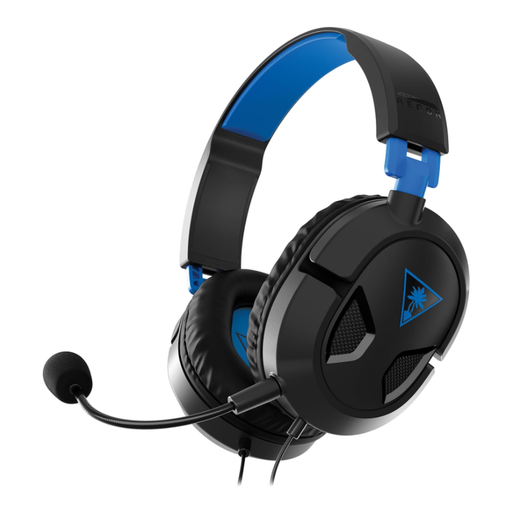
Turtle Beach Recon 50P Wired Headset
This wired headset is worth considering for desk gaming if its connection and microphone work with your chosen device.
Check the headset’s weight and fit directly before using either to judge whether it will suit a long session.
View on Joybuy
 No image available
ASUS ROG Pelta Wireless Headset, Black
Consider this wireless option if moving around your home office without a headset cable matters more than avoiding charging.
Check that its USB-C gaming connection suits your device. If you want phone and game audio at the same time, confirm that this variant supports simultaneous listening rather than source switching.
View on Joybuy
Frequently asked questions
Should I use Bluetooth alone for historical adventure games on a PC?
If keeping game audio closely synchronised matters to you, choose a compatible wired connection or a headset with a dedicated gaming transmitter rather than relying on Bluetooth alone. RTINGS identifies latency as a consideration with wireless headphones; a headset can still offer Bluetooth as a separate convenience for phone audio.
Does virtual surround automatically improve historical adventure games?
No; treat virtual surround as an optional feature to try, not a guaranteed improvement. For the Razer BlackShark V2 X, the UK manufacturer page and a Joybuy green-variant listing state different Windows conditions for the advertised 7.1 feature, so check the exact variant, operating system and activation requirements.
What should I check before choosing a wireless headset for both games and calls?
Confirm that the exact model’s gaming transmitter supports your PC or console, then check its microphone controls and how it handles Bluetooth audio. SteelSeries describes switching between 2.4 GHz and Bluetooth on the Arctis Nova 5; do not assume that switching means simultaneous game and phone audio.


