What matters when choosing?
Start with audio and microphone compatibility for the devices you will actually use. Then decide whether contained chat and comfort or fewer cables should take priority.
| Concern |
What to check |
Who this matters to |
| Platform and chat compatibility |
Check each device or controller’s audio connection and whether the headset microphone works through the intended connection. Check platform limits on software features separately. |
If guests bring different gaming devices, I need both game audio and voice chat to work on the ones we will use. Around 42% of consumers put compatibility first. |
| Shared-room chat and comfort |
Consider closed-back earcups, microphone position and mute controls; assess the fit and padding for the time you expect to wear the headset. |
In a shared room, I want to hear the game without using speakers and speak to teammates comfortably through a longer session. Around 33% of consumers chiefly prioritise contained chat and comfort. |
| Cables and charging |
Check the wireless connection mode, supported devices and stated battery life; decide whether you can charge before play. |
I want fewer cables across a small desk and can make time to charge the headset. Cable-free convenience is the primary concern for around 25% of consumers. |
Joybuy headset options for game-night setups
These options include wired headsets and a wireless model for student-room play. Check the connection and microphone requirements of every device you expect to use.
 No image available
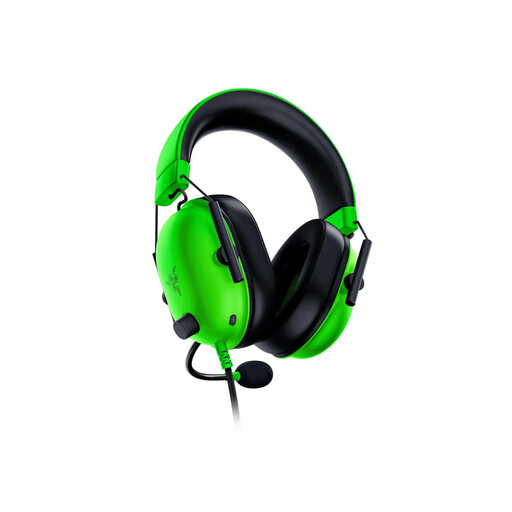
Razer BlackShark V2 X, Green
Consider this wired model if your game-night devices accept its 3.5 mm connection and you do not want to manage charging. Razer lists closed earcups and a 240 g weight for the BlackShark V2 X; check the fit and cable reach for your seating arrangement.
View on Joybuy
 No image available
Logitech ASTRO A10 Gen 2 Wired Headset, White
This wired option suits a session where charging would be inconvenient. Confirm its audio plug and microphone connection against the computer, console or controller you intend to use.
View on Joybuy
 No image available
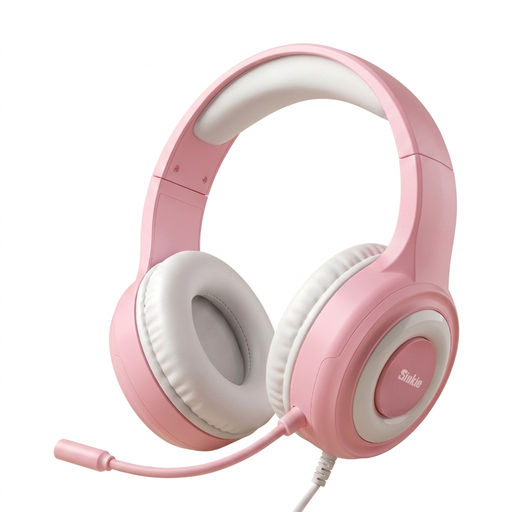
Siukie CH25 Wired Headset, 50 mm Driver, USB and 3.5 mm
For a wired group setup, confirm how audio and microphone signals connect to your exact console or controller. USB and 3.5 mm are both named for this model, but they should not be assumed to serve the same purpose.
View on Joybuy
 No image available
ONIKUMA K8 Wired Over-Ear Gaming Headset
If the session uses a PC or Xbox, check that its audio and microphone connections suit your exact setup. The model name describes a flexible microphone; confirm how you will mute it during play.
View on Joybuy
 No image available
ASUS ROG Pelta Wireless Gaming Headset, Black
Choose a wireless setup if fewer desk cables matter to you and you can plan for charging. Confirm the connection mode and microphone support for each device you intend to use.
View on Joybuy
Frequently asked questions
Will a headset disturb roommates less than speakers?
A headset can keep game and chat audio closer to the wearer than speakers. Logitech’s student-room guidance suggests this can reduce disturbance, though your speaking voice will still be audible and headset fit affects sound leakage.
How do I check whether one headset will work across our devices?
Check audio and microphone support for each device and the exact connection you will use. Razer lists a 3.5 mm connection for the BlackShark V2 X, while HyperX lists 3.5 mm, USB-C and USB-A options for the Cloud III; software audio features may have separate platform limits.
Can I cancel an online headset order if I change my mind?
For most online goods purchases in the UK, GOV.UK says consumers can cancel up to 14 days after delivery without giving a reason. Exceptions can apply, so check the applicable cancellation instructions; remedies for faulty goods are separate from change-of-mind cancellation.
What if the headset arrives faulty?
The Consumer Rights Act 2015 provides a short-term right to reject faulty goods, with a minimum 30-day time limit according to the Act’s explanatory notes. Its starting point depends on the relevant delivery and ownership conditions; keep evidence of the fault and contact the seller promptly.
How should I dispose of an unwanted wireless headset?
Take it to an appropriate electrical-waste collection point rather than putting it in household rubbish. UK government guidance also directs batteries to suitable recycling routes; follow local instructions if the headset has a removable battery.


