Teachers recording one seated interviewee
A wired mobile lavalier keeps the microphone close to the speaker without wireless setup, provided the phone or tablet has the right input or adapter.


Choose a lavalier that places the microphone close to the interviewee rather than relying on a recorder in the middle of the classroom; the Oral History Society advises a distance of around 15 cm from the speaker’s mouth. A compatible wired mobile lavalier keeps a seated, one-person setup straightforward. For two speakers who need to move, consider a dual-channel wireless system, and check for independent onboard recording if the interview cannot be repeated.
A wired mobile lavalier keeps the microphone close to the speaker without wireless setup, provided the phone or tablet has the right input or adapter.
Separate microphones let the interviewer and interviewee move without sharing one clip-on microphone. If the conversation cannot be repeated, look for independent onboard recording as well as a compatible receiver connection.
A managed UHF system may suit a planned multi-station setup, but the exact tuning range, local frequency arrangements and applicable Ofcom requirements need checking before use.
Choose when: One seated speaker is recording directly to a compatible phone or tablet.
Trade-off: The cable limits movement, and a 3.5 mm TRRS microphone needs the correct input or adapter.
Choose when: Both speakers need microphones or freedom to move; select independent onboard recording when a separate backup matters.
Trade-off: Charging, pairing and radio conditions add checks before the interview.
Choose when: Several interview stations need a planned wireless setup and the school can manage frequencies.
Trade-off: The model’s tuning range and intended use must be checked against current Ofcom requirements.
| Concern | What to check | Who this matters to |
|---|---|---|
| Clear interviewee speech | Can the lavalier sit close to the speaker? For two voices, can each person use a microphone? | In a busy classroom, I want the interviewee close-miked rather than relying on a distant recorder, though placement will not remove other voices. Around 42% of consumers put close speech capture first. |
| Recording resilience | Check for separate onboard recording on each transmitter and a way to monitor the session. | If a conversation cannot be repeated, I want a separate recording in case the received audio fails. For around 33% of consumers, protecting that recording is the primary concern. |
| Device compatibility | Match the microphone or receiver connection to the recording device; confirm any adapter and required plug-in power. | With an existing school device and little setup time, I need to know the whole recording connection will work. Getting that connection right comes first for around 25% of consumers. |
A distant microphone picks up surrounding voices and room noise as well as the interviewee. The Oral History Society advises placing the microphone around 15 cm from the speaker’s mouth.
Clip a lavalier close to the main speaker, reduce nearby conversations where possible and make a short test recording.
Shure’s MVL uses a mobile-oriented TRRS connection, while RØDE Lavalier GO uses TRS and requires plug-in power. A plug fitting a socket does not establish that the recording setup will work.
Identify the device first, then check the microphone connection, any required adapter and its power requirements.
An adapter can add another item to the classroom kit.
Manufacturer transmission ranges are stated for particular conditions; walls, people and other equipment can change the conditions in a classroom. Wireless transmission also does not correct poor microphone placement.
Test the complete setup in the intended room, monitor the recording where possible and use independent onboard recording when a backup matters.
The usable frequency and licensing position depends on the exact system variant and how and where it will be used.
Confirm the variant’s tuning range, then check current Ofcom requirements for the school’s location and intended use before deploying it.
The MOTIV MVL represents a wired mobile-device route for recording one speaker.
Its Lavalier GO and Wireless GO (Gen 3) and Wireless PRO models illustrate different wired and compact wireless connections.
The EW-D ME2 Set (Q1-6) represents a managed digital UHF route with an ME 2 clip-on microphone.
These two-transmitter wireless kits are options for placing a microphone on each speaker in a classroom interview. If an independent backup is essential, confirm onboard recording for the exact kit before choosing either one.
 No image available
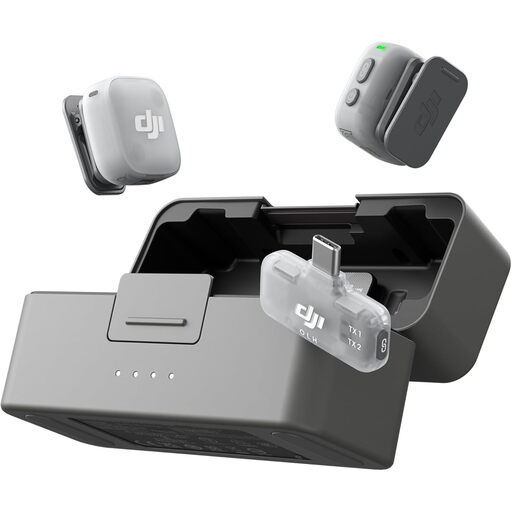
The two-transmitter kit offers a microphone for each person in a paired interview.
The named bundle includes one mobile receiver and a charging case. Confirm compatibility with the school’s device and recording app, and check whether the transmitters offer independent onboard recording if a backup is needed.
 No image available
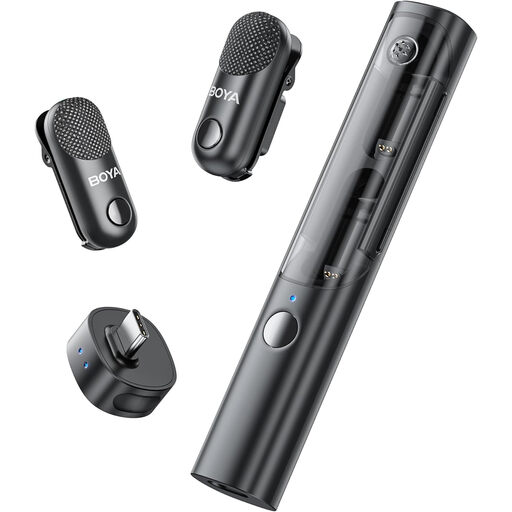
Its two-transmitter configuration suits an interview in which both speakers need a microphone.
The named kit has a USB-C connection, one receiver and a charging case. Check the intended recording device and app, and confirm whether independent onboard recording is available if the interview needs a separate backup.
The Oral History Society advises placing the microphone around 15 cm from the interviewee’s mouth for school oral-history recording. Secure the clip, keep the cable from rubbing against clothing and test it with the speaker seated as they will be during the interview.
Not necessarily: the microphone, device input and any adapter must be compatible. Shure says its MVL uses 3.5 mm TRRS and works with most suitable mobile-device jacks or an appropriate CTIA-compliant adapter; a TRS lavalier such as RØDE Lavalier GO has different connection and power requirements.
Whether a wireless microphone needs a licence depends on its frequency band and intended use. Check the exact model variant against current Ofcom requirements before recording; Ofcom also notes that licence-exempt ranges can be shared with other low-power equipment and may experience interference.
Agree how the interview will be recorded, retained and potentially shared before starting. The National Lottery Heritage Fund’s oral-history guidance covers recording agreements and archiving; confirm the school’s safeguarding and data-protection process, particularly when children’s personal information is involved.
Make sure the recorder has enough storage and power for the planned session, and decide how the file will be transferred afterwards. The Oral History Society includes storage, battery life or mains power, and file upload among its school recording considerations.