Solo home-studio script recorders
If you speak close to a computer, recorder, camera or phone, a compatible wired connection may meet your needs without a radio link. Check the device’s microphone input before choosing the lavalier plug.


For a walking-tour script recorded in one position at home, start with a wired lavalier that matches your recording device’s microphone input and power requirements. Choose wireless when you need to move away from the recorder or camera; it adds charging and radio-link considerations, and either setup needs a short clothing-rustle test before the full take.
If you speak close to a computer, recorder, camera or phone, a compatible wired connection may meet your needs without a radio link. Check the device’s microphone input before choosing the lavalier plug.
If you rehearse or film while moving away from the camera or computer, a wireless system can remove the cable run between you and the recording device. Its receiver must still connect to that device.
If the microphone needs to stay unobtrusive on camera, consider capsule size and how you will secure its cable against clothing. If you later record on location, check whether the chosen microphone suits the conditions you expect.
Decide where you will record and how far you need to move, then confirm a complete signal path from microphone to recording device. These three routes address different inputs and working positions.
Choose when: You record near a compatible 3.5 mm TRS microphone input, or use a transmitter designed for that lavalier.
Trade-off: No radio link is needed, but the cable limits how far you can move from the connected device.
Choose when: You record to a phone or tablet with a compatible headset input or a confirmed adapter.
Trade-off: A TRRS plug should not be assumed to work in a TRS camera or recorder input.
Choose when: You need to pace, demonstrate movement or speak away from the camera or recorder.
Trade-off: You must manage charging and the radio link as well as the receiver connection.
| Concern | What to check | Who this matters to |
|---|---|---|
| Device connection | Identify the recording device’s microphone input and required power. Confirm that the lavalier plug, receiver or adapter provides a compatible path. | If I am recording alone at my desk, I need the microphone to work with the device I already use. Around 50% of consumers would put connection compatibility first. |
| Movement | Check the usable cable reach for a wired lavalier. For wireless, confirm the receiver connection, kit contents and operating band. | While rehearsing a tour on camera, I want to move away from the recorder without trailing a cable; roughly 30% of consumers would prioritise that freedom of movement. |
| Placement and clothing noise | Check the capsule, clip, cable and windscreen supplied with the exact model. Test it with the clothing you intend to wear. | If the microphone will be visible or brush against clothing, I need a secure position that does not spoil the narration. About 20% of consumers would make discreet, stable placement their primary concern. |
RØDE specifies a TRS plug for Lavalier GO, while Shure specifies TRRS for the phone-oriented MVL. A plug fitting into a socket does not establish that the microphone and input will work together.
Check the exact input on your recorder, camera, phone, computer or transmitter, including any adapter and microphone-power requirements.
Choosing the wrong connection can mean needing an adapter or a different microphone.
A wireless system can help when you move away from the recorder, but it also brings charging, pairing and radio-link considerations to a session you may be able to record by cable.
If you will stay near the recording device, check whether a wired lavalier and practical cable route meet your needs before choosing wireless.
Allow time to charge and check the transmitter and receiver before a wireless session.
Ofcom notes that licence-exempt wireless-microphone ranges in the UK can also be used by other low-power equipment and may experience interference.
Check the exact system’s operating band and applicable UK conditions, then make a monitored test at your intended working distance.
An unobtrusive capsule can still rub against fabric or pick up unwanted sound if its mounting shifts as you speak or move.
Fit the clip and windscreen, wear the intended clothing and record a short movement test before reading the whole script.
Catching a rustle only afterwards may mean rerecording part of the narration.
A reference point for a direct TRS lavalier or a wireless system that accepts an external lavalier.
Relevant when a compatible phone or tablet is your recording device.
Relevant when an external lavalier must connect to a compatible locking 3.5 mm wireless transmitter.
Relevant to a 3.5 mm stereo-mini-jack lavalier setup when the recording device accepts that connection.
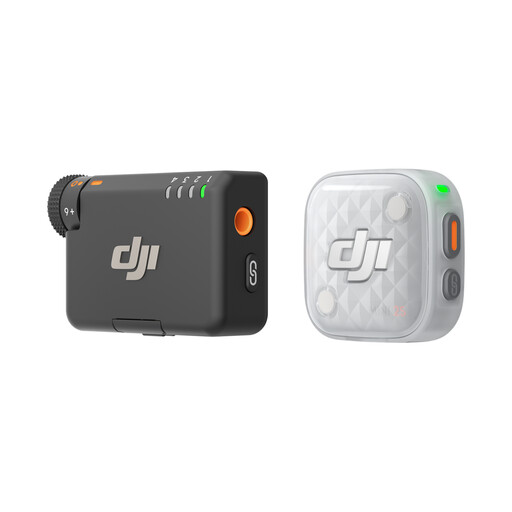
These wireless microphone kits are relevant if you plan to move while rehearsing or recording your script. Compare the named transmitter-and-receiver bundle with your recording device before choosing; a fixed-position session may call for a compatible wired lavalier instead.
 No image available
Consider this wireless kit if you need to move while recording one voice. The title identifies one transmitter, one mobile receiver and a charging case; confirm the exact included components, as the kit descriptions differ. Check how its receiver connects to your recording device and the operating band for the UK variant.
 No image available
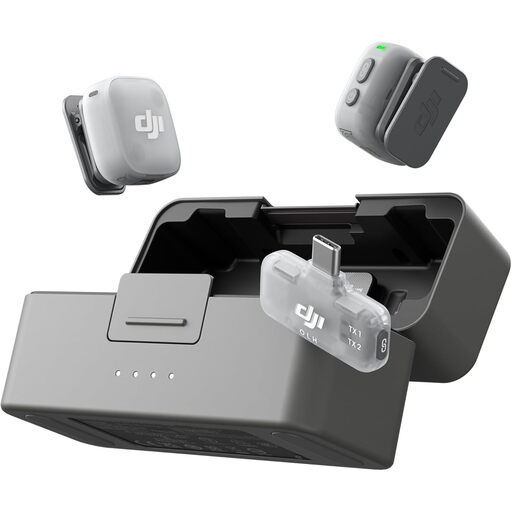
Consider this wireless bundle if you want the option of using two transmitters rather than one. The title identifies a mobile receiver and charging case; confirm the receiver connection with your recording device, along with the operating band and charging arrangements for the UK variant.
 No image available
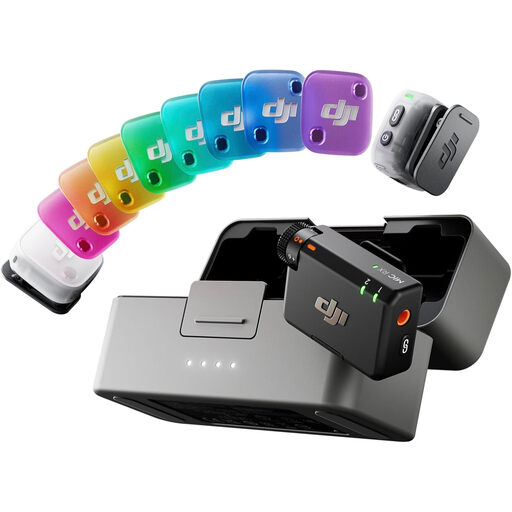
Consider this two-transmitter wireless bundle if you need its receiver variant for your setup. Unlike the other DJI Mic Mini 2 bundle shown here, its title identifies one RX rather than one Mobile RX. Confirm that receiver’s connection to your recording device, plus the operating band and charging arrangements for the UK variant.
Use a compatible wired lavalier if you can stay near the recorder and route the cable comfortably. Choose wireless if you need to move away from it, and check the receiver connection, charging needs and radio link before recording the full script.
No: the socket and plug must provide a compatible microphone signal and power arrangement. RØDE specifies TRS for Lavalier GO, whereas Shure specifies TRRS for MVL; check the exact device input and any required adapter before buying.
Clip the microphone securely near your mouth and make a short recording in the clothing you intend to wear. Speak and move as you will for the full take, checking for rubbing against fabric, hair or jewellery; a windscreen does not fix clothing contact.
Ofcom lists 2400–2483.5 MHz among wireless-microphone ranges that can be used without a licence, subject to the applicable conditions. Check the exact product’s operating band and UK requirements before use; Ofcom also warns that licence-exempt ranges can experience interference from other low-power equipment.