Socket- and cable-conscious city builders
If a long session makes charging inconvenient, decide whether your real constraint is a wall socket, a USB port or a cable across the desk. Wired and wireless mice address different parts of that problem.


A wired mouse avoids battery charging but keeps a cable on the desk and needs an available USB port. A wireless mouse removes the movement cable, but its battery routine depends on the model and connection settings. For city-building games, weigh those practical constraints alongside reachable shortcut controls, scroll-wheel behaviour and hand fit rather than choosing by a headline specification alone.
If a long session makes charging inconvenient, decide whether your real constraint is a wall socket, a USB port or a cable across the desk. Wired and wireless mice address different parts of that problem.
If you repeatedly select tools or issue commands, reachable programmable controls may matter more than the largest advertised button count. Razer, SteelSeries and Logitech G describe different control layouts across the models discussed here.
Compare shape and weight with a mouse that already suits your grip. SCAN UK identifies grip style as a consideration when choosing mouse shape; a stated weight alone cannot establish how a model will feel in your hand.
Identify whether wall sockets, USB ports or desk cables are the pressing constraint, then decide which commands you want on the mouse and whether its shape suits your grip. A wireless receiver can still require a USB port, so cable-free movement does not necessarily free one.
| Concern | What to check | Who this matters to |
|---|---|---|
| Charging and power | For wired models, check the required USB connection. For wireless models, check the battery claim for the mode you intend to use. | If charging might interrupt a long session, I would accept a cable to avoid managing a mouse battery. Around 29% of consumers put avoiding that routine first. |
| Command access | Check whether programmable buttons are within comfortable reach and whether the wheel offers the scrolling behaviour you want. | When I repeat city-building commands, I want controls I can reach without accidental presses. Reachable shortcuts are the primary need for around 29% of consumers. |
| Desk freedom | Check the offered wireless modes, PC compatibility and whether a receiver occupies a USB port. | If the mouse cable gets in my way, I would rather manage a battery than keep that cable on the desk. Around 24% of consumers prioritise cable-free movement. |
| Long-session comfort | Compare shape, dimensions and stated weight with a mouse that fits your usual grip. | For extended play, I need the shape and button positions to feel manageable in my hand. Hand fit comes first for around 18% of consumers. |
Manufacturer maximums can depend on connection and efficiency settings. SteelSeries gives the Aerox 5 Wireless figures of up to 180 hours in Bluetooth or High Efficiency Mode and up to 80+ hours in default 2.4 GHz mode.
Compare claims for the mode you intend to use, and plan around its stated conditions rather than treating the longest figure as your expected runtime.
A wireless mouse removes the movement cable, not necessarily the need for a USB receiver or battery management. A wired model avoids charging but retains its cable and needs a compatible USB port.
Count the available wall sockets and USB ports separately, then decide whether charging or cable clutter is the inconvenience you most want to avoid.
Extra controls help only when their position suits your grip and you have commands to assign to them. A scroll-wheel design may also affect how you move through maps and menus.
Check side-button reach, the available customisation and wheel behaviour before deciding how many controls you need.
GOV.UK advises that waste electrical products and batteries should be recycled separately from household rubbish.
Use an appropriate electrical-waste or battery collection route when replacing a mouse, and follow the collection point’s instructions for removable batteries.
The Basilisk V3 X HyperSpeed is a right-handed wireless option with 2.4 GHz and Bluetooth connectivity.
The Aerox 5 Wireless is listed at 66 g and has nine programmable buttons, including a five-button side panel.
The G502 X line includes a wireless LIGHTSPEED model and a wired G502 X for players who prefer to avoid battery charging.
These options include wired mice for avoiding a battery routine and a wireless mouse for removing the movement cable. Check each model’s port requirements, controls and hand fit against your own desk and city-building habits.
 Image unavailable
Consider this wired option if avoiding a mouse-battery routine matters more than clearing the desk cable.
Check that its USB-A connection suits an available port. If you want mouse inputs for camera movement or repeated commands, confirm that their placement suits your grip.
 Image unavailable
This wireless option removes the movement cable for players willing to manage charging and use a receiver.
The product title states 53 g and 10 programmable buttons. Its advertised battery life is up to 750 hours; that claim depends on a driver update enabling low-power mode, so check the conditions for your intended settings. Make sure a suitable USB port is available for the receiver.
 Image unavailable
Choose a wired model such as this if avoiding battery charging takes priority over removing the mouse cable.
The product title identifies adjustable settings and RGB lighting. Confirm the connector type, control layout and dimensions if port compatibility or long-session comfort will decide your choice.
 Image unavailable
This wired variant suits a desk where avoiding mouse charging matters more than having cable-free movement.
Before assigning city-building shortcuts, check whether its button positions and customisation options cover the actions you use. Confirm that its USB connection fits an available port.
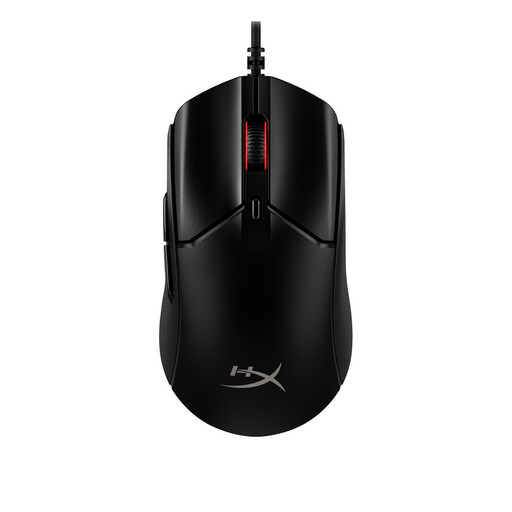 Image unavailable
Wired operation avoids a wireless battery routine, provided you have a suitable USB port and room for the cable.
If configurable inputs matter for your city-building commands, check the button layout and software requirements. Compare its dimensions with your usual grip before choosing it for long sessions.
No. A wired mouse uses a computer port rather than a separate wall socket and avoids battery charging, while a wireless mouse removes the movement cable but still needs battery management. Check whether wall sockets, USB ports or desk space are actually limiting you.
Use the figure for your intended connection mode and settings, not the longest advertised maximum by default. SteelSeries, for example, states different maximums for the Aerox 5 Wireless in Bluetooth or High Efficiency Mode and default 2.4 GHz mode.
They can help if you have repeated commands to assign and can reach the buttons comfortably. Check their layout with your usual grip and consider scroll-wheel behaviour as well as the stated control count.
Use an appropriate electrical-waste or battery collection route rather than household rubbish. GOV.UK advises recycling electrical products and batteries separately; follow the collection point’s instructions for the particular battery.