PC replay analysts
If you pause and replay clips at one desk, prioritise connections and sound controls that work with your PC, alongside a fit you can tolerate through repeated listening.


For a fixed replay-review desk, a wired headset offers a direct connection without charging; consider 2.4 GHz wireless if moving between compatible devices or avoiding a cable matters more. In either case, check the fit, the connections on your actual devices and whether the audio controls you want work on your platform. Surround-sound labels and manufacturer comfort claims do not establish how clearly you will hear a particular replay or how the headset will fit you.
If you pause and replay clips at one desk, prioritise connections and sound controls that work with your PC, alongside a fit you can tolerate through repeated listening.
If your clips move between a PC, console, handheld or mobile device, check each device against the exact headset variant. A compatible connector does not necessarily bring the same software features to every platform.
If you review matches or discuss clips for extended periods, compare ear-pad materials, stated weight and fit. None of those details alone can tell you whether the headset will feel comfortable on your head.
Choose it when: replay review happens mainly at one setup and you want a direct connection without charging.
Trade-off: the cable is less convenient when you move between devices, and software features still need a platform check.
Choose it when: cable freedom or switching between compatible replay and everyday-use devices matters to you.
Trade-off: connection support is model-specific, while stated battery-life figures are maximum claims rather than guaranteed runtime.
| Concern | What to check | Who this matters to |
|---|---|---|
| Replay cues | Check usable EQ or profiles and any platform restriction on surround processing; driver size alone cannot establish positional performance. | If I repeatedly listen for the direction or timing of a cue, I need controls I can use on my replay setup. Around 37% of consumers put cue interpretation first. |
| Extended-session comfort | Compare stated weight and pad materials, then assess fit and pressure where possible. | Long reviews mean I need a headset I can keep wearing without an uncomfortable fit. Comfort is the primary need for around 27% of consumers. |
| Setup compatibility | Confirm the exact variant, connector or dongle, supported devices and software requirements. | When I review clips on more than one device, I need the intended connection and features to work on each one. Around 18% of consumers make setup compatibility their first priority. |
| Team discussion | Check the microphone and mute arrangement, including whether voice features work in your intended connection mode. | If I talk through clips with teammates, I need to know how I will communicate as well as listen. For around 18% of consumers, communication comes first. |
Logitech G says Blue VO!CE and DTS Headphone:X 2.0 on the PRO X Wired function only on PC through G HUB. Razer limits BlackShark V2 X USB 7.1 surround sound to Windows 10 64-bit.
Check the exact model’s operating-system and software requirements against the device on which you review replays.
A stated maximum for a wireless headset may apply to a particular connection mode or set of usage conditions, rather than every replay session.
Check which mode the figure covers, how the headset charges and whether you can use it while charging if uninterrupted review matters.
Materials and weight give you points to compare, but neither establishes comfort with your head shape or glasses. Razer states a 240 g weight for the BlackShark V2 X USB; that number cannot describe its fit for every wearer.
Compare pads and headband adjustment, and assess pressure where possible before relying on a headset for long sessions.
A manufacturer’s warranty has its own terms. Citizens Advice explains that warranties and guarantees add to, rather than replace, legal rights.
Keep your order confirmation and warranty details, and contact the seller if a newly purchased headset is faulty.
The Cloud III range offers a choice between a wired model with several connector types and a Cloud III S Wireless model with 2.4 GHz and Bluetooth.
The wired PRO X and wireless PRO X3 LIGHTSPEED are relevant if adjustable PC audio settings are part of your replay workflow.
Arctis Nova 5 Wireless is a model to examine if you want to switch between 2.4 GHz game audio and Bluetooth use.
BlackShark V2 X USB is relevant when a stated weight and a closed-earcup design are on your comparison list.
These wired and wireless gaming headsets cover fixed-desk replay review and setups that use more than one device. Choose the exact platform variant before comparing features, particularly where PlayStation and Xbox versions of a similarly named headset appear below.
 No image available
Consider this wireless model if you want to review replays without a cable. Check that its connection modes and any sound-adjustment software work with your devices; assess fit for extended sessions rather than relying on audio-feature claims to predict replay accuracy.
 No image available
This wired model suits a replay desk with a compatible USB connection. Its title lists PC, Mac and PS4 use, a 50 mm driver and a microphone; check software requirements before counting on the advertised 7.1 surround feature, and do not assume Xbox compatibility.
 No image available
Choose the PlayStation and PC variant if those are the devices on which you review clips. Check the sound controls and connection requirements for each device, and confirm the microphone arrangement if you also discuss replays with a team.
 No image available
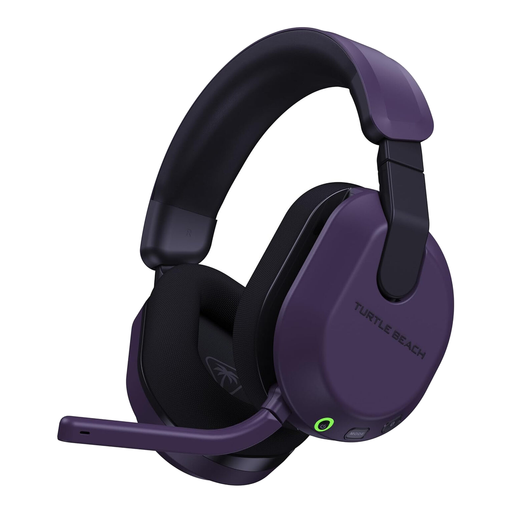
This is the Xbox Series X|S, Xbox One and PC variant for consumers reviewing clips on those systems. If PlayStation is also part of your setup, check the Bluetooth-only support and which features work there; confirm microphone details if voice discussion matters.
 No image available
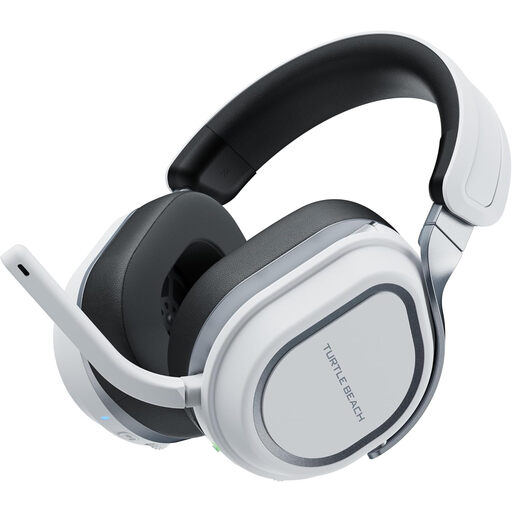
Consider this PlayStation and PC variant if replay review moves between those systems. Check how its device switching works in your setup; its stated 408 g weight is worth considering for long sessions, though weight alone cannot predict fit. Confirm microphone details if you need to talk through clips.
Choose wired if you review mainly at one desk and want to avoid charging; consider wireless if cable freedom or moving between compatible devices matters more. For a wireless model, check its dongle, device list and battery-life conditions before ordering.
Not necessarily: those features depend on the exact headset and platform. Logitech G limits Blue VO!CE and DTS Headphone:X 2.0 on PRO X Wired to PC through G HUB, while Razer specifies Windows 10 64-bit for BlackShark V2 X USB 7.1 surround sound.
Treat a change of mind and a fault as separate issues: check whether cancellation rights apply to your online order and follow the seller’s return instructions, but contact the seller about a headset that arrives faulty or misdescribed. A manufacturer’s warranty does not replace statutory rights, as Citizens Advice explains.
No. Citizens Advice says warranties and guarantees add to legal rights; keep proof of purchase and check both the warranty’s claim process and the remedy available through the seller if a fault develops.