Scarce mains sockets do not, by themselves, make a wireless mouse the better choice for point-and-click adventures: a wired mouse draws power from the computer’s USB port. Choose an AA-powered wireless mouse if avoiding charging matters most, or consider Bluetooth if a receiver would occupy a USB port you need. If you want adventure-game shortcuts on the mouse, check the number and placement of programmable controls alongside the connection method, power arrangement and hand fit.
Who these choices suit
Players avoiding charge interruptions
If you play for long stretches and do not want another device to charge, an AA-powered mouse is worth considering. Keep replacement batteries available, and check any quoted runtime against the connection mode you intend to use.
Players who use adventure-game shortcuts
If you regularly open an inventory or map, pause, or use other keyboard commands, accessible remappable controls may be useful. Count the commands you want on the mouse before choosing a dense side-button layout, and check the required configuration software.
Players with few free USB ports
If your laptop has limited USB ports as well as limited mains sockets, Bluetooth may let you avoid a dedicated mouse receiver. Confirm that both the computer and the exact mouse support Bluetooth before relying on that connection.
What matters when choosing
Check how the mouse gets power and connects to your computer first. Then decide how many shortcuts you would use and whether you can comfortably reach their buttons.
| Concern |
What to check |
Who this matters to |
| Charging interruptions |
Check whether the exact mouse uses replaceable batteries or needs charging. Read battery-life claims with their stated connection mode and conditions. |
I want to keep playing without planning another charging session, and I am willing to replace batteries when needed. Around 31% of consumers put avoiding charge interruptions first. |
| Adventure-game shortcuts |
Count the commands you would remap, then check button placement and software compatibility. |
When I use inventory, map or pause commands often, I want controls I can reach without an awkward grip. For around 31% of consumers, shortcut access is the primary concern. |
| Comfort and simplicity |
Check handedness, dimensions and weight for the exact model; consider whether a smaller set of controls is enough. |
Long sessions make me care about a comfortable shape and a layout I can learn easily. Around 23% of consumers place straightforward control and fit first. |
| Free USB ports |
Confirm Bluetooth support on the mouse and computer, and check whether your preferred alternative mode needs a receiver. |
I need my remaining USB port for another device, so I would rather connect the mouse without a dedicated receiver. Preserving a port is the main concern for around 15% of consumers. |
Buying pitfalls
-
Assuming wireless means no ports or charging
A 2.4 GHz connection can occupy a computer USB port with its receiver, while a rechargeable mouse still needs a way to charge. Bluetooth avoids a dedicated receiver only when the computer and mouse support it.
Check your free USB ports and Bluetooth capability before choosing a connection. If you prefer replaceable batteries to charging, check the exact mouse’s power arrangement too.
-
Choosing a large button grid for only a few commands
The Corsair Scimitar Elite Wireless SE has 16 customisable buttons, including an adjustable 12-button side panel. That layout asks more of your thumb and your setup time if you only intend to map a handful of adventure-game actions.
Write down the commands you would assign, then check whether you can comfortably distinguish and reach the buttons you need.
-
Reading a quoted battery life as a guaranteed runtime
Runtime claims can vary with connection mode and use. Razer gives different battery-life figures for the Basilisk V3 X HyperSpeed in HyperSpeed and Bluetooth modes; neither figure describes every setup.
Compare claims under the mode you plan to use, and keep replacement batteries or an accessible charging cable as appropriate.
AA-powered mice require replacement cells; rechargeable mice require time and access to power for charging.
-
Putting an old mouse or batteries in household rubbish
GOV.UK advises using appropriate recycling collection points for unwanted electrical products and batteries rather than putting them in household rubbish.
Find a suitable battery collection point for removable cells and an electrical-waste collection route for the mouse.
Relevant brands to consider
Logitech G
Its G305 and G309 are relevant if you are considering AA-powered wireless mice. Logitech G specifies 250 hours on one AA battery for the G305; the G309 offers LIGHTSPEED and Bluetooth connections.
- The G309’s Bluetooth option is worth checking if a dedicated receiver would occupy a needed USB port.
- Check button layout, hand fit and the conditions behind any battery-life figure for the model you choose.
Razer
The right-handed Basilisk V3 X HyperSpeed combines 2.4 GHz wireless and Bluetooth with nine programmable controls, according to Razer.
- Its control layout may suit players who intend to map several frequently used commands.
- Check whether its shape fits your hand and whether Razer Synapse supports the computer on which you plan to configure those controls.
Corsair
The Scimitar Elite Wireless SE is a more button-dense option: Corsair lists 16 customisable buttons, an adjustable 12-button side panel, and 2.4 GHz, Bluetooth and USB connections.
- The side panel gives players with many planned bindings room to assign them.
- It requires configuration and charging, and its dense controls may be unnecessary if you use only a few shortcuts.
Joybuy mouse choices
These choices include a wired mouse for avoiding battery maintenance, replaceable-battery wireless and Bluetooth-capable options, and mice with more programmable controls. Choose by the connection and controls you would actually use, rather than treating limited mains sockets alone as a reason to go wireless.
 No image available
ASUS TUF Gaming M4 Wireless Gaming Mouse, Black
If you want to avoid routine charging, check whether its replaceable-battery arrangement suits you. Confirm Bluetooth compatibility if you plan to connect without occupying a USB port, and check software support before relying on custom button assignments.
View on Joybuy
 No image available
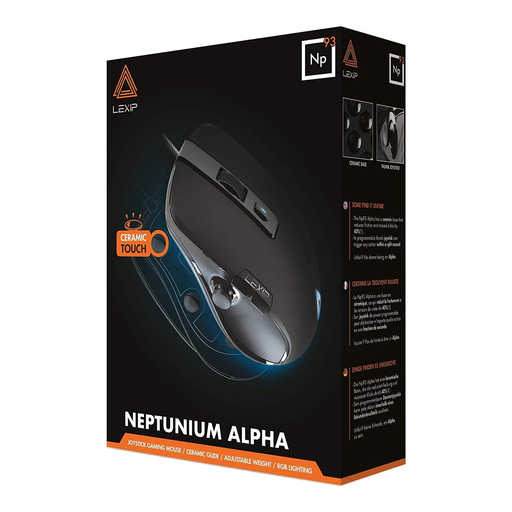
Lexip Np93 Alpha Gaming Mouse
Consider this wired option if you would rather avoid batteries and charging. Its connection occupies a computer USB port; check that a suitable port is free and that its right-handed shape suits your grip.
View on Joybuy
 No image available
Rapoo VT7 MAX Wireless Gaming Mouse, White
If you want several mouse-bound commands, its title lists 10 programmable buttons and macro support. It also lists a 53 g weight. Plan for USB charging and an occupied USB port when using its receiver; check the conditions behind the advertised battery-life claim before relying on it.
View on Joybuy
 No image available
AJAZZ AJ200 AI MC Wireless Gaming Mouse with Charging Dock
If keeping a USB port free matters most, check whether its listed Bluetooth mode works with your computer. The title also lists 2.4G and USB-C modes and a charging dock; confirm where you could power the dock or charge the mouse in your setup.
View on Joybuy
 No image available
MACHENIKE L9X1 Advanced Wireless Mouse
Consider its listed Bluetooth mode if you want a receiver-free connection and your computer supports it. The title also specifies wired and 2.4G modes and a 49 g weight. If mapped adventure-game shortcuts are important, check its button controls and configuration options before choosing it.
View on Joybuy
Frequently asked questions
Will a wireless mouse solve a shortage of plug sockets?
Not necessarily: a wired mouse is powered through the computer’s USB port rather than a separate mains plug. An AA-powered wireless mouse avoids routine charging but needs replacement batteries, while a rechargeable model still needs an occasional charging opportunity.
Should I use Bluetooth or a 2.4 GHz receiver for adventure games?
Choose Bluetooth if preserving a USB port is your priority and both your computer and the exact mouse support it. If you want to use a mouse’s dedicated 2.4 GHz mode, allow a port for its receiver; Logitech G309 and Razer Basilisk V3 X HyperSpeed are among the models whose makers list both wireless modes.
Do I need software to remap mouse buttons?
For custom button assignments, check the mouse’s configuration software and its compatibility with your computer. Logitech G describes remapping through G HUB, while Razer describes button and macro configuration through Synapse; do not assume the same setup applies to every model.
How should I dispose of an old mouse and its batteries in the UK?
Use an appropriate recycling collection point rather than household rubbish. GOV.UK advises separate collection for unwanted electrical products and batteries; check local collection arrangements for the mouse and a suitable battery collection point for removable cells.


