
24/7 Customer Support

Free returns

Same-day & Next-day Delivery

Quality Guaranteed

Unlock Your Welcome Offers: FREE Delivery | Up to 80% OFF | Free 30-day JoyPlus trial
Download the APP
Choosing a new printer can feel overwhelming. The modern home and office demand a device that does more than just print; it needs to be a versatile hub for scanning, copying and connecting seamlessly with all your devices. Whether you're running a small business from your spare room, managing a busy household's paperwork, or equipping a new home office printer, finding the right balance of features, performance and running costs is key.
This guide is designed to help you navigate the options. We'll break down the essential features to look for in a wireless all-in-one printer and present a few of our top recommendations for 2026 to help you make an informed decision.
Before diving into specific models, let's cover a few key considerations that will help you narrow down your search.
One of the most significant decisions you'll make concerns the ink system, as it directly impacts the long-term running costs.
ink tank printer has a higher initial purchase price but offers exceptionally low cost printing. Instead of replacing cartridges, you refill the printer's built-in tanks from bottles of ink. These bottles contain far more ink than a standard cartridge, dramatically reducing the cost per page and making them ideal for high-volume printing.To get the most out of your all-in-one device, look for features that streamline your workflow.
printer with ADF is a must-have for anyone who needs to scan or copy multi-page documents. Simply place a stack of papers in the feeder, and the printer will process them one by one, saving you significant time and effort.duplex printer can automatically print on both sides of the paper. This simple feature can cut your paper consumption in half, saving money and reducing your environmental impact.Here are our recommendations, selected to meet a range of needs for home and small office users.

Why It Stands Out: The Brother DCP-T780DW is built for users who never want to worry about ink costs again. It ships with an extraordinary amount of ink in the box—enough for up to 15,000 black and 5,000 colour pages. This, combined with its simple, mess-free refilling system and robust feature set, makes it a powerhouse for high-volume environments.
Pros:
Who is it for? Small businesses, busy home offices and families who print a large volume of documents and want the lowest possible long-term running costs without sacrificing features.
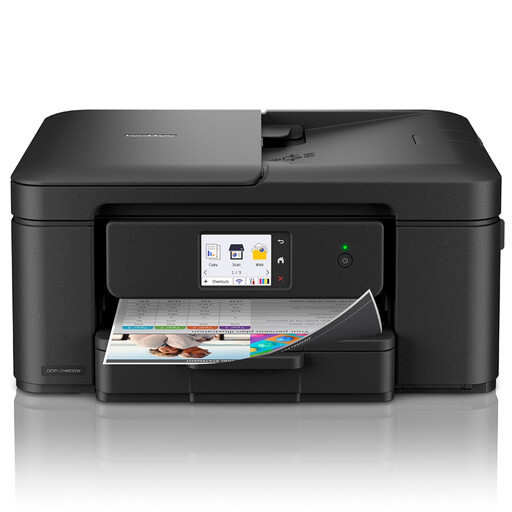
Why It Stands Out: The DCP-J1460DW packs premium usability into a compact and affordable design. Its large 6.8cm colour touchscreen provides an intuitive, smartphone-like experience that sets it apart from button-operated rivals. Combined with fast print speeds and a full suite of productivity features, it offers excellent all-round performance.
Pros:
Who is it for? Home office professionals, students and families who need a feature-rich A4 colour printer that is easy to use and offers fast performance for everyday printing, scanning and copying tasks.

Why It Stands Out: The Canon PIXMA TS6550i combines style, simplicity and solid performance. Its sleek, compact body fits neatly into any modern home, while the clear OLED display and simple QR code setup make it exceptionally user-friendly. It's a reliable all-rounder for everyday tasks, from printing homework to scanning important documents.
Pros:
Who is it for? Individuals, students and families looking for a straightforward, reliable and compact printer for everyday document and photo printing who value ease of use and a modern aesthetic.
If you're carefully analysing long-term expenses, it's wise to consider the cost and availability of consumables. Understanding the price of replacement cartridges or ink bottles is a key part of making a cost-effective choice.
Explore our full range of printer ink to compare options and ensure you get great value from day one.
Explore Our Printer Ink Selection
A cartridge printer uses small, disposable plastic cartridges containing ink. An ink tank printer has larger, refillable reservoirs that you top up from ink bottles. While ink tank models cost more initially, their cost per page is significantly lower, making them more economical for frequent printing.
Absolutely. A wireless 3-in-1 device consolidates printing, scanning and copying into a single, space-saving unit. Wireless connectivity means you can print from laptops, tablets and smartphones anywhere in your home without being tethered by cables, offering a level of convenience that is perfect for modern households.
ADF stands for Automatic Document Feeder. It is a mechanism that automatically feeds multiple pages into the scanner or copier. This is an invaluable feature for anyone who needs to digitise or duplicate multi-page documents like contracts, reports or invoices, as it eliminates the need to place each page on the scanner glass manually.