
24/7 Customer Support

Free returns

Same-day & Next-day Delivery

Quality Guaranteed

Unlock Your Welcome Offers: FREE Delivery | Up to 80% OFF | Free 30-day JoyPlus trial
Download the APP
For many UK drivers, factory-fitted Apple CarPlay and Android Auto have become indispensable. They offer seamless access to navigation, music and messages. Yet, the reliance on a physical cable feels increasingly dated. It clutters the console, suffers from wear and tear and means you have to plug and unplug your phone for every short trip.
A wireless CarPlay adapter promises a simple, elegant solution: a small dongle that plugs into your car's USB port and lets your phone connect automatically and wirelessly. However, the market is flooded with options and choosing the wrong one can lead to more frustration than convenience. Before you buy, be aware of the common pitfalls that catch out many buyers.
convert wired CarPlay to wireless instantly is appealing, but compatibility is not always guaranteed. Some units fail to work with specific infotainment systems found in popular UK models from Volkswagen, Ford or Toyota, despite claiming universal support. This often comes down to firmware that hasn't been updated to handle the car manufacturer's specific software.carplay dongle should be designed to operate reliably in a vehicle's fluctuating environment.To ensure a smooth, reliable experience, focus on these key technical details. They are the difference between a gadget that works and one that gathers dust in your glovebox.
The stability of your connection depends entirely on the adapter's wireless hardware. Don't settle for less than these standards:
"Works with 98% of cars" is a marketing claim, not a guarantee. Before purchasing a wireless android auto adapter or CarPlay equivalent, you must verify three things:
carplay adapter for iphone, this is typically iOS 10 or newer. For Android Auto, it is usually Android 11 or newer.We've filtered through the options to find products that address the common pitfalls and meet the essential technical criteria. Here are our recommendations, matched to different driver needs.

Why This Fits Their Persona: Ideal for the driver who wants a 'set-it-and-forget-it' solution. It offers a clean, cable-free dashboard and automatically connects your phone for every journey, from the daily school run to the weekend getaway.
This ottocast wireless adapter uses 5.8GHz Wi-Fi and Bluetooth 5.2 to deliver a stable, low-lag connection, directly countering the 'Lag and Drop' trap. FOTA updates ensure it stays compatible, avoiding the 'plug and play' pitfall.
Maintains full use of original car controls (steering wheel buttons, knobs and touchscreen). It also supports both Apple CarPlay and Android Auto in one device.
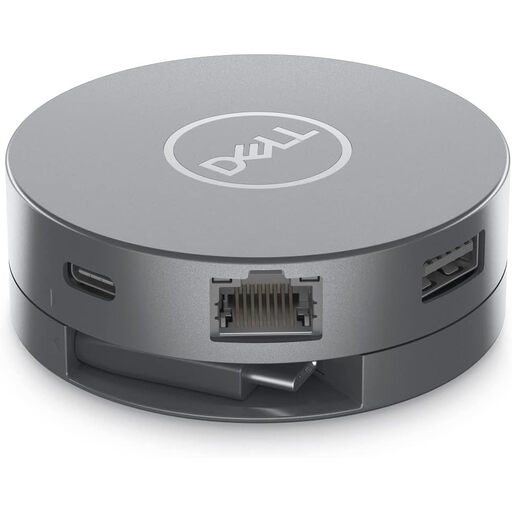
Why This Fits Their Persona: For the power user whose car is an extension of their office. If your vehicle's single USB-C port is now taken by a wireless adapter, this hub expands your connectivity to power a laptop, connect to a wired network and more.
This solves the new problem of port scarcity. It avoids the trap of cheap, unpowered hubs that can't handle multiple devices by offering robust 90W power delivery pass-through, enough for demanding laptops.
Offers a comprehensive port selection including 4K HDMI, DisplayPort, Gigabit Ethernet and high-speed USB-A/C ports in a compact, well-built unit.
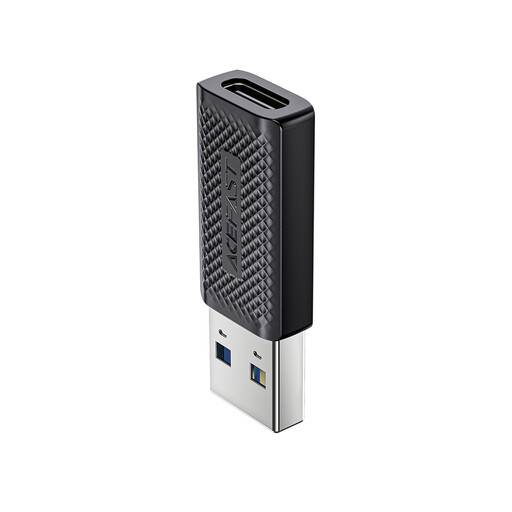
Why This Fits Their Persona: A practical, low-cost accessory for any driver. If your car has the older USB-A port but your new wireless dongle uses USB-C, this tiny adapter bridges the gap without you needing to buy a whole new device.
It prevents the simple but frustrating trap of port mismatch. Instead of discovering your new gadget won't plug in, this ensures compatibility between modern USB-C devices and the common USB-A ports in cars from 2017-2022.
Supports USB 3.0 speeds (up to 5 Gb/s), ensuring it won't be a bottleneck for data-intensive devices like wireless CarPlay adapters. It's compact and built to last.
We have compiled a complete, real-time list of products that fully satisfy these strict selection criteria and UK safety regulations.
A quality adapter is designed to draw very little power. When you turn off your car's ignition, the power to the USB port is typically cut and the adapter shuts down. Therefore, it should not have any noticeable effect on your car's battery when the vehicle is off.
Most modern adapters with FOTA (Firmware-Over-The-Air) capabilities have a simple update process. You typically connect your phone to the adapter's Wi-Fi network, open a web browser and navigate to a specific IP address (e.g., 192.168.50.2), which is provided in the user manual. From there, you can check for and install any available updates.
With a high-quality adapter that uses 5.8GHz Wi-Fi, the latency is minimal and often imperceptible for most tasks like music control and navigation. While a wired connection will always be technically faster, a good wireless unit provides an experience that is more than responsive enough for daily driving, with the huge benefit of added convenience.