
24/7 Customer Support

Free returns

Same-day & Next-day Delivery

Quality Guaranteed

Unlock Your Welcome Offers: FREE Delivery | Up to 80% OFF | Free 30-day JoyPlus trial
Download the APP
As a Joybuy Product Recommendation Officer, I often see drivers in the UK looking to modernise their in-car experience. If your car has a factory-fitted wired Apple CarPlay or Android Auto system, you already know how useful it is. But you also know the daily frustration of fumbling with cables just to get your navigation and music running. The promise of a wireless CarPlay adapter is simple: get in, start your car, and connect automatically.
However, the market is flooded with options, and it's easy to make a purchase you'll regret. Many drivers end up with a device that introduces more problems than it solves. Before you buy, let's look at the common pitfalls that lead to wasted money and a frustrating driving experience.
carplay dongle might connect, but then you notice a two-second delay when you skip a song, or your navigation instructions are consistently late. In dense urban areas or on the motorway, these devices can disconnect entirely, leaving you without guidance at a critical moment.To convert wired CarPlay to wireless successfully, you need to look beyond the marketing hype and focus on a few key technical specifications. These are the non-negotiable factors that separate a reliable device from a piece of e-waste.
The entire wireless experience depends on the quality of the connection between the adapter and your phone. This is handled by Wi-Fi and Bluetooth working together.
This is the most critical check. A wireless android auto adapter or CarPlay equivalent is not a universal accessory. Before adding one to your basket, confirm the following:
Technology evolves, and so do car and phone operating systems. A good adapter should be supported with firmware updates to maintain compatibility and fix bugs. Look for mentions of FOTA (Firmware-Over-The-Air) updates, which allow the device to be updated easily without needing to connect it to a computer. This is a strong indicator of a manufacturer's long-term commitment to the product.
Instead of a one-size-fits-all approach, we've matched some of our top-rated automotive accessories to the UK drivers who would benefit from them most.

Why This Fits Their Persona: For the driver whose daily routine involves commuting, school runs or client visits, convenience is paramount. This user wants to get in the car and have their navigation, podcasts and calls ready to go instantly, without the fuss of plugging in a cable. This adapter makes the car's infotainment system a seamless extension of their smartphone.
It directly counters the lag and disconnection trap by using a stable 5.8GHz Wi-Fi connection. It also avoids the compatibility myth with a clear disclaimer for factory-wired systems and FOTA updates for future-proofing.
Features both wireless CarPlay and Android Auto in one unit. It maintains full use of the car's original controls, including steering wheel buttons, touchscreens and rotary knobs.
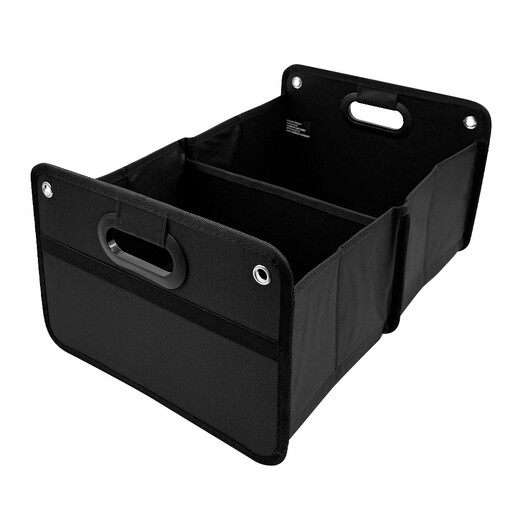
Why This Fits Their Persona: This user's car is the command centre for family life. From weekend sports to holiday road trips, their boot is often filled with gear, groceries and kids' essentials. They need a practical solution to prevent items from rolling around and to keep the car tidy and organised for every journey.
Unlike flimsy, cheap organisers that collapse under weight, this model avoids that pitfall with its durable Oxford fabric construction and internal cardstock reinforcement, ensuring it holds its shape and lasts.
Features a large capacity with multiple compartments for easy organisation. The entire unit is foldable, allowing for compact, space-saving storage when the boot needs to be cleared.
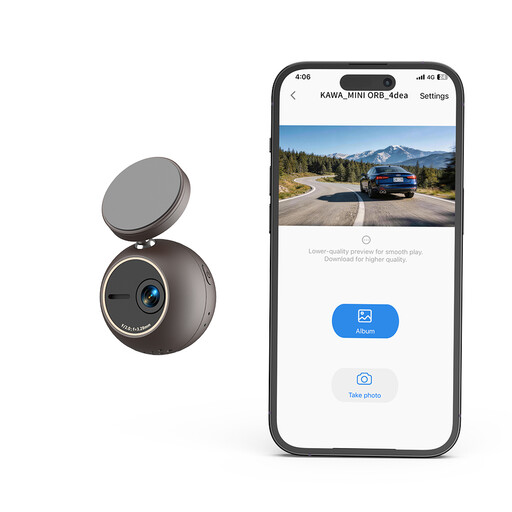
Why This Fits Their Persona: This driver values security and evidence. They want a reliable, high-quality recording of their journeys for peace of mind against incidents, insurance claims and parking mishaps. They appreciate modern features like voice control and app connectivity for easy footage management.
It avoids the trap of low-resolution dash cams that produce unusable, blurry footage. With a crisp 2K resolution and a dedicated "NightEagle Engine" for low-light conditions, it ensures number plates and details are captured clearly.
Features hands-free voice control for safe operation while driving. The built-in G-sensor automatically locks footage upon impact, and the 24-hour parking monitor provides protection when the vehicle is unattended.
We have compiled a complete, real-time list of products that fully satisfy these strict selection criteria and UK safety regulations.
The adapter is powered by your car's USB port. In most modern vehicles, this port loses power shortly after the ignition is turned off, meaning there is no risk of battery drain. If you have an older vehicle where the USB port remains constantly powered, it is good practice to unplug the adapter if the car will be left unused for several days.
With a quality plug and play carplay adapter that uses 5GHz Wi-Fi, any latency is typically imperceptible for navigation and music streaming (usually under a second). You might notice a very slight delay during phone calls or when skipping tracks. Adapters that rely solely on the older 2.4GHz Wi-Fi band are far more likely to exhibit noticeable and frustrating lag.
The lifespan of an adapter depends on its build quality and internal components. A well-made device with good heat dissipation and support for over-the-air firmware updates should provide reliable service for many years, adapting to new phone and vehicle software updates along the way.