
24/7 Customer Support

Free returns

Same-day & Next-day Delivery

Quality Guaranteed

Unlock Your Welcome Offers: FREE Delivery | Up to 80% OFF | Free 30-day JoyPlus trial
Download the APP
Getting into your car, fumbling for a cable and plugging in your phone just to get directions on screen—it’s a routine many of us know too well. While Apple CarPlay and Android Auto have revolutionised in-car infotainment, the reliance on a physical wire can feel dated. A tangled cable cluttering your console is not only untidy but can also be a distraction.
Fortunately, upgrading to a seamless, automatic and wireless connection is easier and more affordable than you might think. Whether your car is a few years old or a classic without a modern screen, there is a solution available. This guide will walk you through the different types of wireless adapters and displays, helping you choose the right one to modernise your driving experience.
Before you buy, it’s important to understand what you need. The market offers everything from simple dongles to all-in-one entertainment systems. Here are a few key points to consider.
First, what does your car already have?
This is the most crucial step. For adapters that convert a wired system, you must confirm your vehicle has factory-installed wired CarPlay or Android Auto. These devices are generally not compatible with aftermarket head units or certain manufacturer systems, such as those in BMW or Tesla vehicles which often use proprietary wireless protocols. Also, ensure your smartphone meets the minimum operating system requirements, which is typically iOS 10+ for iPhones and Android 11+ for Android devices.
Do you want more than just wireless navigation and music? Advanced devices like a CarPlay AI box can transform your car's screen into a fully functional Android tablet. This allows you to install apps from the Google Play Store, making it a popular choice for those wanting a CarPlay Netflix adapter to stream videos when parked. Some models, like the Ottocast P3, even include an HDMI output for rear-seat screens.
Here are our recommendations for upgrading your in-car experience, selected to cover a range of needs and vehicle types.

Why It Stands Out: This is an all-in-one solution that brings any car into the modern era. It combines a large, high-resolution touchscreen for wireless CarPlay and Android Auto with a fully integrated 4K front dash cam and a 1080p rear camera.
Pros:
Who is it for?: Drivers with older vehicles that lack a built-in infotainment screen. It’s ideal for anyone wanting to add modern navigation, hands-free calling and the security of a dash cam without modifying their car.
View the ESSGOO 10.26" Screen on Joybuy
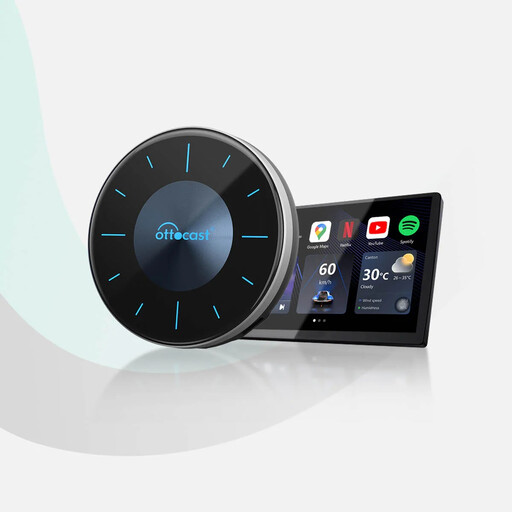
Why It Stands Out: The OTTOCAST P3 is more than just an adapter; it's a powerful computer for your car. It runs on Android 12 and allows you to download and run apps like YouTube, Netflix and Disney+ directly on your vehicle's factory screen.
Pros:
Who is it for?: Vehicle owners who already have factory-wired CarPlay and want to unlock the full potential of their screen for entertainment and productivity. It's perfect for families on long trips or anyone who spends a lot of time waiting in their car.
Explore the OTTOCAST P3 AI Box on Joybuy

Why It Stands Out: This device focuses on doing one thing exceptionally well: providing a stable, fast and seamless wireless connection for both CarPlay and Android Auto. Its compact design and straightforward setup make it an effortless upgrade.
Pros:
Who is it for?: Anyone with a car that has factory-wired CarPlay or Android Auto who simply wants to get rid of the cable. If you are happy with your current system and just want the convenience of wireless, this is the ideal choice.
Check out the OTTOCAST Mini Adapter on Joybuy
These three products represent some of the most popular solutions for different needs, but the technology is always evolving. If you're looking for a different model or feature set, there are many other excellent devices available.
Browse our full collection of Android Auto and CarPlay adapters to find the perfect fit for your vehicle.
The easiest method is to use a plug-and-play wireless CarPlay dongle. These compact devices plug into the same USB port you use for your wired connection. After a one-time pairing with your phone via Bluetooth, the adapter uses Wi-Fi to establish a wireless link to your car's infotainment system automatically every time you start the engine.
Standard Apple CarPlay and Android Auto systems block video streaming apps for safety reasons. To enable this, you need a CarPlay AI box. These devices run a full version of the Android OS, giving you access to the Google Play Store. You can then download and use apps like Netflix and YouTube, though this should only be done when the vehicle is safely parked.
Yes, modern adapters have become very reliable. High-quality models that use 5GHz Wi-Fi offer a fast and stable connection with minimal lag, making the experience feel almost identical to a wired one. They are designed to reconnect automatically and maintain full integration with your car's existing controls, providing a convenient and dependable upgrade.