
24/7 Customer Support

Free returns

Same-day & Next-day Delivery

Quality Guaranteed

Unlock Your Welcome Offers: FREE Delivery | Up to 80% OFF | Free 30-day JoyPlus trial
Download the APP
As a Joybuy Product Recommendation Officer, my role is to help you navigate the crowded market of car accessories. Many modern vehicles in the UK come with the convenience of factory-fitted Apple CarPlay or Android Auto, but they often require a physical cable connection. This tether can lead to a cluttered console and the daily hassle of plugging and unplugging your phone.
A wireless CarPlay adapter promises a simple, elegant solution: a small dongle that lets you convert wired CarPlay to wireless. However, not all adapters are created equal. Many UK drivers find themselves disappointed with devices that fail to deliver on their promises. Before you buy, let's look at the common pitfalls to avoid.
To ensure you get a reliable device, focus on these key technical specifications. They are the difference between a smooth, cable-free drive and a source of daily frustration.
Connectivity: Dual-Band Wi-Fi is Non-Negotiable A quality adapter must support both 2.4GHz and 5.8GHz Wi-Fi. The 5.8GHz band is crucial as it's less congested and offers much higher bandwidth. This translates directly to a more stable connection with minimal latency, ensuring your music doesn't skip and your map updates in real-time. Also, look for Bluetooth 5.0 or higher, which ensures a fast and reliable initial handshake when you get in the car.
Processor and Firmware: The Brains of the Operation The performance of a CarPlay dongle depends on its internal processor and software. Look for devices that run on a stable, lightweight operating system (often Linux-based) rather than a clunky, modified version of Android. Crucially, check if the manufacturer offers FOTA (Firmware-Over-The-Air) updates. This allows the device to receive bug fixes and compatibility improvements directly, ensuring it continues to work smoothly with future phone and car software updates.
Verified Vehicle Compatibility: Do not rely on vague claims. Before purchasing, verify that the adapter explicitly lists your car's make, model, year and infotainment system name (e.g., Mercedes MBUX, Audi MMI, Ford SYNC 4). Reputable listings will clearly state which models are supported and, just as importantly, which are not (e.g., most adapters are incompatible with BMW, Tesla and aftermarket head units).
Based on these practical criteria, we've matched a few items from our catalogue to different UK driver profiles.

Why This Fits Their Persona: This is for the typical UK driver with a compatible post-2016 car who wants a single, reliable device for a household with both iPhone and Android users. It’s a set-and-forget solution for daily commutes and weekend trips.
It directly counters the lag pitfall by using 5.8GHz Wi-Fi and Bluetooth 5.2. It also addresses the compatibility gamble with a clear list of supported systems and FOTA updates for future-proofing.
Offers 2-in-1 support for both wireless CarPlay and wireless Android Auto adapter functionality. The compact design and included USB-C adapter ensure it fits neatly in any car.
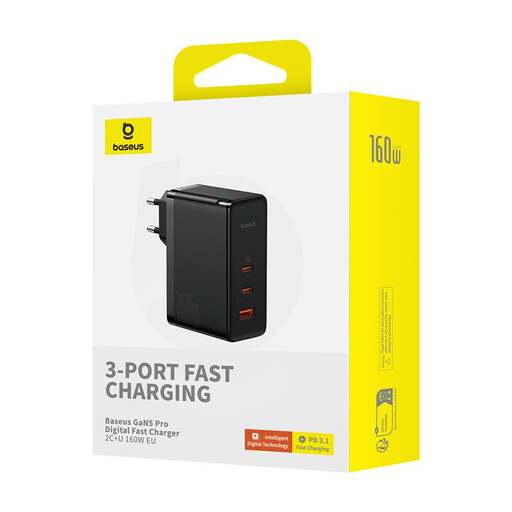
Why This Fits Their Persona: For the road warrior who carries a laptop, work phone and personal devices. This charger complements a wireless setup by providing serious power from the 12V socket, keeping all gadgets topped up between meetings.
It avoids the "slow charging" trap. While your phone is wirelessly connected to CarPlay and using battery-intensive apps like Waze, this ensures it receives power faster than it consumes it, preventing a dead battery on arrival.
A massive 160W total output can fast-charge a laptop and a phone simultaneously. The digital display provides real-time information on power delivery, and its multi-port design adds versatility.
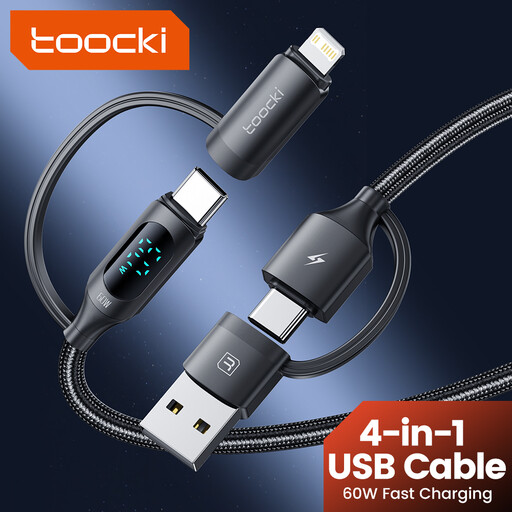
Why This Fits Their Persona: Perfect for the driver who has gone wireless but needs a tidy solution for passengers. This single cable can charge an iPad for the kids in the back, a partner's Android phone and other devices without creating a tangled mess.
It solves the "cable chaos" trap. While the driver enjoys a wireless connection, this accessory prevents the car from filling up with multiple messy wires for everyone else. It keeps the cabin organised and functional.
Its 4-in-1 design combines USB-A, USB-C and Lightning connectors into one durable, braided cable. This versatility makes it an essential item for any family car, simplifying the charging setup for all passengers.
We have compiled a complete, real-time list of products that fully satisfy these strict selection criteria and UK safety regulations.
No, a properly designed adapter is powered by your car's USB port and is engineered to power down when you turn off the ignition. The power draw is minimal and equivalent to slowly charging your phone, so it will not drain a healthy car battery when the vehicle is off.
With a modern adapter that utilises 5.8GHz Wi-Fi, any audio or screen latency is typically under a second and is imperceptible during normal use for navigation and music playback. Models that only use the 2.4GHz band may exhibit a more noticeable delay, which is why checking for dual-band support is important.
The lifespan of a good quality adapter should be several years. Longevity is primarily determined by the quality of its internal components and, most importantly, the manufacturer's commitment to providing FOTA (firmware) updates. These updates ensure ongoing compatibility with new smartphones and vehicle software, preventing the device from becoming obsolete.