
24/7 Customer Support

Free returns

Same-day & Next-day Delivery

Quality Guaranteed

Unlock Your Welcome Offers: FREE Delivery | Up to 80% OFF | Free 30-day JoyPlus trial
Download the APP
As a Joybuy Product Recommendation Officer, my role is to help you navigate the crowded market of car accessories. In-car systems like Apple CarPlay and Android Auto have transformed our drives, but the reliance on a physical cable can feel like a step back. It clutters the console, suffers from wear and tear and means you have to plug in your phone for every single trip.
A wireless CarPlay adapter promises a simple, elegant solution: a small dongle that plugs into your car's USB port and allows your phone to connect automatically and wirelessly. However, the market is filled with options that over-promise and under-deliver. Before you buy, be aware of these common pitfalls that can lead to frustration and wasted money.
To ensure a smooth, cable-free experience, focus on these three non-negotiable specifications. They are the difference between a seamless upgrade and a daily source of irritation.
This is the most critical checkpoint. The adapter you choose must be explicitly stated to work with your car's make, model, year and infotainment system. High-quality adapters are designed specifically to convert wired CarPlay to wireless on factory-fitted systems. If your car has an aftermarket stereo, you will need to check for compatibility with that specific head unit brand (e.g., Pioneer, Kenwood and Sony). Always check the product's compatibility list before purchasing.
The performance of your wireless connection depends entirely on the technology inside the dongle.
To ensure your adapter keeps working flawlessly after future smartphone software updates, it must support FOTA updates. This feature allows the manufacturer to push new firmware to your device wirelessly. This is a key indicator of a quality product from a brand committed to long-term support, turning a simple CarPlay dongle into a future-proof investment.
We have selected a few products that address the common needs of UK drivers, from achieving a seamless wireless connection to building a complete, powerful in-car tech setup.

Why This Fits Their Persona: This user wants a true plug and play CarPlay adapter. They value simplicity and reliability for their daily commute in the UK, wanting their phone to connect automatically without ever leaving their pocket.
It features 5.8GHz Wi-Fi to prevent lag, has a wide, clearly stated compatibility list for factory systems and supports FOTA updates for long-term stability.
It’s a 2-in-1 device, supporting both wireless CarPlay and wireless Android Auto. It also retains all original car controls (touchscreen, steering wheel buttons and knobs).
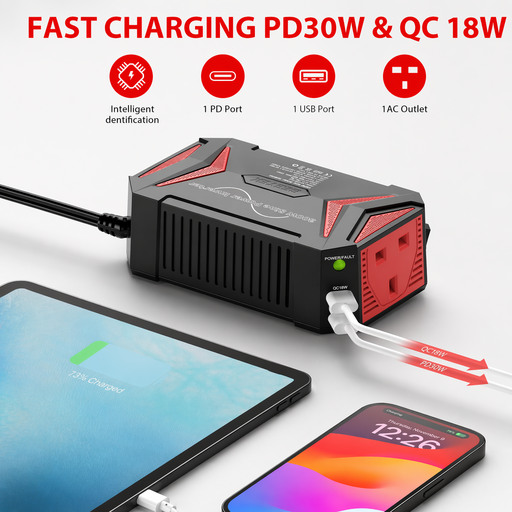
Why This Fits Their Persona: This user treats their car as a mobile office. While their wireless adapter is running, they also need to charge a laptop, camera or other power-hungry devices without relying on slow 12V ports.
It avoids the trap of underpowered car chargers by providing a stable, pure sine wave 230V AC outlet, which is safe for sensitive electronics like laptops, unlike cheaper modified sine wave inverters.
Offers a combination of a 300W AC outlet, a PD30W USB-C port and a QC3.0 USB-A port, allowing for simultaneous fast charging of multiple devices.
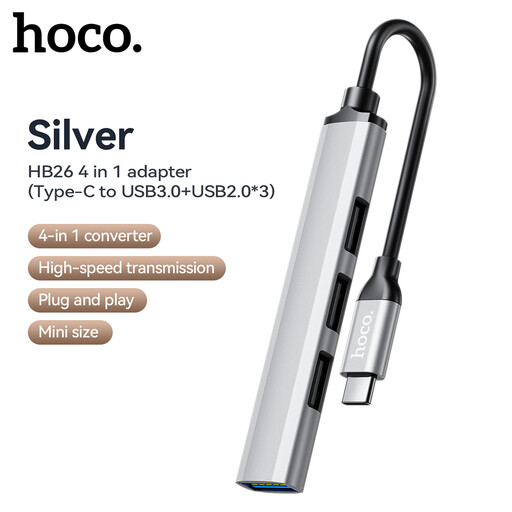
Why This Fits Their Persona: This driver has a modern car with only USB-C ports but needs to connect their wireless adapter, a dashcam and a phone charging cable simultaneously. They need to expand their connectivity without creating a mess.
It solves the "port scarcity" problem that forces users to constantly swap cables, which can damage ports and interrupt connections. It provides a stable, multi-port hub from a single car port.
It turns one USB-C port into four ports: one high-speed USB 3.0 port (ideal for the wireless adapter) and three USB 2.0 ports for charging and other lower-speed peripherals.
We have compiled a complete, real-time list of products that fully satisfy these strict selection criteria and UK safety regulations.
Generally, no. These adapters are designed to draw very little power and typically power down completely when you turn off your car's ignition. The power draw during operation is minimal and comparable to charging a phone, so it will not have a noticeable impact on a healthy car battery.
With a quality adapter that uses 5GHz Wi-Fi, any delay is usually negligible. You might notice a fraction-of-a-second delay when skipping tracks, but for core functions like navigation and phone calls, the experience is virtually seamless. Adapters that only use the 2.4GHz band are more likely to exhibit noticeable lag.
For adapters that support FOTA (Firmware-Over-The-Air), the process is straightforward. You typically connect your phone to the adapter's own Wi-Fi signal, then use your phone's web browser to navigate to a specific IP address (e.g., 192.168.50.2), which is provided in the user manual. This will open a settings page where you can check for and install any available updates.