
24/7 Customer Support

Free returns

Same-day & Next-day Delivery

Quality Guaranteed

Unlock Your Welcome Offers: FREE Delivery | Up to 80% OFF | Free 30-day JoyPlus trial
Download the APP
If you own a car from 2017 or later, you likely appreciate the convenience of Apple CarPlay or Android Auto. But the daily ritual of plugging and unplugging your phone, dealing with a tangle of cables and watching them fray over time can quickly turn a helpful feature into a minor annoyance. A wireless CarPlay adapter promises a simple, elegant solution: a clutter-free dashboard and an infotainment system that connects automatically the moment you start the engine.
However, the market is flooded with options that look similar but perform very differently. Many UK drivers find themselves with a device that constantly disconnects, introduces frustrating audio lag or simply stops working after a few months. Before you make a purchase, it is crucial to understand the common pitfalls that lead to buyer's remorse.
To sidestep these issues, focus on the technical specifications that directly impact performance and longevity. Analysing these core parameters will help you choose a device that works seamlessly from day one and continues to perform for years to come.
The single most important factor for a stable wireless experience is the wireless technology inside the adapter.
A good adapter should not only work today but also adapt to tomorrow's technology.
The connection port in your car is a final, simple checkpoint.
Instead of a generic list, we have matched our recommendations to specific driver profiles and their in-car technology needs.

Why This Fits Their Persona: This user wants the core promise of a wireless adapter delivered without fuss. They value a clean, cable-free dashboard and an automatic connection for daily commutes and family trips. This device is designed to convert wired CarPlay to wireless with minimal effort.
It uses 5.8GHz Wi-Fi for a stable connection, explicitly supports FOTA updates for future-proofing and lists compatibility with specific vehicle systems, avoiding the "universal" myth.
It's a 2-in-1 device supporting both wireless CarPlay and wireless Android Auto. It also includes a USB-A to USB-C adapter, ensuring it fits most modern cars.
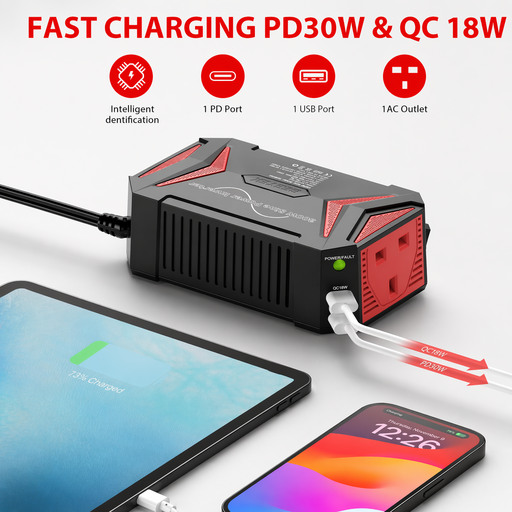
Why This Fits Their Persona: This driver needs more than just a phone connection. They might be a road warrior charging a laptop between meetings or a parent on a long journey needing to power a tablet or games console. Their car is a mobile base of operations.
It avoids the trap of underpowered, unreliable 12V chargers. The pure sine wave output provides clean, stable power, safe for sensitive electronics like laptops, unlike cheaper modified sine wave inverters.
It offers a standard 230V UK socket alongside modern fast-charging ports (PD30W USB-C and QC3.0 USB-A), providing versatile power for almost any device you might bring into the car.
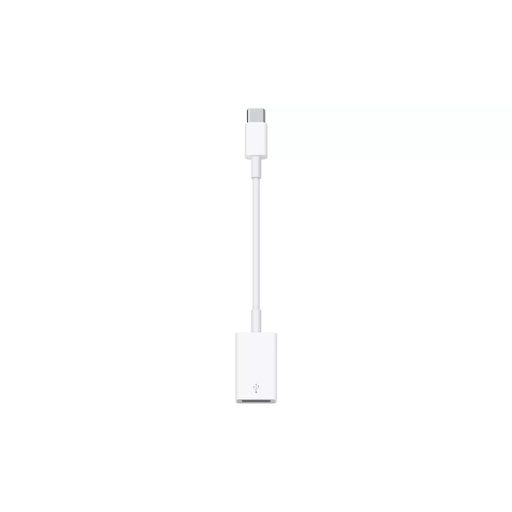
Why This Fits Their Persona: This user has a newer iPhone or Android device with a USB-C port but their car has an older USB-A port. They need a simple, reliable way to connect for wired CarPlay/Android Auto and charging, and they prioritise reliability over going wireless.
It avoids the critical failure of cheap adapters: an inability to handle data. Many third-party adapters only support charging, but this Apple-engineered adapter ensures a stable data connection, which is essential for CarPlay to function.
This is a straightforward, dependable solution for connecting modern USB-C devices to legacy USB-A ports. Its compact and durable build is designed for consistent performance.
We have compiled a complete, real-time list of products that fully satisfy these strict selection criteria and UK safety regulations.
Most quality adapters are designed to power on with the car's ignition and enter a low-power standby mode or shut down completely when the car is turned off. Their power draw during operation is minimal, similar to charging a phone. Therefore, they should not drain a healthy car battery during normal use.
With a modern adapter that uses 5GHz Wi-Fi, any lag is typically negligible for most applications. You may notice a fractional-second delay when skipping audio tracks or during phone calls, but for navigation and music streaming, the experience is generally seamless. This is a minor trade-off for the significant convenience of a wireless connection.
The physical lifespan depends on build quality, but the functional lifespan is determined by software support. A quality adapter that receives regular FOTA (Firmware-Over-The-Air) updates can last for many years, as it will remain compatible with new phone operating systems and vehicle software. This is why choosing a device from a manufacturer that provides ongoing support is a critical part of the purchasing decision.