
24/7 Customer Support

Free returns

Same-day & Next-day Delivery

Quality Guaranteed

Unlock Your Welcome Offers: FREE Delivery | Up to 80% OFF | Free 30-day JoyPlus trial
Download the APP
As a Joybuy Product Recommendation Officer, my role is to help you navigate the crowded market of car accessories. If you own a modern vehicle, you likely appreciate the convenience of Apple CarPlay or Android Auto. However, the reliance on a USB cable can quickly lead to a cluttered console and the daily hassle of plugging and unplugging your phone.
The solution seems simple: a wireless CarPlay adapter. Yet, many UK drivers find themselves disappointed with their purchase. Before you buy, let's look at the common pitfalls that lead to wasted money and frustration.
A quick search reveals dozens of seemingly identical dongles. However, subtle differences in their internal components can make or break the user experience. Here are the traps to avoid:
CarPlay dongle must be compatible with your vehicle's specific infotainment system (e.g., VW's MIB, Ford's SYNC) and your smartphone's operating system. A lack of specific compatibility information often means the device hasn't been properly validated, leading to it not working at all or failing after a phone software update.car play wireless dongle is constantly powered while your car is running. Low-quality units with poor heat dissipation can become excessively hot during long drives. This not only poses a safety concern but also drastically shortens the lifespan of the adapter, forcing you to buy a replacement within months.To convert wired CarPlay to wireless successfully, you need to look beyond the marketing and check a few key technical details. These are the non-negotiable features for a reliable, long-lasting adapter.
The stability of your wireless connection depends entirely on the hardware inside. For a seamless experience, insist on an adapter that features:
Your car's software and your phone's operating system will receive updates. Your adapter needs to keep up.
plug and play CarPlay solution should adapt over time.Do not rely on vague claims. Before purchasing, verify that the adapter explicitly lists your car's make, model, year and infotainment system. Reputable products will provide a detailed compatibility list and state exclusions clearly (e.g., "Not for BMW/Tesla systems" or "Requires factory-fitted wired CarPlay"). This applies whether you need a wireless CarPlay adapter or a wireless Android Auto adapter.
Based on these practical criteria, we've identified products that align with the needs of different UK drivers.

Why This Fits Their Persona: Ideal for the driver who wants a reliable, set-and-forget solution. It supports both Apple and Android devices, making it perfect for families who share a car but use different phones. Its automatic connection means your journey starts without fumbling for cables.
It directly counters the common pitfalls by using 5.8GHz Wi-Fi for a stable, low-lag connection and features FOTA updates to maintain compatibility. It also provides a clear, detailed list of compatible vehicle systems, avoiding the "universal" myth.
2-in-1 support for both Wireless CarPlay and Wireless Android Auto in one device. The compact design and included USB-A/USB-C adapter ensure it fits neatly in any car console.
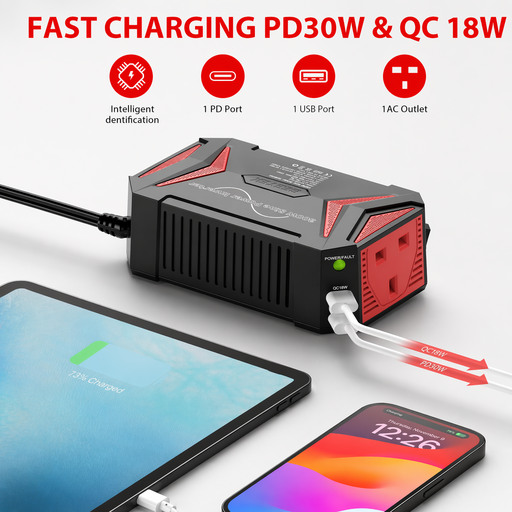
Why This Fits Their Persona: For the mobile professional, family on a road trip or campervan owner. While the wireless adapter handles infotainment, this inverter provides the power for laptops, cameras, drones or even a small cooler, turning the vehicle into a mobile hub.
It avoids the trap of relying on underpowered car USB ports. The pure sine wave output protects sensitive electronics from damage, a risk with cheaper, modified sine wave inverters. Built-in safety features prevent overloading your car's electrical system.
Provides a standard 230V AC outlet in your car, alongside modern PD 30W USB-C and QC 18W USB-A ports for fast-charging multiple devices simultaneously. The intelligent cooling fan keeps noise to a minimum.
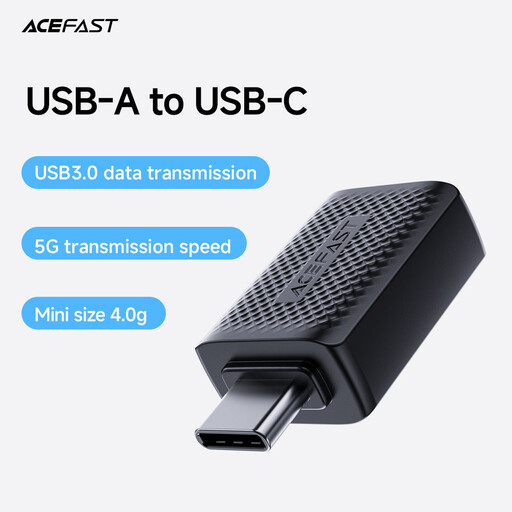
Why This Fits Their Persona: For the owner of a car from 2017-2020 with a USB-A port for CarPlay, who has purchased a modern USB-C wireless dongle. This small adapter is the essential bridge to make new technology work with the car's existing hardware.
It avoids the "wrong plug" frustration and the unreliability of cheap, uncertified adapters. Unlike basic adapters, this one supports the USB 3.0 data transfer standard, which is crucial for maintaining a stable, high-speed connection for CarPlay.
Supports data transfer speeds up to 5 Gb/s, ensuring the wireless CarPlay adapter it's connected to receives enough bandwidth. Its compact and durable TPE construction is designed for the rigours of in-car use.
We have compiled a complete, real-time list of products that fully satisfy these strict selection criteria and UK safety regulations.
Most quality adapters are designed to enter a low-power standby mode or shut down completely when your car's ignition is turned off. However, some vehicles provide constant power to their USB ports. If your car does this and you plan to leave it parked for an extended period (e.g., more than a week), it may be wise to unplug the adapter to be safe.
With a high-quality adapter that uses 5.8GHz Wi-Fi, any latency is typically minimal (measured in milliseconds) and is not noticeable during normal use for navigation or music playback. You may perceive a slight delay of 1-2 seconds when skipping tracks. Adapters that only use the crowded 2.4GHz band are far more likely to exhibit noticeable lag and connection drops.
Not necessarily. Many modern devices are 2-in-1 solutions that can handle both systems. An adapter like the OTTOCAST Mini automatically detects whether an iPhone or Android phone is connecting. This offers great flexibility for families or individuals who might switch between phone brands. Always check the product specifications to confirm it supports both platforms.