
24/7 Customer Support

Free returns

Same-day & Next-day Delivery

Quality Guaranteed

Unlock Your Welcome Offers: FREE Delivery | Up to 80% OFF | Free 30-day JoyPlus trial
Download the APP
If you own a modern car, you likely appreciate the convenience of Apple CarPlay or Android Auto. But the daily ritual of plugging in your phone can quickly turn that convenience into a chore, leaving your car's interior cluttered with cables. A wireless CarPlay adapter promises a simple solution: a small dongle that converts your car's wired system to a seamless, wireless one.
However, the market is flooded with options, and not all are created equal. Many UK drivers find themselves disappointed with devices that fail to deliver on their promises. Before you buy, it's crucial to understand the common pitfalls that lead to wasted money and frustration.
As a Joybuy Product Recommendation Officer, my role is to help you navigate these choices. Here are the three most common traps to avoid when choosing a car wireless adapter.
Many adapters claim to work with "98% of cars," but this broad statement often hides critical exceptions. A device might be incompatible with specific brands (like BMW or Tesla), certain infotainment systems (especially aftermarket head units) or even particular model years. Buying based on a generic claim without checking the specifics is a frequent cause of returns and disappointment.
There is nothing more frustrating than a map that freezes mid-turn or music that stutters and drops out. This is a common complaint with lower-quality adapters that use outdated technology. These devices often rely solely on the crowded 2.4GHz Wi-Fi band, which is susceptible to interference, leading to significant audio lag and unstable connections. The initial pairing can be clunky, and the device may fail to reconnect automatically, defeating the purpose of a 'convenience' gadget.
Technology moves fast. A new iOS or Android update can render a cheap wireless CarPlay dongle useless overnight if the manufacturer doesn't provide support. Many pocket-friendly adapters lack a crucial feature: FOTA (Firmware-Over-The-Air) updates. Without the ability to receive software patches and improvements, your adapter has a limited lifespan and no way to fix bugs or adapt to new phone operating systems.
To ensure you get a device that performs reliably, focus on these core technical parameters. They are the difference between a seamless experience and a daily headache.
The single most important factor for performance is the adapter's wireless hardware.
plug and play CarPlay experience.Before adding any adapter to your basket, you must verify its compatibility with your specific vehicle.
An adapter with FOTA (Firmware-Over-The-Air) update capability is a smart investment. This feature allows the manufacturer to send software updates directly to your device, ensuring it remains compatible with future smartphone updates, fixing any discovered bugs and even improving performance over time. It's a non-negotiable feature for long-term reliability.
Instead of a generic list, we've matched our recommendations to specific types of UK drivers. This helps you find a solution that fits your actual daily usage.

Why This Fits Their Persona: This user wants a fire-and-forget solution for their daily drive to work. They value reliability and seamless automatic connection above all else. This adapter is designed for exactly that, connecting automatically after the first setup.
It tackles the lag pitfall with 5.8GHz Wi-Fi and Bluetooth 5.2 for a stable link. It also includes FOTA updates, avoiding the obsolescence trap.
Its main benefit is the 2-in-1 functionality, supporting both Apple CarPlay and Android Auto, making it a versatile choice for any modern smartphone user.
Why This Fits Their Persona: This family shares a car and uses different phones—one iPhone, one Android. They need a single `wireless Android Auto adapter` that also works seamlessly as a `wireless CarPlay adapter` without needing to swap devices.
It avoids the trap of buying a platform-specific adapter. The 2-in-1 functionality ensures it works for both ecosystems, and its clear compatibility list helps avoid the "universal" myth by stating what it works with.
The device retains all original car controls, including steering wheel buttons, knobs and touchscreen functionality, ensuring a consistent user experience for both drivers.
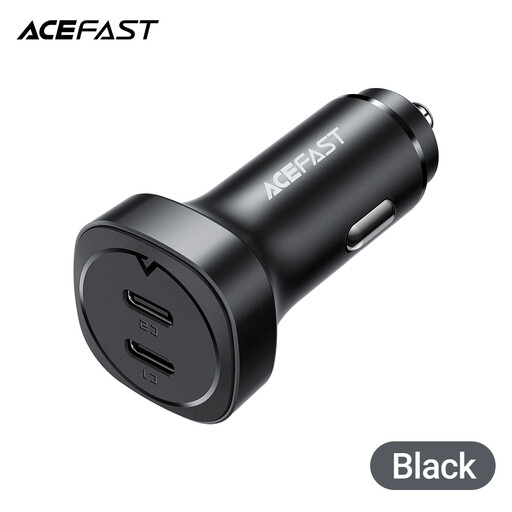
Why This Fits Their Persona: This user has already gone wireless with an adapter but now needs a powerful charging solution that doesn't re-introduce cable clutter. They need to power their phone (which drains faster on wireless CarPlay) and a passenger's device simultaneously.
It avoids the trap of slow charging. Standard car USB ports often can't keep up with the power draw of a phone running navigation and music wirelessly. This charger provides ample power to charge quickly.
With a total output of 72W across two USB-C ports, it can fast-charge two modern devices at once, making it a perfect companion for a fully wireless and powered in-car setup.
We have compiled a complete, real-time list of products that fully satisfy these strict selection criteria and UK safety regulations.
With a quality adapter that uses 5GHz Wi-Fi, any lag is typically minimal (under a second) and is not noticeable for navigation or music playback. Cheaper adapters that are limited to the 2.4GHz band may exhibit a more obvious delay of 1-3 seconds, which can be distracting when skipping tracks or during phone calls.
Most adapters are designed to power down when your car's ignition is turned off. However, this depends on whether your vehicle's USB data port continues to supply power after the engine is off. If you plan to leave your car parked for an extended period (e.g., more than a few days), it is good practice to unplug the adapter to be safe.
No. After the initial one-time setup, a good plug and play CarPlay adapter will automatically recognise and connect to your phone via Bluetooth and Wi-Fi each time you start the car. The goal is a seamless experience where your phone stays in your pocket or bag.