
24/7 Customer Support

Free returns

Same-day & Next-day Delivery

Quality Guaranteed

Unlock Your Welcome Offers: FREE Delivery | Up to 80% OFF | Free 30-day JoyPlus trial
Download the APP
Tired of fumbling with cables every time you get in the car? Whether you're looking to bring modern navigation and media into an older vehicle or simply want to free yourself from the tether of a wired connection in your new car, a wireless CarPlay adapter is a straightforward and effective upgrade.
Many UK drivers face one of two common scenarios. You might have a reliable older car, lorry or motorhome that lacks a modern infotainment screen. Or, you may have a newer vehicle with factory-fitted CarPlay or Android Auto, but find the need to constantly plug in your phone a hassle.
This guide is designed to help you navigate the options. We'll break down the key features to look for and present some of our top recommendations to help you find the right device for your specific needs, without the confusing marketing jargon.
Before you buy, it's important to understand what type of device your vehicle requires. Here are a few key points to consider.
The first step is to identify your car's current setup.
convert wired CarPlay to wireless seamlessly.add CarPlay to an older car, lorry or van that doesn't have a built-in infotainment system, you'll need a portable CarPlay screen. These are all-in-one units that mount to your dashboard or windscreen and are powered by the vehicle's 12V socket.Getting the sound from the CarPlay device to your car's speakers is crucial. Most portable screens offer several methods:
The majority of these devices are designed for easy, non-permanent installation. Look for plug and play CarPlay solutions that don't require you to modify your car's wiring. Most are powered via the standard 12V-24V cigarette lighter socket, making them compatible with everything from small cars to large lorries.
Here are a few standout options that cater to different needs and vehicle types.
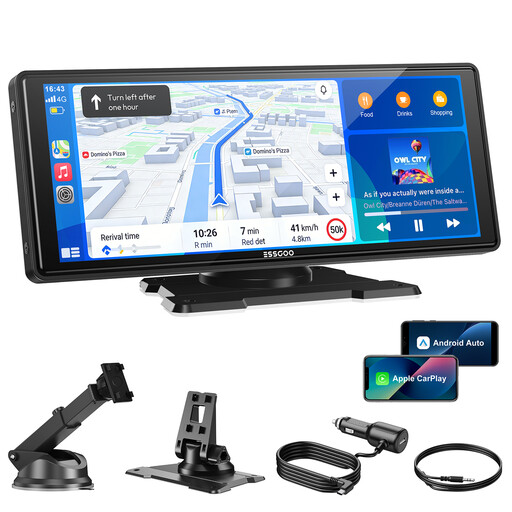
Why It Stands Out: This unit is built around a large, sharp widescreen display that provides an immersive experience for navigation and media. Its stable wireless performance makes it a strong choice for anyone wanting a premium, non-permanent upgrade.
Pros:
Who is it for? Drivers of older cars, motorhomes or commercial vehicles who want the benefit of a large, modern infotainment screen without the cost and complexity of a permanent head unit replacement.
View Details for the ESSGOO 10.26-Inch Display

Why It Stands Out: The OTTOCAST Mini is a compact and efficient solution for one specific job: making your existing wired CarPlay or Android Auto system wireless. It's a true plug-and-play device that hides away neatly and just works.
Pros:
Who is it for? Owners of modern cars (typically 2017 and newer) who are tired of plugging in their phone and want the convenience of a wireless Android Auto and CarPlay experience.
View Details for the OTTOCAST Mini Adapter
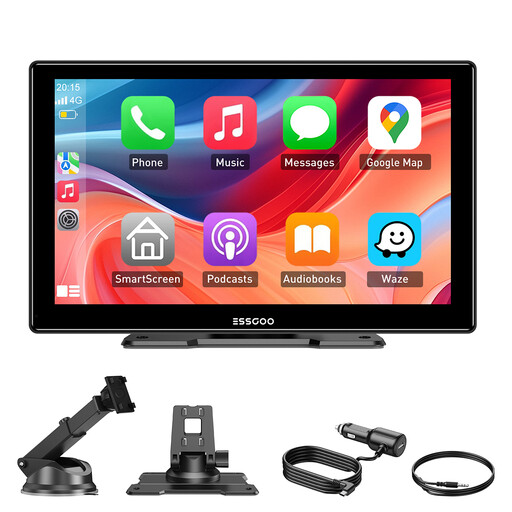
Why It Stands Out: This 9-inch screen offers a great balance of size, features and value. It provides all the core functions needed to modernise an older vehicle's cabin in a slightly more compact form factor than its larger sibling.
Pros:
wireless Android Auto via Bluetooth and Wi-Fi.Who is it for? Anyone looking for a cost-effective and highly compatible way to add smart-driving features to a vehicle without a factory screen. Its universal fit makes it a great choice for fleet vehicles, family cars or motorhomes.
View Details for the ESSGOO 9-Inch Display
While these recommendations cover the most common needs, the world of in-car technology is always expanding. If you're searching for different screen sizes, mounting options or other vehicle accessories, you may find what you're looking for in our broader collection.
Explore our full range of in-car plug-in solutions
This depends on the type of adapter. A dongle (like the OTTOCAST Mini) requires your car to already have a factory-installed, wired CarPlay or Android Auto system. A portable screen (like the ESSGOO models) is a standalone system that works in almost any vehicle with a 12V power socket. Always check the product's compatibility list before purchasing.
Most portable screens offer three main ways: a direct connection using the included AUX cable (if your car has an AUX port), broadcasting to an empty frequency on your car radio via the FM transmitter or connecting to your car's stereo via Bluetooth.
Not at all. These are designed as plug and play CarPlay systems. Installation typically involves mounting the screen on your dashboard or windscreen with the supplied bracket, plugging the power cord into your car's 12V cigarette lighter socket and pairing your smartphone via Bluetooth and Wi-Fi. No tools or wiring knowledge are required.