
24/7 Customer Support

Free returns

Same-day & Next-day Delivery

Quality Guaranteed

Unlock Your Welcome Offers: FREE Delivery | Up to 80% OFF | Free 30-day JoyPlus trial
Download the APP
If you own a modern car, you likely appreciate the convenience of Apple CarPlay or Android Auto. But for many, that convenience is still tethered to a cable. Fumbling to plug in your phone for a short trip to the shops, dealing with a tangled mess in your centre console or finding your connection drops because of a frayed wire—it all detracts from an otherwise seamless experience.
A wireless carplay adapter promises to solve this. These small dongles plug into your car's USB port and create a wireless link to your phone. However, the market is flooded with options, and it is easy to make a purchase you will regret. Before you buy, be aware of the common pitfalls that catch out many UK drivers.
carplay dongle might not power down correctly with your vehicle's ignition. This can lead to a slow, parasitic drain on your car battery, which can be a serious problem if you leave your car parked for several days.To convert wired to wireless carplay effectively, you need to look past the marketing hype and focus on the technical specifications that actually matter. Here are the non-negotiable parameters to check.
The stability of your wireless connection hinges entirely on the adapter's internal hardware. This is not an area to compromise on.
Do not rely on a generic "works with 98% of cars" claim. A reputable plug and play carplay adapter will provide specific compatibility details.
Technology evolves, and so should your adapter. Look for a device that offers Firmware-Over-The-Air (FOTA) updates. This feature allows the manufacturer to push updates directly to your device, fixing bugs, improving compatibility with new phones and car software and enhancing performance over time. An adapter without an update mechanism can quickly become obsolete.
We have analysed the market based on these critical criteria. Instead of a generic list, we have matched specific products to the drivers who will benefit most from them.

Why This Fits Their Persona: This is for the driver who wants a true "set it and forget it" solution. It is ideal for those who make frequent short trips and are tired of the constant plugging and unplugging of their phone. It offers a seamless, cable-free experience for both Apple and Android users.
It directly counters the lag pitfall by using modern 5.8GHz Wi-Fi and Bluetooth 5.2. It also avoids the compatibility myth by providing a clear list of supported vehicle systems, ensuring you can verify it before purchase.
Features a stable Linux-based OS and supports FOTA updates for long-term reliability. It is a true 2 in 1 carplay android auto solution.
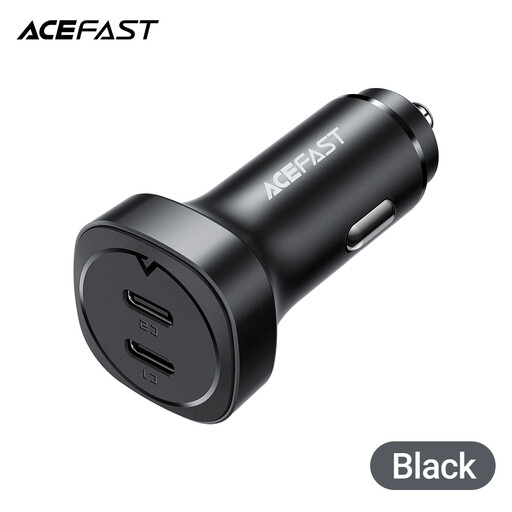
Why This Fits Their Persona: This user has gone wireless but knows that streaming maps and music drains battery. They need to keep their phone—and a passenger's device—charged at high speed on long journeys. This is an essential accessory to complement a wireless setup.
It solves the secondary problem of battery drain caused by wireless connectivity. Instead of arriving with a depleted battery, this ensures you and your passengers stay powered up, avoiding the frustration of a dead phone after a long drive.
Provides a massive 72W total output across two USB-C ports. Each port can deliver up to 36W, supporting fast charging protocols like PPS and Power Delivery for the latest smartphones and tablets.
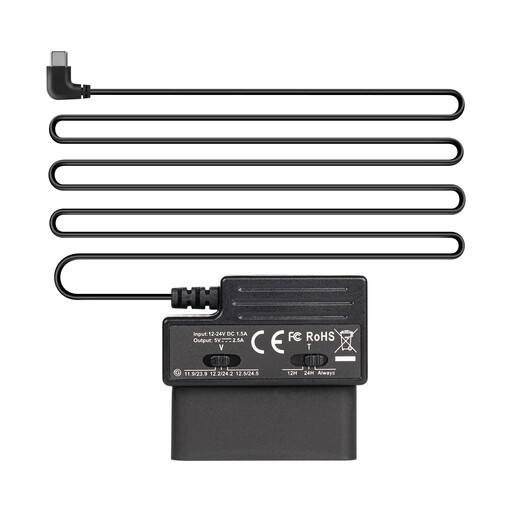
Why This Fits Their Persona: This driver is looking for a complete, clean and integrated tech overhaul. After adding a wireless adapter to declutter, they also want to hardwire a dash cam for 24/7 security without splicing into the car's electrical system.
This avoids the battery drain pitfall for a different device—the dash cam. Its built-in voltage protection prevents it from draining the car battery while enabling parking mode, a feature many drivers want but fear implementing.
Offers a simple, reversible plug-and-play installation via the car's OBD-II port. It provides continuous power for dash cam parking surveillance and automatically cuts power if the car's battery voltage drops too low.
We have compiled a complete, real-time list of products that fully satisfy these strict selection criteria and UK safety regulations.
Reputable adapters are designed to enter a low-power standby mode or shut off completely when the car's ignition is off. However, it is crucial to choose a model with good power management, as some cheaper, uncertified units can cause a parasitic drain. Always check recent user feedback regarding this specific issue for the model you are considering.
With a quality adapter using 5GHz Wi-Fi, any latency is minimal and often imperceptible for core functions like navigation and music streaming. You might notice a fractional delay when skipping audio tracks, but for general day-to-day use, the experience is very smooth. This is a significant improvement over older models that only used 2.4GHz Wi-Fi.
Yes, the adapter only handles the wireless data connection; it does not charge your phone. Because wireless CarPlay and Android Auto use both Wi-Fi and Bluetooth, they can consume more power than a wired connection (which also charges the phone). For any journey longer than a short commute, having a separate high-speed car charger is highly recommended to keep your battery topped up.