
24/7 Customer Support

Free returns

Same-day & Next-day Delivery

Quality Guaranteed

Unlock Your Welcome Offers: FREE Delivery | Up to 80% OFF | Free 30-day JoyPlus trial
Download the APP
As a Joybuy Product Recommendation Officer, my role is to help you navigate the crowded market of car accessories. Many modern vehicles from brands like Volkswagen, Ford and Toyota come with the convenience of factory-installed Apple CarPlay and Android Auto, but they often require a physical cable connection. This tethered experience can feel dated and lead to a cluttered centre console.
A wireless CarPlay adapter promises a simple solution: a small dongle that plugs into your car's USB port to convert wired CarPlay to wireless. However, not all adapters are created equal. Many UK drivers find themselves frustrated after purchasing a device that fails to deliver on its promise. Before you buy, be aware of these common purchasing traps.
To avoid these issues, focus on a few key technical specifications. These are not marketing buzzwords; they are the factors that determine whether your car play wireless experience will be seamless or frustrating.
The single most important factor for a stable connection is the Wi-Fi technology used.
An adapter is only useful if it works with your specific setup and continues to work in the future.
CarPlay dongle that supports FOTA (Firmware-Over-The-Air) updates. This allows the manufacturer to release software patches that can fix bugs, improve performance and maintain compatibility with new phone and vehicle system updates.Instead of a generic list, we have matched a few standout products to specific UK driver profiles. This helps you choose a solution that fits your actual needs and budget.

Why This Fits Their Persona: This is for the driver who wants a true "set it and forget it" solution. They want to get in their car, have CarPlay or Android Auto connect automatically and drive off without fumbling with cables. It's a straightforward upgrade for a modern driving experience.
It directly addresses the pitfalls with 5.8GHz Wi-Fi for a stable connection and supports FOTA updates, ensuring it remains compatible long after purchase. The Linux-based firmware provides a fast, reliable boot-up.
It's a 2-in-1 device, supporting both wireless Apple CarPlay and a wireless Android Auto adapter in one unit. It also maintains all original car controls (steering wheel buttons, knobs and touchscreen).
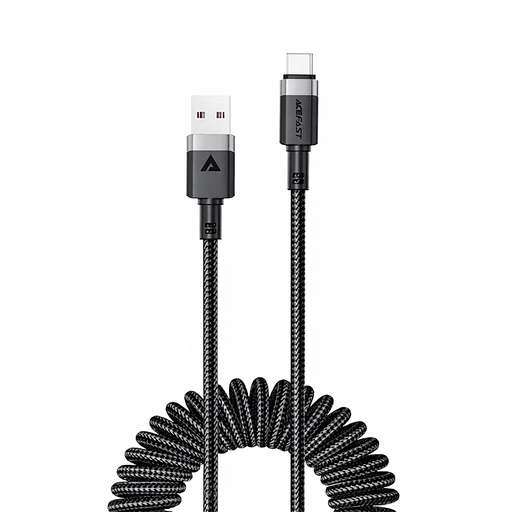
Why This Fits Their Persona: This driver knows that wireless CarPlay drains the phone battery. They need a dedicated charging cable that won't add to the clutter. This coiled cable stays compact when not in use and stretches when needed, keeping the console neat.
It avoids the trap of cheap, flimsy cables that fray and fail within months. The premium nylon jacket is wear-resistant and the coiled design prevents the tangles and mess that standard long cables create in a car.
The anti-tangle coiled form factor is specifically suited for vehicle interiors. It provides a durable and tidy solution for keeping your phone charged during long drives while using battery-intensive wireless apps.
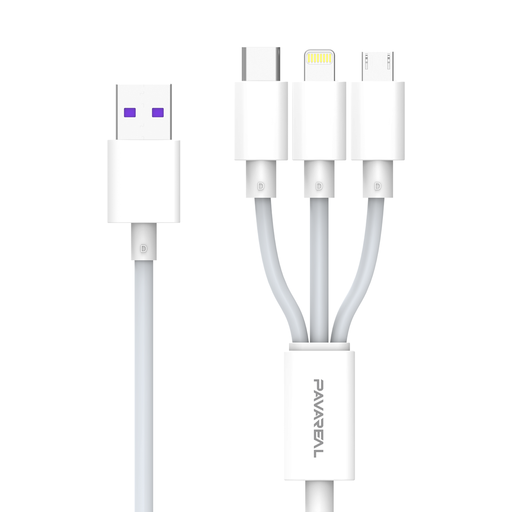
Why This Fits Their Persona: This is for the family car where one person has an iPhone, another has an Android and there's a tablet with a Micro-USB port for the kids. They need a single, robust cable to charge everything without carrying a tangled mess of different wires.
It solves the ultimate cable clutter problem by consolidating three common connector types into one. The intelligent control chip also helps manage power distribution, preventing issues that can arise from using cheap, uncertified multi-cables.
Highly versatile with integrated USB-C, Lightning and Micro-USB connectors. The durable TPE material and nylon anti-break wire core are designed for heavy use, making it a reliable choice for a busy family car.
We have compiled a complete, real-time list of products that fully satisfy these strict selection criteria and UK safety regulations.
Yes, it does. A wireless connection uses both Wi-Fi and Bluetooth to stream data, which consumes more power than a wired connection that simultaneously charges your phone. For longer journeys, it is a good idea to have a quality car charger and cable available to keep your phone's battery topped up.
The most important requirement is that your vehicle must have factory-fitted, wired Apple CarPlay or Android Auto. Aftermarket head units are typically not supported. Before purchasing, carefully review the product's compatibility list, which usually details supported brands (like VW, Audi, Ford, Toyota, Mercedes) and explicitly excluded ones (like BMW or Tesla).
No, the process is designed to be very simple. Typically, it involves three steps: