
24/7 Customer Support

Free returns

Same-day & Next-day Delivery

Quality Guaranteed

Unlock Your Welcome Offers: FREE Delivery | Up to 80% OFF | Free 30-day JoyPlus trial
Download the APP
As a Joybuy Product Recommendation Officer, my role is to help you navigate the crowded market of car accessories. Many UK drivers with modern vehicles from brands like Volkswagen, Ford and Toyota enjoy the benefits of factory-fitted Apple CarPlay and Android Auto. However, the daily routine of plugging in a cable can feel like a tether to old technology. The promise of a simple plug and play CarPlay upgrade is appealing, but the reality can often be disappointing.
This guide cuts through the clutter to focus on what truly matters. We will look at the common pitfalls that lead to buyer's remorse and break down the essential features you need to check before you buy a wireless CarPlay adapter.
Many drivers are tempted by low-priced adapters, only to find they are a source of constant frustration. Before you add any CarPlay dongle to your basket, be aware of these common issues.
To convert wired CarPlay to wireless successfully, you need to look beyond the marketing and check a few key technical specifications. These are the non-negotiables for a smooth, reliable experience.
wireless Android Auto adapter. The connection is made via the car's data-enabled car play adapter USB port, so ensure you know whether your car has a USB-A or USB-C port.Based on the criteria above, we have identified several products that cater to different user needs and priorities. Instead of a one-size-fits-all approach, we match the product to the driver.

Why This Fits Their Persona: This user wants a true 'set-it-and-forget-it' solution. They value stability and a quick, automatic connection above all, intending to keep their car's original screen and controls for a factory-finish feel.
It directly counters the 'unstable connection' pitfall by using 5.8GHz Wi-Fi and Bluetooth 5.2. It also supports FOTA updates, avoiding the 'dead-end device' problem.
Maintains full use of factory controls (steering wheel buttons, knobs and touchscreen). Its compact, discreet design keeps the cabin tidy.
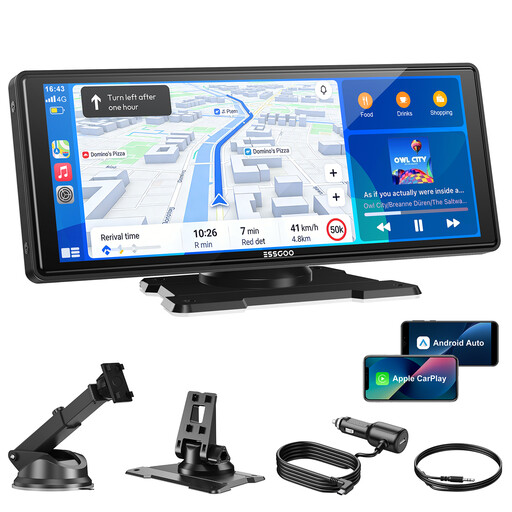
Why This Fits Their Persona: This driver may have a factory system, but finds the built-in screen too small or dated. They want a larger, more vibrant display for navigation without the cost and complexity of replacing the entire head unit.
This external screen avoids the 'compatibility nightmare' of modifying a car's electronics. It's a universal solution that uses dual-band Wi-Fi for a stable wireless connection.
Provides a large 10.26-inch HD (1600x600) screen for an immersive experience. Offers flexible audio output via FM, AUX or Bluetooth to the car's speakers.
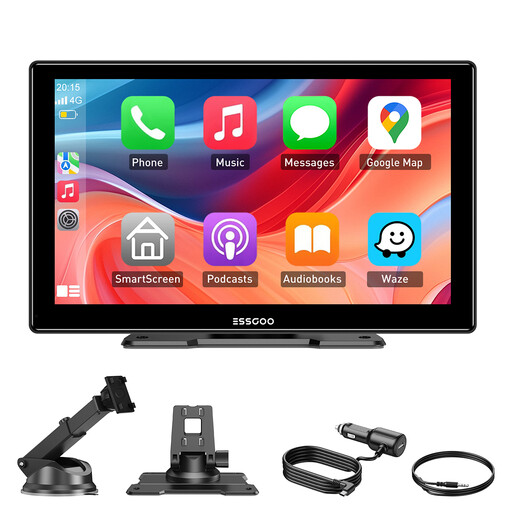
Why This Fits Their Persona: This user wants the modern convenience of a large, wireless CarPlay screen but is working with a tighter budget. A 9-inch display is more than sufficient for their navigation and media needs.
Like its larger counterpart, this is a simple plug-and-play device that avoids complex installation risks. It also features dual-band Wi-Fi, ensuring it doesn't fall into the 'unstable connection' trap.
Offers excellent value by providing a full-featured wireless screen experience at an accessible price. The 9-inch HD screen is a significant upgrade over a phone display.
We have compiled a complete, real-time list of products that fully satisfy these strict selection criteria and UK safety regulations.
Connection times can vary, but a quality adapter with a modern processor should establish a connection within 15-30 seconds of the car's ignition turning on. The speed can also be influenced by your car's specific infotainment system and your phone.
No, it should not. These adapters are powered by the car's USB port, which in most vehicles only provides power when the ignition is on or the engine is running. When the car is turned off, the adapter powers down and does not draw from the battery. The power consumption during use is minimal, similar to charging a smartphone.
Yes, periodic updates are a sign of a good product and manufacturer support. Look for models that explicitly mention Firmware-Over-The-Air (FOTA) updates. This feature allows the device to download and install software improvements wirelessly, ensuring it remains compatible with new phone operating systems and fixing any bugs that may arise.