
24/7 Customer Support

Free returns

Same-day & Next-day Delivery

Quality Guaranteed

Unlock Your Welcome Offers: FREE Delivery | Up to 80% OFF | Free 30-day JoyPlus trial
Download the APP
As a Joybuy Product Recommendation Officer, my role is to help you navigate the crowded market of in-car tech. If you're driving an older car, lorry or motorhome in the UK, you've likely considered adding a modern infotainment system. A wireless CarPlay screen seems like the perfect solution, offering navigation, music and hands-free calls without the cost and hassle of a full head unit replacement.
However, the market is flooded with options that look great online but fail to deliver in practice. Before you buy, it's crucial to understand the common pitfalls that lead to buyer's remorse.
Many drivers are disappointed by units that promise a seamless experience but end up being a source of frustration. Here are the three most common issues to watch out for:
To ensure you get a reliable and enjoyable car screen with Apple CarPlay, focus on these non-negotiable technical specifications.
A stable wireless connection is paramount. Don't just look for "Wi-Fi" and "Bluetooth" on the box; check the specifics.
A great screen is useless if the sound is poor. A quality portable Android Auto screen should offer multiple audio output options to suit your vehicle's setup.
The device must be compatible with your vehicle and stay securely in place.
lorry CarPlay screen or motorhome (24V).Based on these practical criteria, here are a couple of solutions matched to specific driver needs.
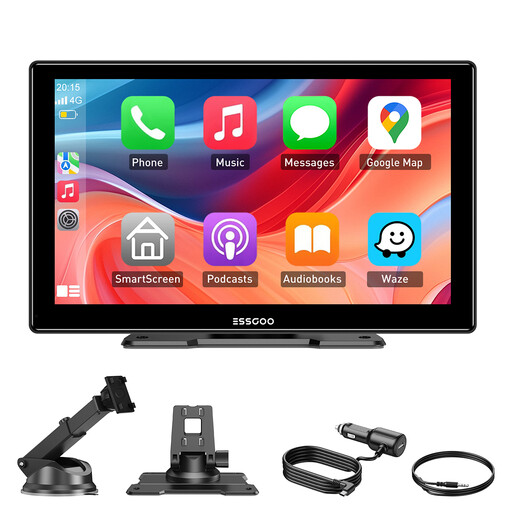
Why This Fits Their Persona: This is for the driver of an older car, van or lorry with no built-in screen. It provides a complete, modern infotainment system with a large 9 inch car display without any permanent modifications to the vehicle.
It features Dual-Band Wi-Fi to combat lag and offers four audio outputs (AUX, FM, Bluetooth and built-in speaker), directly addressing the most common performance and audio quality issues.
True plug and play CarPlay installation in minutes. The 12V-24V compatibility makes it suitable for nearly any vehicle, from a Ford Fiesta to a Scania lorry.

Why This Fits Their Persona: This is for drivers whose car already has a factory-installed screen with wired CarPlay or Android Auto. Their goal is not to add a new screen, but to eliminate the need to plug their phone in every time they get in the car.
It avoids audio and control issues by integrating directly with the car's existing system. It uses 5.8GHz Wi-Fi for a fast, stable link, ensuring the experience is as responsive as a wired connection.
It's incredibly compact and maintains all original functionality, including steering wheel controls, knobs and touchscreen operation. It's a simple, set-and-forget upgrade.
We have compiled a complete, real-time list of products that fully satisfy these strict selection criteria and UK safety regulations.
Here are answers to a few common questions about using a wireless CarPlay screen.
1. Will a portable screen drain my car battery? No. These devices are designed to be powered by your car's 12V/24V socket (the cigarette lighter), which typically only provides power when the ignition is on. The screen will turn on and off with your vehicle, so it won't drain the battery when parked.
2. How difficult is the installation? Is it truly plug and play? For the vast majority of these external screens, yes. The process involves attaching the mount to your windscreen or dashboard, plugging the power cable into the 12V socket and pairing your phone via Bluetooth. No wiring, drilling or professional assistance is required, making it an ideal plug and play CarPlay solution for CarPlay for older cars.
3. Can I use a portable Android Auto screen in a lorry or motorhome? Absolutely. This is a popular use case. The key is to check that the device supports a 12V-24V power input. This specification confirms its compatibility with the 24V electrical systems found in most lorries, HGVs and larger motorhomes, making it a versatile lorry CarPlay screen.