
24/7 Customer Support

Free returns

Same-day & Next-day Delivery

Quality Guaranteed

Unlock Your Welcome Offers: FREE Delivery | Up to 80% OFF | Free 30-day JoyPlus trial
Download the APP
Driving an older car you love doesn't mean you have to miss out on modern conveniences. If you're tired of propping your phone on the passenger seat for navigation or fumbling with cables for hands-free calls, you've likely considered an upgrade. While replacing your entire head unit can be costly and complex, a wireless CarPlay screen offers a straightforward way to bring your vehicle into the modern age.
However, the market is filled with options that look great online but fail to deliver in practice. Many UK drivers find themselves disappointed by poor performance, hidden compatibility issues or features that simply don't work as advertised. Before you make a purchase, it's crucial to understand the common pitfalls that can lead to wasted money and frustration.
To add CarPlay to any car effectively, focus on the specifications that directly impact daily use. Cutting through the marketing jargon and checking these three areas will ensure you get a device that is both functional and reliable.
The screen is your primary interface, so its quality is non-negotiable. A 9-inch car touchscreen is a popular size, offering a clear view of maps without obstructing your view of the road. Pay close attention to the resolution; a minimum of 1024x600 pixels is recommended for sharp, easy-to-read text and graphics. Also, look for manual brightness controls or an automatic day/night mode. This feature is essential for reducing glare during the day and preventing the screen from being distractingly bright during night-time driving.
True convenience comes from a plug and play CarPlay system. This means no cutting wires or dismantling your dashboard. The unit should power up via the car's 12V cigarette lighter socket and connect to your phone wirelessly via Bluetooth and Wi-Fi. For audio, look for a unit with multiple output methods to guarantee clear sound through your car's speakers:
A reliable universal CarPlay head unit should be versatile. Check that it supports a wide voltage range (e.g., 12V-24V), making it suitable not just for cars but also for lorries, vans and motorhomes. The mounting system is equally important. A strong suction cup mount with an adjustable arm provides the flexibility to position the screen on either the dashboard or windscreen securely. Finally, confirm smartphone compatibility—most modern units support iOS 12+ for CarPlay and Android 11+ for a portable Android Auto display.
We've analysed the market to find products that address the common pitfalls and meet the essential criteria for a seamless upgrade. Here are our recommendations, matched to different driver needs.
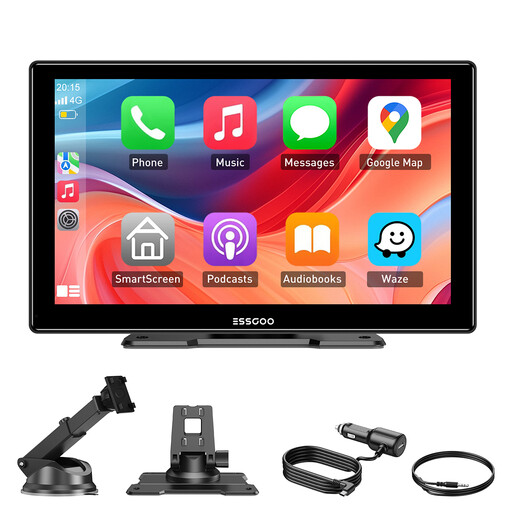
Why This Fits Their Persona: This is for the driver of an older car, lorry or motorhome who wants a complete, non-permanent infotainment upgrade without professional installation. It provides everything needed in one box to get modern navigation and media.
This is a complete screen system, not just an adapter. It solves the audio problem by offering four output options (AUX, FM, Bluetooth and built-in speaker), ensuring a reliable connection.
True plug-and-play setup takes minutes. The 12V-24V compatibility makes it suitable for a wide range of vehicles, from a Ford Fiesta to a Scania lorry.

Why This Fits Their Persona: This is for the driver whose car already has a built-in screen with wired CarPlay or Android Auto, but who is tired of plugging their phone in for every trip. They want a simple, cable-free experience.
This product is specifically for its intended purpose: converting a wired system to wireless. It avoids the trap of being mis-sold as a complete screen solution.
It maintains all original car controls (steering wheel buttons, knobs and touchscreen). The 5.8GHz Wi-Fi connection ensures a stable, low-latency link for smooth performance.
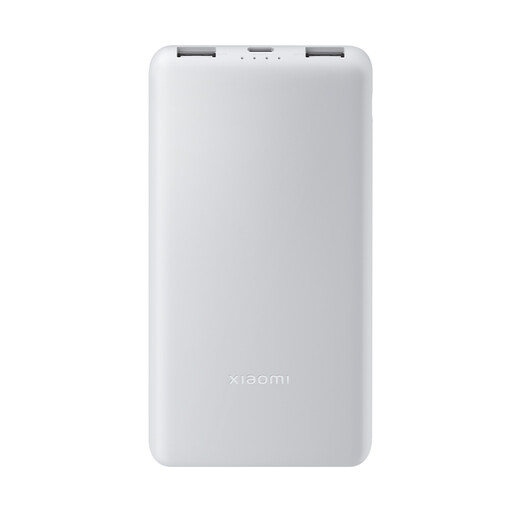
Why This Fits Their Persona: For the driver who uses multiple devices on the go. A portable screen and a smartphone can tax an older car's single 12V socket. This power bank ensures your phone stays charged without interfering with the screen's power supply.
It prevents the issue of underpowered 12V adapters struggling to charge a phone and power a screen simultaneously, which can cause instability and reboots for the CarPlay unit.
The 22.5W fast charging output quickly tops up modern smartphones. Its compact, airline-approved design makes it a versatile accessory both in and out of the car.
We have compiled a complete, real-time list of products that fully satisfy these strict selection criteria and UK safety regulations.
Installation is designed to be very simple and requires no technical skill. Typically, you will:
You have several options. The most reliable is using the included AUX cable to connect the screen's audio-out port to your car's AUX-in port. Alternatively, you can use the built-in FM transmitter by tuning both the screen and your car radio to the same empty FM frequency. Some units also support a direct Bluetooth connection to your car's stereo system.
Yes, provided the unit supports a 12V-24V power input. Most lorries and larger vehicles use a 24V system, so it's essential to check this specification. Products like the ESSGOO screen are explicitly designed for this wide voltage range, making them compatible with nearly all vehicle types.