
24/7 Customer Support

Free returns

Same-day & Next-day Delivery

Quality Guaranteed

Unlock Your Welcome Offers: FREE Delivery | Up to 80% OFF | Free 30-day JoyPlus trial
Download the APP
Driving an older car doesn't mean you have to miss out on modern conveniences like seamless navigation and hands-free communication. A wireless carplay screen with dash cam offers a brilliant, non-permanent upgrade. However, the market is flooded with options, and it's easy to fall for marketing hype that leads to a frustrating experience.
As a Joybuy Product Recommendation Officer, my role is to help you see past the flashy adverts and focus on what truly matters. Many drivers invest in these all-in-one units only to be disappointed. Let's look at the common pitfalls to avoid so you can make a smart purchase.
To get a reliable universal car infotainment upgrade, you need to look past the marketing and check a few key specifications. These are the non-negotiable features that determine whether a device will be a helpful co-pilot or a dashboard distraction.
It is crucial to check the specifications for both the display and the camera separately.
10-inch carplay screen, look for a resolution of at least 1600 x 600 pixels. This ensures that maps, text and app interfaces are sharp and easy to read at a glance. A lower resolution on a large screen will look blurry.car stereo with backup camera function, to provide a clear view when reversing.A stable wireless connection is the foundation of any good portable android auto display.
A plug and play carplay unit should be dependable from the moment you install it.
Based on these practical criteria, here are a couple of units that match different driver needs and successfully avoid the common pitfalls.
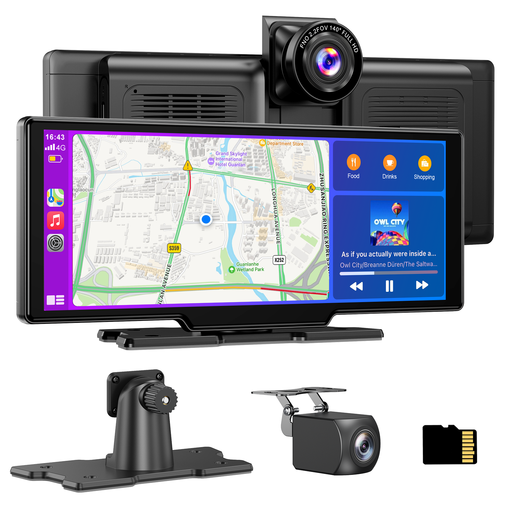
Why This Fits Their Persona: This is for the driver who wants a single, comprehensive solution. It provides a large screen for navigation, wireless media playback and the security of front and rear cameras without any permanent modifications to their vehicle.
It clearly specifies a high 1600x600 screen resolution for the display and a separate 4K sensor for the front camera, avoiding the resolution illusion. It also offers AUX and Bluetooth audio outputs to bypass laggy FM transmitters.
A true all-in-one package. It includes a 1080p rear camera and a 64GB TF card in the box, so you have everything needed for a full setup right away.
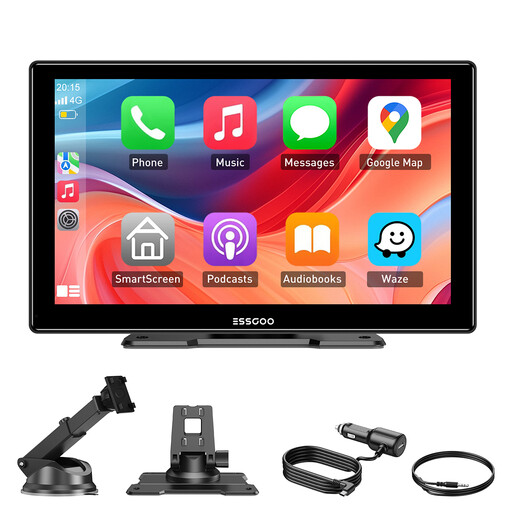
Why This Fits Their Persona: Ideal for the budget-conscious driver whose main priority is getting a large, reliable screen for navigation and media. It provides the core smart-driving experience without the added cost of an integrated dash cam system.
This unit focuses on doing one job well. It provides a solid HD touchscreen (1024x600) and a full suite of audio outputs, including AUX and Bluetooth 5.3, ensuring a stable connection and clear sound for navigation and calls.
It offers an affordable entry point for a `car screen with apple carplay`. The 12-24V compatibility and robust suction mount make it a reliable choice for a wide range of vehicles, from cars to lorries.
We have compiled a complete, real-time list of products that fully satisfy these strict selection criteria and UK safety regulations.
These devices are designed to be powered by your vehicle's 12V cigarette lighter socket. In most cars, this socket is only active when the ignition is on or the engine is running, so there is no risk of draining the battery when the car is parked. Some models with a 24-hour parking monitor feature may require a separate hardwire kit, which connects directly to the car's fuse box. If you choose this option, it's advisable to have it installed by a professional to ensure it has a low-voltage cut-off to protect your battery.
Yes, it is legal to use a dashboard screen in the UK, but with important conditions. According to the Highway Code, a screen must be positioned so that it does not obstruct the driver's view of the road and traffic ahead. It must be mounted securely and should not be placed in an airbag deployment zone. It is illegal to watch television or videos on the screen while driving. Using it for 4K dash cam with navigation or controlling music is permitted.
Absolutely. Many modern portable screens are designed with commercial drivers in mind. The key feature to look for is a wide voltage input range, specifically 12V-24V. This ensures the unit is compatible with the 24V electrical systems found in most lorries, vans and motorhomes, as well as standard 12V systems in cars. Always check the product specifications for this detail.