
24/7 Customer Support

Free returns

Same-day & Next-day Delivery

Quality Guaranteed

Unlock Your Welcome Offers: FREE Delivery | Up to 80% OFF | Free 30-day JoyPlus trial
Download the APP
A multi-device wireless charging station can replace several loose cables on a desk or bedside table. However, product listings often make similar-looking promises while hiding important differences in compatibility, power delivery and included accessories.
For UK shoppers, the right choice depends on the devices you own, where you plan to use the charger and whether you need wireless convenience or higher-powered wired charging. This guide highlights the common buying traps, explains the specifications that matter and matches practical options to different user profiles.
A 3-in-1 wireless charger usually refers to charging a phone, wireless earbuds and a smartwatch. That does not automatically mean every model supports every smartwatch.
Apple Watch charging may require a dedicated magnetic charging module, while some stations provide a USB port instead. Android users should also check whether their watch uses Qi charging or a manufacturer-specific system. Before ordering, confirm the exact watch series and whether the required cable or charging puck is included.
A product may list 15W, 20W or more, but the actual speed depends on the phone, charging protocol, alignment and power adaptor. A Qi2 wireless charger can offer magnetic alignment for compatible phones, while older Qi devices may charge at a lower rate.
A MagSafe charging station is primarily designed around compatible Apple devices and accessories. Android phones may need a compatible magnetic case or ring. In addition, several charging stations require a separate USB-C PD or QC power adaptor. If the adaptor is underpowered, the station may not deliver its listed output across multiple devices.
A compact charging station is only useful if your devices sit securely on it. A narrow phone ledge may not accommodate a thick case, while a flat pad can make it difficult to see notifications during the day.
For a bedside charging station, check whether indicator lights can be dimmed and whether the base is stable. For a desk charging station, consider viewing angle, cable routing and whether the footprint leaves room for a keyboard, notebook or monitor stand.
Look for the stated charging standard rather than relying on general phrases such as “universal”. Qi supports many wireless charging phones and earbuds, while Qi2 adds a magnetic alignment system for compatible devices. Magnetic alignment does not by itself guarantee full Qi2 performance.
For iPhone owners, check compatibility with your specific generation and case. A non-magnetic or thick case can prevent proper alignment. For older phones, some products include a magnetic ring, such as the Cygnett ChargeBase Qi2.0, but the ring may change how the phone case feels and functions.
Review both the maximum total output and the output allocated to each charging position. For example, a station may provide 15W to a phone and 5W to earbuds, while a smartwatch position may be limited to 2.5W or 3W.
If you also need to charge a tablet or laptop, consider a multi-port GaN charger instead of relying solely on wireless charging. A USB-C fast charger can provide considerably more power for larger devices, although output may be shared when several ports are occupied.
Choose a charger with clear input requirements, protection features and instructions. The LDNIO 5-in-1 model lists over-current, over-voltage, short-circuit and temperature protection. These features do not remove the need for correct setup: use a suitable adaptor, keep the station dry and avoid placing metal objects on wireless charging areas.
Materials such as ABS, PC, aluminium alloy or anodised aluminium can affect weight and finish, but they are not a substitute for correct compatibility. A weighted, non-slip base is particularly useful on smooth UK desks and bedside tables.
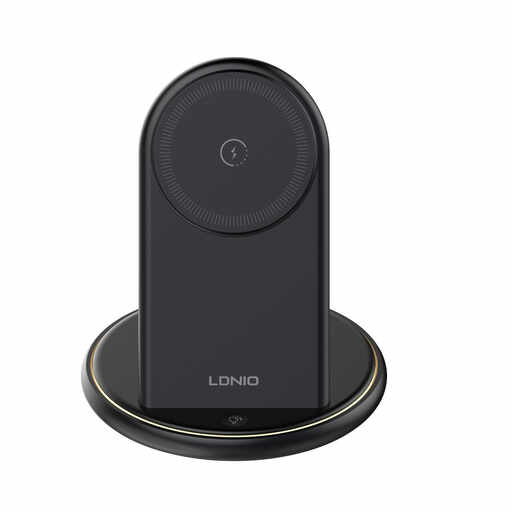
Why This Fits Their Persona: A practical starting point for students or home-office users who need to charge several everyday devices from one upright stand.
Its five-device layout makes the number of charging positions clear, while the stated protection features provide useful information beyond a headline wattage.
Charges up to three devices wirelessly and two through USB-A; upright phone positioning suits video calls and bedside viewing.
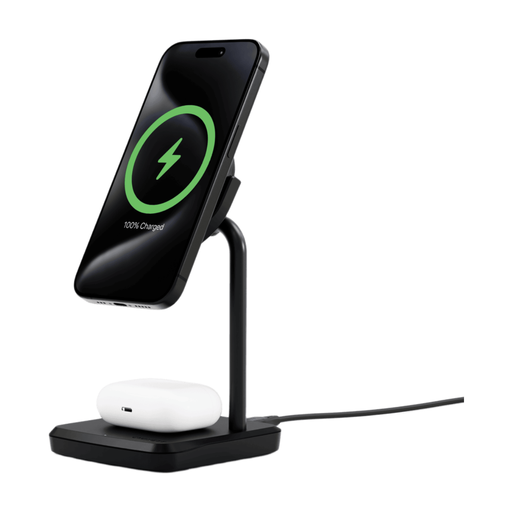
Why This Fits Their Persona: Suitable for a tidy desk or bedside table where magnetic phone alignment, a metal finish and adjustable viewing are priorities.
The listing specifies 15W and 5W wireless outputs, a 30W input requirement and an 80° swivel head, making the setup expectations easier to assess.
Charges a phone and earbuds together; includes a 1.2m USB-C cable, MagRing and a stated two-year warranty.
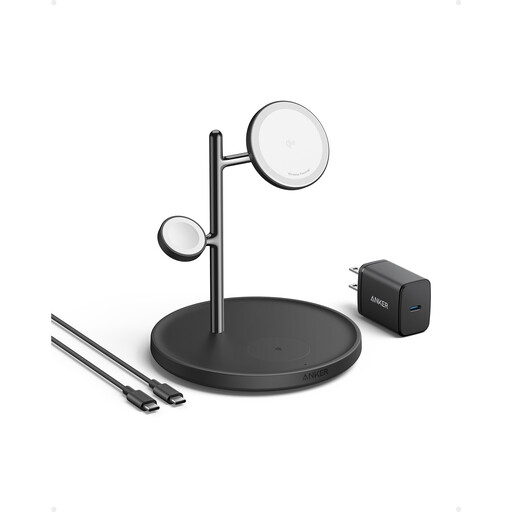
Why This Fits Their Persona: Designed around an iPhone, Apple Watch and AirPods arrangement, making it a considered Apple charging station for home or office use.
Its stated Qi2, MagSafe and MFW compatibility helps distinguish the intended Apple-focused setup from a generic pad.
A tree-style structure separates the three charging areas; the listing includes 15W wireless charging and Apple Watch fast-charging support.
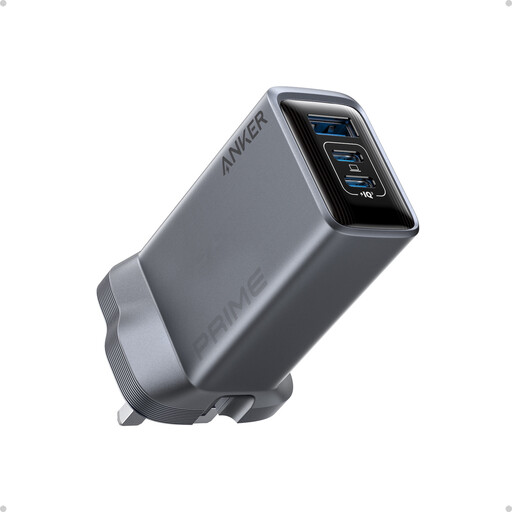
Why This Fits Their Persona: A better match for travellers, laptop users and professionals who prioritise wired power for larger devices over a fully wireless arrangement.
The port count and output allocation are stated clearly: two USB-C ports and one USB-A port, with up to 89W total when all three are used.
Provides up to 100W through a single USB-C port; foldable prongs and a compact body are useful for UK travel and shared workspaces.
We have compiled a complete, real-time list of products that fully satisfy these strict selection criteria and UK safety regulations.
It may draw power while connected, even when devices are fully charged, although the amount depends on the design and usage. To reduce unnecessary consumption, unplug the station when leaving home for an extended period. Use the manufacturer’s recommended adaptor and avoid running a high-output charger continuously if you only need occasional charging.
There is no universal lifespan. Cable strain, heat, dust, drops and unsuitable power adaptors can affect durability. Keep the station in a dry, ventilated area, do not cover it during operation and replace damaged cables or adaptors. A stated warranty, such as the two-year warranty listed for the Cygnett model, can also help when comparing purchase options.
Often, yes, if both devices support the relevant Qi or Qi2 standard. Magnetic alignment and maximum wattage can differ between models. Check the phone, case, earbuds and smartwatch requirements individually before buying, particularly if you want one station for a mixed household.