
24/7 Customer Support

Free returns

Same-day & Next-day Delivery

Quality Guaranteed

Unlock Your Welcome Offers: FREE Delivery | Up to 80% OFF | Free 30-day JoyPlus trial
Download the APP
Wireless earbuds can make commuting, work calls, travel and exercise more convenient, but the wrong pair may become uncomfortable, unreliable or impractical surprisingly quickly. Marketing often focuses on Bluetooth version numbers, large driver sizes or impressive-sounding battery claims without explaining what those features mean in everyday use.
Before buying, watch for three common traps:
True wireless earbuds sit inside the ear canal and usually offer a compact profile, passive noise isolation and a secure fit when the tips match your ears. They can suit trains, offices and general listening, although some users may prefer not to have anything inserted into the ear canal.
Open-ear earbuds and clip-on wireless earbuds sit outside or around the ear. They allow more awareness of traffic, colleagues and other surroundings, which can be useful when walking or working in shared spaces. However, they may sound less isolated in busy environments.
Earhook wireless earbuds add a stabilising hook for movement. They can be a practical choice for running or gym sessions, but check the shape and weight because pressure points may become noticeable over long periods.
Bluetooth 5.3, Bluetooth 5.4 and Bluetooth 6.0 can support stable connections and efficient power use, but the version alone does not determine sound quality. Compatibility, antenna design, software and the source device also matter.
For everyday UK use, check whether the earbuds support:
A model described as earbuds with microphone should also indicate whether it has one microphone per earbud, call noise reduction or a larger microphone array. These features may help voice clarity, but performance can vary in wind and heavy traffic.
Check both earbud playback time and combined case battery life. A pair offering seven hours per charge may be sufficient for a workday, while frequent travellers may prefer a longer total figure.
USB-C charging earbuds are convenient because the same cable may work with a phone, tablet or laptop. Confirm whether a cable is included: some products, such as HUAWEI FreeClip 2, specify that the USB-C cable is not supplied.
Water-resistance ratings also need careful reading. IPX4 generally indicates resistance to splashes and sweat, not immersion. The HUAWEI FreeClip 2 earbuds are listed with an IP57 rating, while the case is rated IP54; the supplied instructions still advise against swimming, showering and high-pressure water exposure. Keep charging contacts dry and follow the manufacturer’s care guidance.
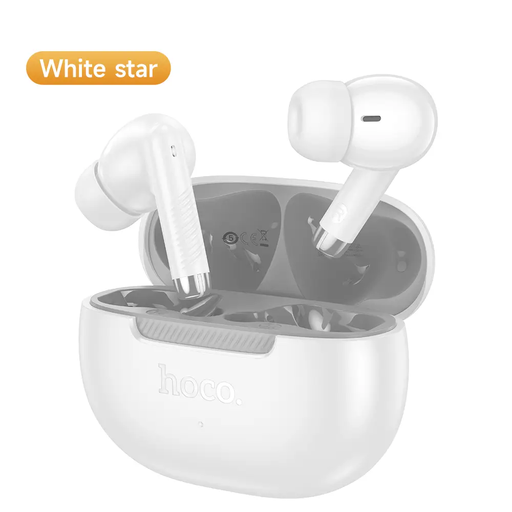
Why This Fits Their Persona: A straightforward option for first-time buyers who want compact true wireless earbuds for commuting, podcasts and everyday calls.
The listing states up to 7 hours of continuous playback and identifies the charging case separately, making the battery information easier to interpret.
Bluetooth 5.4, built-in microphones in both earbuds and a stated total weight of 46.5 grams.
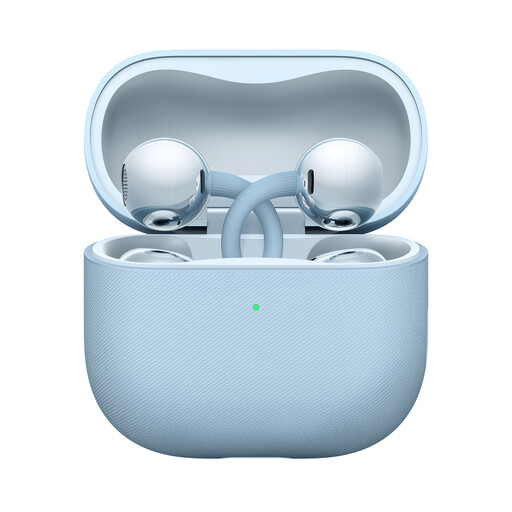
Why This Fits Their Persona: Suited to users seeking open-ear comfort, situational awareness and extended listening for office work, walking and travel.
The clip-on structure avoids ear-canal insertion, while the published instructions clearly distinguish earbud and case water-resistance ratings.
Approx. 5.1g per earbud, up to 9 hours of music playback and 38 hours with the case; Bluetooth 6.0 supports dual-device connection.
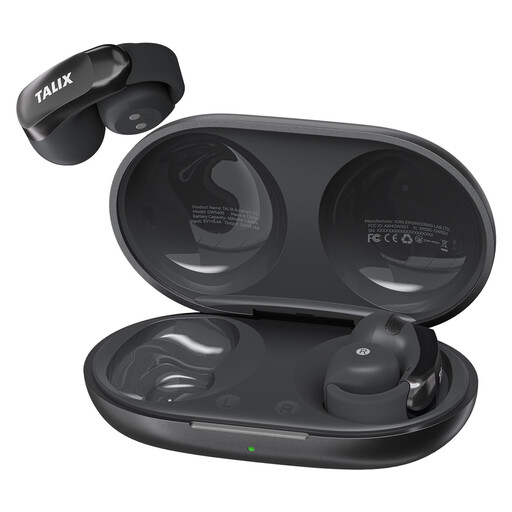
Why This Fits Their Persona: A practical match for exercise, commuting and frequent online meetings where a secure fit and voice pickup are priorities.
Its specifications separate per-charge playback from the case total, and the IPX4 rating sets a more realistic boundary for sweat and light rain.
Each earbud is listed at 5.2g, with four microphones, up to 7 hours per charge and 28 hours with the case.
We have compiled a complete, real-time list of products that fully satisfy these strict selection criteria and UK safety regulations.
Place the earbuds in their case, open the lid and enable Bluetooth on the phone. Select the product name from the available devices. If the earbuds have previously connected to another device, turn Bluetooth off on that device or reset the earbuds according to the supplied instructions.
Battery capacity gradually reduces with charging cycles, and physical wear can affect the case, hinges and charging contacts. Lifespan depends on use, storage and care. Keeping the earbuds dry, avoiding extreme temperatures and returning them to the case after use can help maintain everyday performance.
ANC earbuds can be useful for reducing consistent low-frequency sounds such as train or aircraft noise. They may be less effective against sudden voices or traffic, and they can cost more than standard Bluetooth earbuds. If awareness is important, open-ear earbuds may be more suitable than full noise isolation.