
24/7 Customer Support

Free returns

Same-day & Next-day Delivery

Quality Guaranteed

Unlock Your Welcome Offers: FREE Delivery | Up to 80% OFF | Free 30-day JoyPlus trial
Download the APP
Wireless earbuds can make commuting, remote meetings, exercise and everyday listening more convenient. However, product pages often focus on impressive-sounding features without explaining what they mean in practical use. A pair advertised as Bluetooth 5.4 earbuds may still be uncomfortable, while a model labelled “noise cancelling” may offer call-noise reduction rather than active noise cancellation.
This guide explains the key checks UK shoppers should make before buying wireless earbuds, followed by product suggestions matched to different listening habits.
Active noise cancellation (ANC) uses microphones and electronic processing to reduce surrounding sound for the wearer. It can be useful on trains, buses or in busy offices, but its effectiveness varies by design and fit.
Environmental noise cancellation (ENC) generally refers to microphone processing intended to make your voice clearer during calls. It does not necessarily reduce the noise you hear while listening to music. Check the specification carefully rather than treating ANC and ENC as interchangeable terms.
Battery claims may refer to the combined capacity of the earbuds and their charging case, or to standby time rather than continuous playback. ANC, high volume, calls and gaming modes can also affect running time.
For a realistic comparison, look for:
Ear canal shape differs considerably. A sealed in-ear fit can help passive isolation and bass response, but an unsuitable ear tip may cause pressure or loosen during movement. Open-ear clip-on designs avoid inserting a bud into the ear canal, although they usually provide less sound isolation.
If you plan to use earbuds while walking or exercising outdoors, fit and awareness of surrounding traffic may matter more than headline audio specifications.
Bluetooth 5.4 is a current connectivity specification found across several Bluetooth earbuds. It can support efficient, stable connections, but the actual experience also depends on the phone, tablet or laptop being used. Bluetooth versions do not automatically guarantee a particular sound quality or range.
True wireless earbuds should also support the profiles needed for music and calls, such as A2DP and HFP. If you regularly switch between a laptop and smartphone, check whether the product supports multipoint connection or whether manual reconnection is required.
Many in-ear wireless headphones use a dynamic driver, which converts the electrical signal into sound. Driver size alone does not determine audio quality, so treat phrases such as “Hi-Fi” or “deep bass” as prompts to inspect the full specification rather than guarantees.
Useful details include:
For sports earbuds, check the stated water or sweat resistance rating. An IP rating describes protection against dust or water under specific test conditions; it does not mean a product is suitable for swimming unless the manufacturer explicitly states this.
USB-C earbuds are convenient for households already using USB-C cables. Also check whether the case has a digital battery display, as this can make it easier to judge when the next recharge is needed. Keep charging contacts clean and dry, and follow the supplied charging instructions.
Under UK product-safety expectations, buyers should also review the supplied safety information, battery warnings and disposal guidance. Products containing lithium batteries should not be exposed to excessive heat or placed in general household waste at the end of their life.
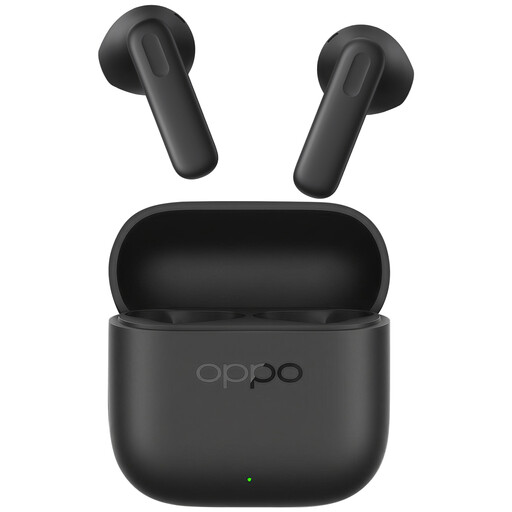
Why This Fits Their Persona: A practical everyday option for UK users wanting true wireless earbuds for music, podcasts, media and calls without adding complicated controls or accessories.
The listing identifies Bluetooth 5.4, a 45 mAh earbud battery and a 450 mAh case, helping shoppers distinguish individual earbud capacity from case capacity.
Dynamic drivers, touch controls, USB-C charging and a compact case are specified. The listed net weight is 50 grams.
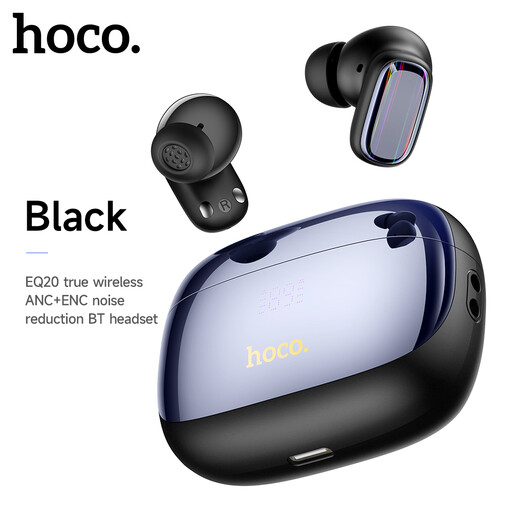
Why This Fits Their Persona: Suited to listeners who prioritise flexible listening modes for commuting, work calls and longer music sessions.
The listing separates ANC from exterior noise cancellation and states up to 7 hours of playtime, or 6 hours with ANC activated.
Bluetooth 5.4, Type-C charging, dual-earbud or single-earbud use, ANC and a microphone are listed features.
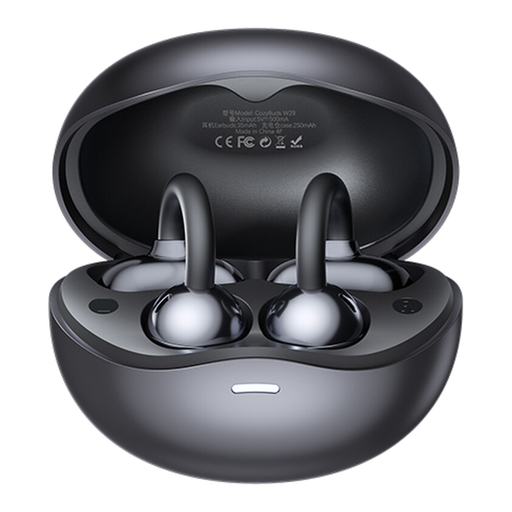
Why This Fits Their Persona: A suitable design to consider for walking, commuting or exercise when staying aware of surrounding sounds is important, or when conventional in-ear earbuds feel uncomfortable.
The open-ear clip-on format avoids relying on a sealed ear-tip fit and is designed to preserve awareness of ambient sound during outdoor use.
Bluetooth 5.4, touch controls, call noise matching and up to 6.5 hours of use on one charge are specified.
We have compiled a complete, real-time list of products that fully satisfy these strict selection criteria and UK safety regulations.
Most Bluetooth earbuds work with Bluetooth-enabled smartphones, tablets and laptops. Basic pairing is usually platform-neutral, but features such as automatic switching, app controls and advanced codecs may depend on the device and operating system.
Service life depends on battery ageing, charging habits, moisture exposure and physical handling. Lithium batteries gradually lose capacity over time. Keeping the case and earbuds away from heat, charging them with suitable equipment and avoiding excessive moisture can help maintain everyday performance.
They require periodic charging, so there is a small electricity cost. The more significant consideration is battery replacement or eventual product replacement, as many compact earbuds have built-in batteries. USB-C charging can simplify cable management when other household devices use the same connector.