
24/7 Customer Support

Free returns

Same-day & Next-day Delivery

Quality Guaranteed

Unlock Your Welcome Offers: FREE Delivery | Up to 80% OFF | Free 30-day JoyPlus trial
Download the APP
Navigating the world of the modern wireless gaming mouse can feel like a minefield of marketing jargon and inflated specifications. With every brand promising a competitive edge, it's easy to spend a significant amount of money on features that don't actually improve your gameplay. As a Joybuy Product Recommendation Officer, my role is to help you cut through the clutter and focus on what truly matters for your gaming setup.
Before you add any mouse to your basket, let's look at the common pitfalls that many UK gamers fall into and how you can avoid them.
Many promising-looking mice hide flaws that only become apparent after weeks of use. Here are two of the most frequent traps we see buyers encounter:
Instead of focusing on marketing buzzwords, let's break down the specifications that deliver a tangible improvement to your gaming experience.
A mouse's physical design is arguably its most critical feature. A lightweight gaming mouse, typically weighing under 75 grams, allows for faster movements and reduces wrist fatigue during long gaming sessions. This is especially crucial in fast-paced FPS titles like Valorant or CS2.
Equally important is the shape. An ergonomic gaming mouse should fit your hand and grip style (palm, claw or fingertip) comfortably. A poor fit can lead to cramping and inconsistent aim, no matter how advanced the internal technology is.
Modern wireless mice offer more than just a single connection. A tri-mode gaming mouse provides three options:
The switches beneath the main buttons determine the feel and lifespan of your clicks. Optical switches use a beam of light to register clicks, which eliminates the "debounce delay" found in mechanical switches and prevents accidental double-clicking issues over time. They often have a longer rated lifespan. Mechanical switches, on the other hand, provide a more traditional tactile and audible click that many players prefer.
Based on these practical criteria, here are a few recommendations from our catalogue, matched to different types of gamers.
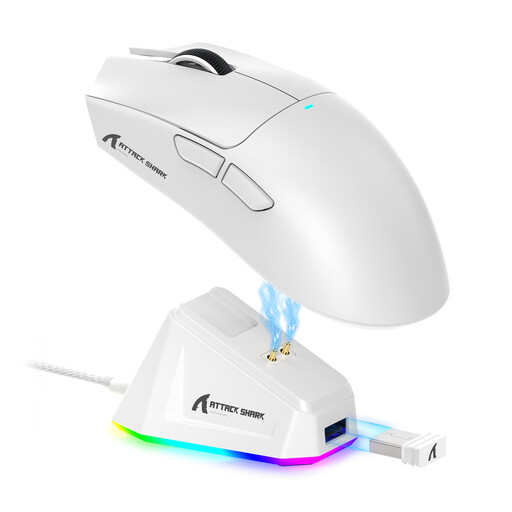
Why This Fits Their Persona: This mouse offers a feature set often found in more expensive models, making it a strong choice for gamers in the UK who want competitive performance without a premium price. It's lightweight, versatile and the included dock adds significant convenience.
It focuses on a reliable PAW3311 sensor and a practical 1000Hz polling rate, avoiding the CPU overhead of 8K while still providing a low-latency experience. The focus is on balanced performance, not just headline numbers.
Tri-mode connectivity offers great versatility and the included gaming mouse with charging dock is a convenient feature for keeping the device ready for action.
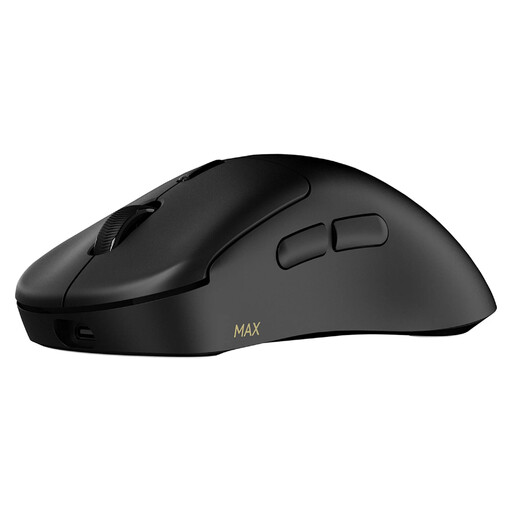
Why This Fits Their Persona: For the player who demands peak performance, this mouse delivers. Its extremely low weight and native 8K polling rate are designed for the highest levels of competitive play, where every millisecond and gram counts.
While it features a high polling rate, it's a native implementation, not a software gimmick. It also pairs this with an exceptionally long battery life at 1000Hz, giving the user a choice between peak performance and endurance.
The combination of a 53g ultra-lightweight body, a true 8K wireless polling rate and durable optical switches makes this a formidable competitive gaming mouse.
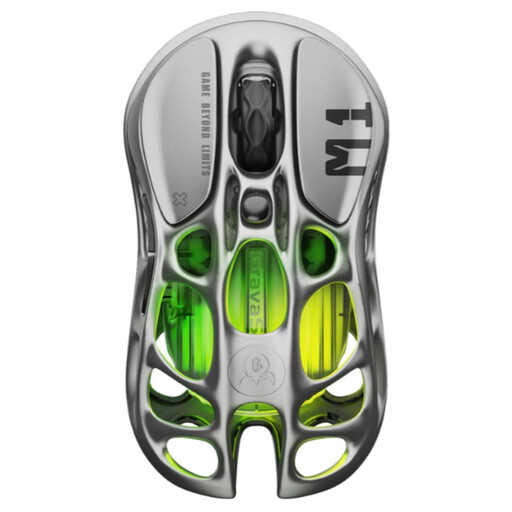
Why This Fits Their Persona: This user wants a mouse that is both a high-performance tool and a centrepiece for their desk. The unique hollowed-out magnesium alloy construction and customisable RGB lighting deliver a premium look and feel that stands out.
Despite its striking design, it doesn't compromise on core performance. It uses the high-end PAW3395 sensor and offers 4K polling rate capability (with a separate dongle), backing up its looks with serious hardware.
The magnesium alloy hollow design provides durability while keeping weight down. It's a high-performance RGB gaming mouse with a premium sensor and tri-mode connectivity.
We have compiled a complete, real-time list of products that fully satisfy these strict selection criteria and UK safety regulations.
Battery life varies significantly based on usage. A mouse used at a standard 1000Hz polling rate with RGB lighting off can last for over 100 hours. However, enabling features like an 8K polling rate and bright RGB lighting can reduce this to 15-20 hours. Many models, like the RAPOO VT series, feature ultra-low-power MCUs that can extend battery life to several hundred hours at 1000Hz.
For most players, a 1000Hz polling rate is more than sufficient and provides a smooth, responsive experience. An 8K polling rate mouse offers a marginal reduction in input lag that may be perceptible to highly competitive esports professionals using high-refresh-rate monitors (240Hz+). For the average gamer, the increased CPU usage and battery drain may not be a worthwhile trade-off.
Most wireless gaming mice are plug-and-play for basic functions. However, to access advanced features like remapping programmable buttons, creating macros, adjusting DPI stages and customising RGB lighting, you will need to install the manufacturer's driver software. Many modern mice also feature on-board memory, which allows you to save your settings directly to the mouse and use them on any computer without the software installed.