
24/7 Customer Support

Free returns

Same-day & Next-day Delivery

Quality Guaranteed

Unlock Your Welcome Offers: FREE Delivery | Up to 80% OFF | Free 30-day JoyPlus trial
Download the APP
Navigating the world of PC gaming peripherals can feel like a minefield of technical jargon and ambitious marketing claims. When it comes to selecting a new wireless gaming mouse, it's easy to get drawn in by flashy features that don't always translate to a better in-game experience. As your Joybuy Product Recommendation Officer, my role is to help you sidestep the common purchasing traps and focus on what truly matters for your setup.
Many gamers find themselves disappointed with a purchase because they fell for one of these common pitfalls:
To make an informed decision, focus on the technical specifications that directly impact performance and comfort. Here are the key parameters to check.
The sensor is the heart of your PC gaming mouse. Instead of chasing the highest DPI, look for a mouse with a reputable optical sensor known for its consistent, reliable tracking without acceleration or prediction. A high DPI mouse is only useful if the sensor can handle it flawlessly.
Equally important is the polling rate, measured in Hertz (Hz). This determines how frequently the mouse reports its position to your computer. The standard for gaming is 1000Hz (1ms response time). Anything lower can feel sluggish. Higher polling rates like 4000Hz or 8000Hz are available for enthusiasts seeking the absolute lowest latency, but 1000Hz is more than sufficient for most players.
The ideal weight is subjective, but the shape is universal. An ergonomic gaming mouse should support your natural grip style—be it palm, claw or fingertip—to prevent strain during long sessions. Consider the mouse's dimensions and shape in relation to your hand size. A lightweight gaming mouse can reduce fatigue and allow for quicker movements, but only if its construction is solid. Materials like magnesium alloy can offer a premium combination of low weight and high strength.
For a wireless gaming mouse, a dedicated 2.4GHz wireless dongle is non-negotiable for a lag-free experience. If you value versatility, a tri-mode gaming mouse is an excellent choice, allowing you to switch to Bluetooth for a laptop or tablet. Also, check for programmable mouse buttons. The ability to re-map buttons and create macros can provide a significant advantage in many games, while customisable RGB gaming mouse lighting adds a personal touch to your setup.
Based on these practical criteria, here are a few recommendations tailored to different types of UK gamers.
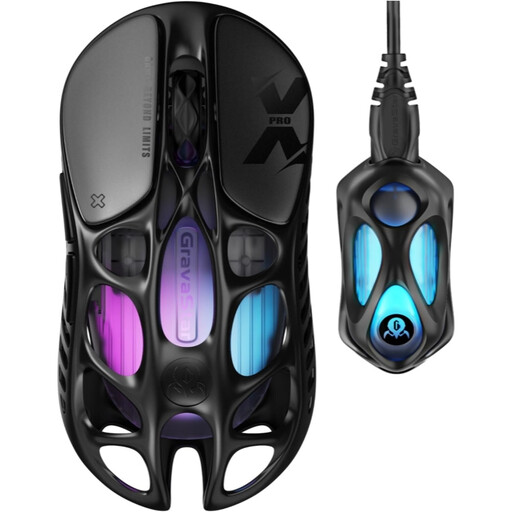
Why This Fits Their Persona: This user demands the lowest latency and weight for peak performance in fast-paced shooters. The Mercury X Pro is built for speed and precision, where every gram and millisecond counts.
It sidesteps the "featherlight fallacy" by using a strong magnesium alloy for its hollow 49g frame, ensuring durability. The 8000Hz polling rate is a tangible performance feature, not just a marketing number.
Features an extremely low weight of 49g and a high-performance 8000Hz polling rate for near-instantaneous response. The PAW 3950 sensor provides exceptionally accurate tracking.
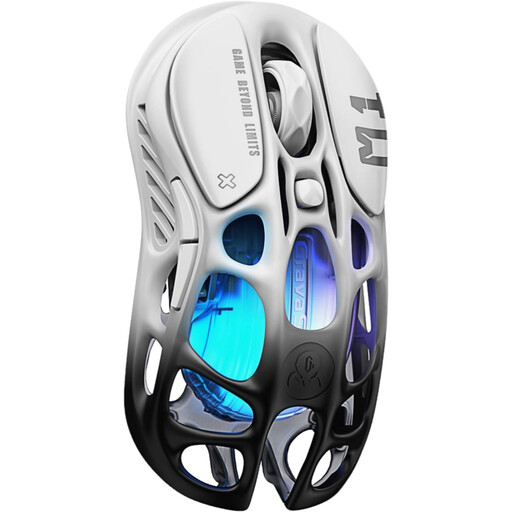
Why This Fits Their Persona: This gamer plays a mix of genres and needs a reliable, feature-rich mouse that performs well across the board. They value customisation and a solid feel over the absolute lowest weight.
It correctly utilises its tri-mode connectivity, offering a high-performance 2.4GHz mode for gaming and Bluetooth for other tasks. The focus is on the proven PAW3395 sensor, not just an inflated DPI number.
Offers excellent versatility with its tri-mode connectivity and 5 programmable buttons. The PAW3395 sensor is a well-regarded component, providing reliable and accurate tracking for any game genre.
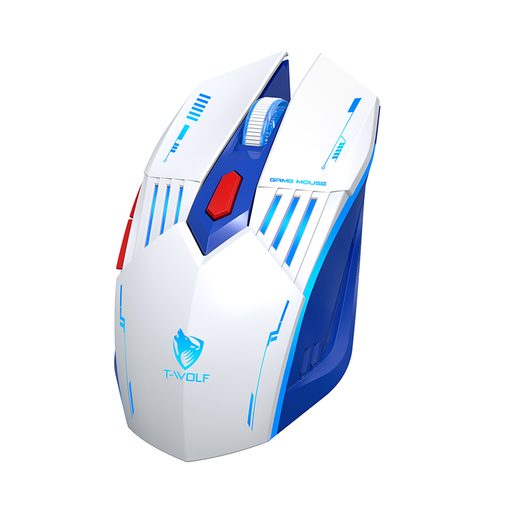
Why This Fits Their Persona: Ideal for someone building their first gaming setup or looking for a capable yet affordable wireless option. This mouse provides essential gaming features without the premium price tag.
It avoids the DPI trap by offering a practical and useful range of 800-3600 DPI, which is perfect for most gaming scenarios. It delivers on its promise of being a solid, functional **affordable gaming mouse**.
Provides excellent value with tri-mode connectivity (2.4G, Bluetooth and Wired) and a rechargeable battery with Type-C charging. The inclusion of RGB lighting is a nice touch at this price point.
We have compiled a complete, real-time list of products that fully satisfy these strict selection criteria and UK safety regulations.
For years, wired mice were considered the only option for competitive play. However, modern 2.4GHz wireless technology has advanced significantly. Today, a quality wireless gaming mouse offers latency that is virtually indistinguishable from its wired counterparts for all but the most elite professional players. The key is to use the 2.4GHz connection via its USB dongle, as Bluetooth mode typically has higher latency and is not recommended for serious gaming.
Battery life varies widely between models, typically ranging from 30 hours to over 100 hours on a single charge. The biggest factor influencing this is the RGB gaming mouse lighting. Turning off or dimming the RGB effects can often double the battery life. Most models also feature power-saving sleep modes and can be used in wired mode while charging, so you're never left unable to play.
For basic plug-and-play use, you generally do not need to install any software. The mouse will function with default settings. However, to unlock its full potential—such as customising DPI levels, changing RGB lighting effects and assigning macros to the programmable mouse buttons—you will need to download and install the manufacturer's specific software. Many mice now come with onboard memory, which allows you to save your settings directly to the mouse, so you don't need the software running in the background.