
24/7 Customer Support

Free returns

Same-day & Next-day Delivery

Quality Guaranteed

Unlock Your Welcome Offers: FREE Delivery | Up to 80% OFF | Free 30-day JoyPlus trial
Download the APP
The freedom of a wireless setup is a game-changer for any PC user, but for gamers, it's about more than just a tidy desk. Cutting the cord eliminates cable drag, allowing for unrestricted, fluid movements that can make all the difference in a fast-paced match. However, navigating the market for a wireless gaming mouse can be complex, with a dizzying array of specifications like DPI, polling rates and switch types.
This guide is designed to help you understand the key features that matter. We will walk you through what to look for and present a few carefully selected options that cater to different types of players, from casual enthusiasts to competitive esports professionals.
Before diving into specific models, let's break down the core technical aspects. Understanding these will help you identify which mouse is the right fit for your play style and budget.
For gaming, not all wireless is created equal. The primary concern is input lag, or latency. A low latency wireless mouse is essential for competitive play. Most high-performance models use a dedicated 2.4GHz USB receiver, which provides a stable, near-instantaneous connection comparable to a wired mouse. While Bluetooth is a convenient option for general use or connecting to multiple devices, 2.4GHz is the standard for serious gaming. Pay attention to the polling rate, measured in Hz, which indicates how often the mouse reports its position to the PC. A higher rate, such as 1000Hz or more, means smoother and more responsive cursor movement.
The sensor is the heart of a gaming mouse. Modern optical sensors offer exceptional tracking precision on various surfaces. A key specification you will see is DPI (Dots Per Inch), which measures how sensitive the mouse is to movement. A high DPI gaming mouse allows you to move the cursor across a high-resolution screen with minimal physical hand movement. While manufacturers often advertise very high DPI numbers, most players use settings between 800 and 3200. The crucial factor is a high-quality sensor that provides true 1:1 tracking without acceleration or smoothing, ensuring your aim is consistent and predictable, a must-have for any FPS gaming mouse.
Comfort is paramount for long gaming sessions. An ergonomic gaming mouse is shaped to fit naturally in your hand, reducing strain. Weight is another critical factor. A lightweight gaming mouse (typically under 80g) is favoured by many FPS players for quick flicks and rapid adjustments. Conversely, some players prefer a heavier mouse for more deliberate control. Finally, consider customisation. A programmable gaming mouse for PC allows you to assign macros and commands to extra buttons, which is invaluable in MMOs and MOBAs. Features like a rechargeable RGB mouse also allow for aesthetic personalisation to match your setup.
Here are a few standout options that balance performance, features and design for different gaming needs.
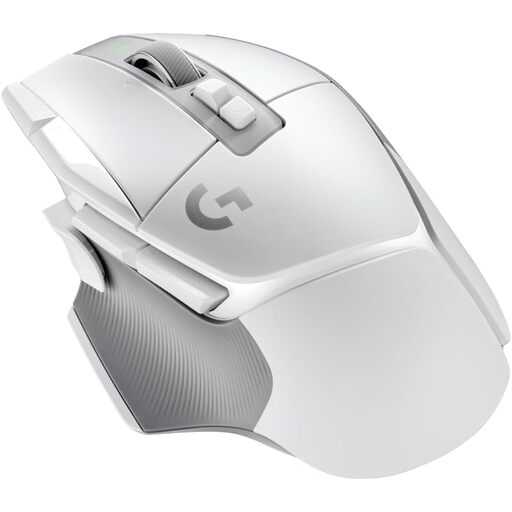
Logitech G502 X Wireless Gaming Mouse - White
Why It Stands Out: The Logitech G502 X builds on a legendary design, offering a superb balance of features for almost any game genre. It is equipped with LIGHTFORCE hybrid optical-mechanical switches, which deliver the tactile feel of mechanical clicks with the speed of optical actuation. The HERO 25K sensor provides exceptional accuracy up to 25,600 DPI, while the 13 programmable buttons make it a highly adaptable tool for both FPS and MMO games. At approximately 102g, it has a reassuring weight and its iconic ergonomic shape provides lasting comfort.
Pros:
Who is it for? Gamers who play a wide variety of titles and want a reliable, feature-rich and ergonomic gaming mouse that excels in any situation.
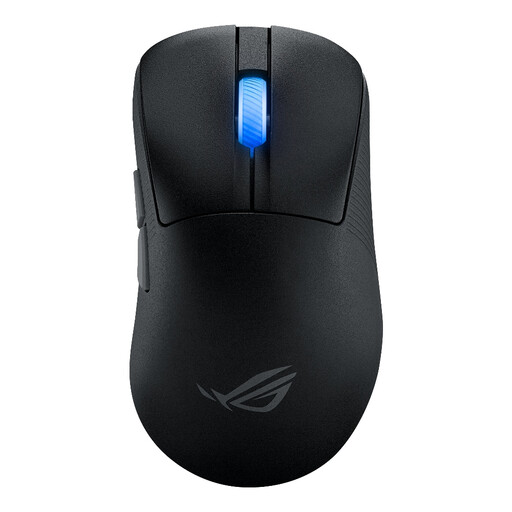
ASUS ROG Keris II Ace Wireless Gaming Mouse - Black
Why It Stands Out: Engineered for competitive performance, the ASUS ROG Keris II Ace is an exceptionally lightweight gaming mouse at just 54 grams. Its ergonomic shape was developed with input from professional FPS players for optimal grip and control. The standout feature is the ROG Polling Rate Booster, which can achieve a 4000 Hz wireless polling rate for incredibly smooth and responsive tracking. This is paired with the ROG AimPoint Pro optical sensor, which boasts a sensitivity of up to 42,000 DPI and the ability to track on glass.
Pros:
Who is it for? Serious and competitive FPS players who demand the lowest possible latency and weight for a distinct performance advantage.

Rexsun Tri-Mode Gaming Mouse - White & Blue, X7
Why It Stands Out: The Rexsun X7 proves that you do not need to spend a fortune to get a capable and stylish wireless mouse. It offers impressive versatility with its tri-mode connection, supporting 2.4G wireless, Bluetooth and wired USB. This makes it easy to switch between a gaming PC, a work laptop and a tablet. It features four adjustable DPI levels up to 3600 DPI, a comfortable ergonomic shape and 4-colour rechargeable RGB mouse lighting for a touch of gaming flair. The built-in battery is conveniently charged via a modern Type-C port.
Pros:
Who is it for? Casual gamers, students or anyone seeking a versatile and affordable wireless mouse for both gaming and everyday productivity.
If these recommendations do not quite match what you are looking for, do not worry. The world of wireless peripherals is vast, with countless shapes, sizes and feature sets available. To see a wider selection, feel free to browse our complete collection.
? Explore our full range of RF Wireless mice here
1. Is a wireless gaming mouse good for competitive gaming? Yes, absolutely. Modern high-performance wireless mice that use a 2.4GHz connection offer latency that is virtually indistinguishable from their wired counterparts. Technologies like Logitech's LIGHTSPEED and ASUS's ROG SpeedNova are specifically engineered for professional-grade, lag-free performance, making them a top choice for many esports athletes.
2. How long do the batteries last in a rechargeable RGB mouse? Battery life varies significantly based on the model and usage. A mouse with extensive RGB lighting will consume power more quickly. Most gaming mice offer anywhere from 30 to 70 hours of playtime with lighting on. However, turning the RGB effects off can often double the battery life, with some models lasting well over 100 hours on a single charge.
3. What DPI is good for a gaming mouse? There is no single "correct" DPI; it is largely a matter of personal preference and is also influenced by your screen resolution. Many professional FPS players use a lower DPI (typically 400-1600) combined with large mouse movements for precise aiming. Players of MMOs or those with 4K monitors might prefer a higher DPI (1600-3200 or more) for faster cursor travel. The most important thing is to find a setting that feels comfortable and allows you to be consistent.