
24/7 Customer Support

Free returns

Same-day & Next-day Delivery

Quality Guaranteed

Unlock Your Welcome Offers: FREE Delivery | Up to 80% OFF | Free 30-day JoyPlus trial
Download the APP
Navigating the market for a new wireless gaming mouse can feel like a competitive game in itself. With endless specifications and bold marketing claims, it's easy to feel overwhelmed and make a choice you later regret. As your Joybuy Product Recommendation Officer, my role is to help you sidestep the common pitfalls and focus on what truly matters for your in-game performance.
Many gamers find themselves disappointed with a purchase that looked great on paper. Before you add any mouse to your basket, let's look at the three most common traps that catch out even experienced players.
To make an informed decision, let's break down the technical specifications that have the biggest impact on your gameplay.
Instead of focusing solely on the maximum DPI, look for information on the sensor model. Sensors like the PixArt PAW series (e.g., PAW3395) or proprietary ones like the ROG AimPoint are known for their flawless, 1:1 tracking. This means the mouse's movement translates perfectly to your screen without prediction or smoothing, which is essential for building muscle memory in an FPS gaming mouse. A high-quality sensor ensures your aim is consistent, whether you're making a tiny adjustment or a rapid flick shot.
The ideal weight and shape depend entirely on you. An ergonomic gaming mouse should feel like a natural extension of your hand.
For gaming, a 2.4GHz RF wireless connection is the standard. It offers the low latency required for competitive play, often matching the performance of wired mice. Bluetooth is a useful secondary option for productivity or connecting to other devices, making a tri-mode gaming mouse a versatile choice.
Polling Rate, measured in Hertz (Hz), dictates how many times per second your mouse sends data to your computer.
Based on these critical factors, here are a few recommendations tailored to different types of UK gamers.
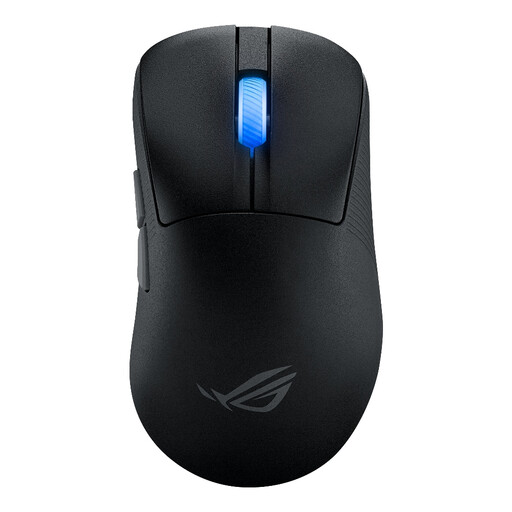
Why This Fits Their Persona: This mouse is built for one purpose: competitive advantage. Its ultralight 54g frame and pro-player-tested ergonomic shape are ideal for the rapid, precise movements required in titles like Valorant or CS2.
It combines a lightweight gaming mouse design with a solid, durable shell, avoiding the flimsy feel of some competitors. Its performance is defined by its high polling rate and flawless sensor, not just a high DPI number.
Supports up to 4000Hz wireless and 8000Hz wired polling rates for exceptionally low latency. The ROG AimPoint Pro sensor offers top-tier precision.
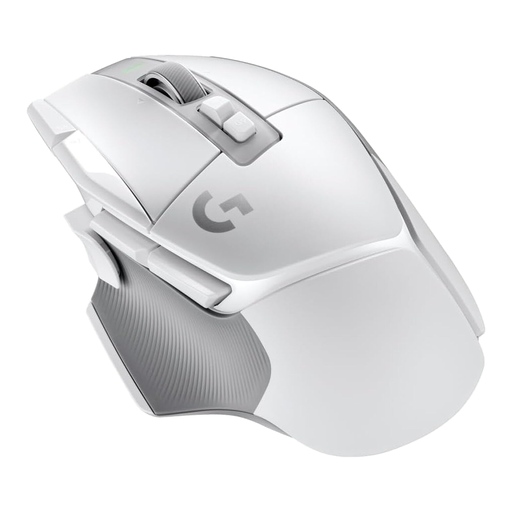
Why This Fits Their Persona: Perfect for gamers who play a variety of genres, from MMOs to single-player adventures. Its 13 programmable buttons and iconic ergonomic shape provide comfort and control for any task, gaming or otherwise.
It prioritises features over chasing the lowest weight. At 102g, it offers a stable, controlled feel, proving that ultralight isn't the only path to performance. Its HERO 25K sensor is renowned for reliability, not just a high number.
LIGHTSPEED wireless provides a professional-grade, low-latency connection. The dual-mode hyper-fast scroll wheel is excellent for both gaming and productivity.

Why This Fits Their Persona: This mouse delivers core gaming features without the premium price. It's for the player who wants a reliable, lightweight and responsive wireless experience for daily gaming and general use.
It focuses on practical durability. The premium PBT top cover resists wear and shine, a feature often reserved for more expensive models, ensuring it avoids the trap of poor long-term build quality.
Offers dual-mode connectivity (2.4GHz and Bluetooth) and a lightweight 62g design. The option to use AA or AAA batteries provides flexibility between weight and battery life.
We have compiled a complete, real-time list of products that fully satisfy these strict selection criteria and UK safety regulations.
Battery life for a rechargeable gaming mouse varies significantly based on usage, polling rate and RGB gaming mouse lighting. Models can range from 40 hours to over 200 hours on a single charge. Most will last for several days of heavy gaming. Turning off RGB lighting is the easiest way to extend battery life.
For most players, the jump from 1000Hz to higher polling rates may not be immediately obvious. However, for competitive FPS players on high-refresh-rate monitors (240Hz or above), the smoother cursor tracking and fractional millisecond reduction in latency can provide a tangible competitive advantage. It makes tracking fast-moving targets feel more connected and responsive.
The lifespan is primarily determined by the click switches and battery. Most gaming mice use switches rated for 50 to 100 million clicks, which translates to years of heavy use. The internal battery will degrade over time, but a quality mouse should provide reliable performance for at least 3-5 years before any significant decline in battery capacity is noticed. Features like hot-swappable switches can extend this lifespan even further.