
24/7 Customer Support

Free returns

Same-day & Next-day Delivery

Quality Guaranteed

Unlock Your Welcome Offers: FREE Delivery | Up to 80% OFF | Free 30-day JoyPlus trial
Download the APP
The search for the perfect wireless gaming mouse can feel like navigating a minefield of technical jargon and marketing promises. With so many options available, it is easy to fall into common traps that leave you with a mouse that hinders, rather than helps, your performance. As a Joybuy Product Recommendation Officer, my role is to help you see past the hype and focus on the features that truly matter for your gaming and productivity needs in the UK.
Before you add ?? mouse to your basket, let's look at the most common pitfalls that catch buyers out.
high DPI mouse that you will never use at its maximum setting is a frequent and unnecessary expense.lightweight gaming mouse has a downside. In the race to shave off every possible gram, some designs sacrifice structural integrity, resulting in creaky plastic, button wobble and a device that feels flimsy. A lightweight mouse should not come at the cost of durability.gaming mouse for PC.To make an informed choice, you need to understand the specifications that directly impact your experience. Here are the three non-negotiable factors to check.
The physical design of a mouse is just as important as its internal electronics.
esports mouse scenarios, a weight of under 65 grams is often preferred for rapid flicks and reduced wrist fatigue. For general gaming or hybrid use, a mouse between 65 and 85 grams can offer a more substantial, controlled feel.ergonomic gaming mouse is designed to fit the natural contour of your hand, reducing strain during long sessions. Consider your grip style—palm, claw or fingertip—and look for a shape that supports it. Symmetrical designs suit both left and right-handed users, while right-handed ergonomic shapes often provide better thumb support.The polling rate, measured in Hertz (Hz), is how many times per second the mouse reports its position to your computer. A higher number means smoother cursor movement and lower input lag.
8K polling rate mouse reports its position up to 8,000 times per second. This provides exceptionally smooth tracking, which can offer a fractional advantage in competitive play. However, it is most noticeable on high-refresh-rate monitors (240Hz and above) and can demand more from your computer's processor.A tri-mode gaming mouse offers the ultimate flexibility, allowing you to switch between connection types for different scenarios.
rechargeable gaming mouse.Instead of a generic list, we have matched our recommendations to specific user profiles to help you find the right fit.

Why This Fits Their Persona: This mouse is for the user who splits their time between work and play. Its tri-mode connectivity allows for a seamless switch from a low-latency 2.4GHz connection on a gaming PC to a convenient Bluetooth connection on a work laptop and all without unplugging a single cable.
It sidesteps the "DPI Deception" by offering a practical and adjustable range (up to 3600 DPI) that is more than enough for casual gaming and office tasks, without charging for an unnecessary specification.
Its main strength is versatility. The combination of tri-mode connectivity and modern Type-C fast charging provides a flexible and reliable experience for multiple devices.
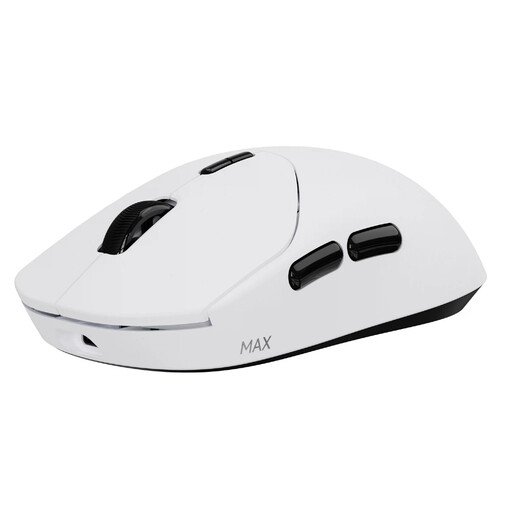
Why This Fits Their Persona: This mouse is built for one purpose: performance. The 53g ultra-lightweight body, native 8K wireless polling rate and long-lasting optical switches are engineered for players who need the fastest response times in competitive titles like Valorant, Apex Legends or CS2.
It avoids the "Fragile Featherweight" trap by using an optimised internal structure that maintains rigidity despite its low weight. The 8K polling rate is a native hardware feature, not a software gimmick, sidestepping the "Latency Lie".
The combination of a true 8000Hz wireless polling rate and a 53g weight provides a tangible edge in speed and smoothness. Its optical switches also prevent accidental double-clicks.
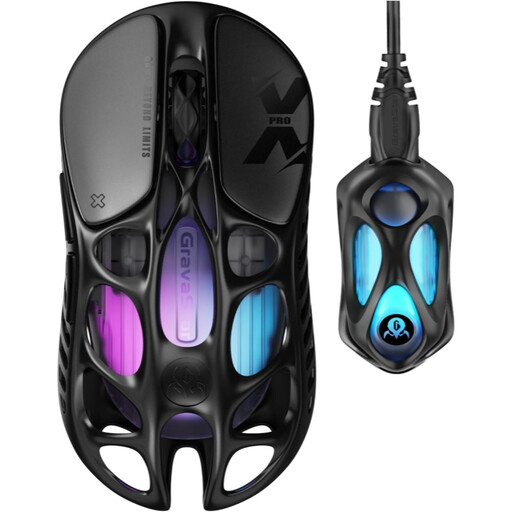
Why This Fits Their Persona: For the enthusiast who values cutting-edge engineering and a standout aesthetic. The hollow-skeleton design, crafted from magnesium alloy and the inclusion of a top-tier PAW 3950 sensor make this a statement piece that also delivers elite performance.
This mouse justifies its high-end specifications with premium materials. The magnesium alloy construction provides incredible strength at just 49 grams, completely avoiding the "Fragile Featherweight" problem through superior engineering.
Its standout feature is the magnesium alloy build, which delivers an astonishingly low weight without any compromise on rigidity. This is paired with a flagship sensor and an included 8K dongle for maximum performance.
We have compiled a complete, real-time list of products that fully satisfy these strict selection criteria and UK safety regulations.
For most users with standard 60Hz or 144Hz monitors, a 1000Hz polling rate is perfectly adequate and provides a responsive experience. An 8K polling rate mouse offers the smoothest possible cursor tracking, but its benefits are most apparent on monitors with a 240Hz or higher refresh rate. It is a feature primarily aimed at competitive players seeking every possible advantage and it may increase CPU usage on some systems.
Battery life varies significantly between models. A lightweight gaming mouse designed for performance may have a smaller battery lasting 50-100 hours. In contrast, other models featuring ultra-low-power technology can last for hundreds of hours when used at a 1000Hz polling rate. Features like the customisable lighting on an RGB gaming mouse will also impact battery duration. Always check the manufacturer's stated battery life and the conditions under which it was measured (e.g., polling rate, lighting on/off).
Most modern mice are plug-and-play, meaning their basic functions will work as soon as you connect them. However, to access advanced features, you will typically need to install the manufacturer's software. This allows you to customise DPI levels, remap the functions of a programmable gaming mouse, record macros and control lighting effects. Some newer models are also introducing web-based drivers that allow customisation through a browser without a local software installation.