
24/7 Customer Support

Free returns

Same-day & Next-day Delivery

Quality Guaranteed

Unlock Your Welcome Offers: FREE Delivery | Up to 80% OFF | Free 30-day JoyPlus trial
Download the APP
Choosing a new wireless gaming mouse can feel like navigating a minefield of technical jargon and marketing hype. The freedom of a wireless setup is appealing, but concerns about latency, weight and battery life are valid. Whether you're executing complex rotations in an MMO, landing critical headshots in an FPS or simply looking for a reliable peripheral for your daily gaming sessions, the right mouse can make all the difference.
As the Joybuy Product Recommendation Officer, my role is to help you cut through the clutter. This guide offers practical advice and highlights a few standout models to help you find a mouse that genuinely matches your playstyle and needs, without the pressure of exaggerated claims.
Before diving into specific products, let's break down the key features to consider. Understanding these will empower you to make a more informed decision.
The physical feel of a mouse is paramount. A lightweight gaming mouse, often weighing under 80 grams, is typically favoured by FPS players for its ability to facilitate rapid flicks and swipes with minimal fatigue. In contrast, some MMO or casual players may prefer a heavier, more substantial mouse that feels planted and stable.
Equally important is the shape. An ambidextrous gaming mouse UK model offers a symmetrical design suitable for both left- and right-handed players, while ergonomic right-handed mice are contoured to fit the natural curve of the hand. Consider your grip style—palm, claw or fingertip—and look for a shape that supports it comfortably over long sessions.
The sensor is the heart of your mouse. While many brands advertise a high DPI mouse, what truly matters for performance is sensor accuracy, consistency and the absence of tracking errors like spin-out. Most competitive players use a DPI setting between 400 and 1600. A high maximum DPI (e.g., over 12,000) is a good indicator of a modern, capable sensor.
For a low latency wireless mouse, look for models with a dedicated 2.4GHz RF connection via a USB dongle. This technology provides a stable, near-instantaneous connection essential for competitive play. Bluetooth is a convenient secondary option for on-the-go use but generally has higher latency than 2.4GHz RF.
The number and placement of programmable mouse buttons should align with the games you play most. For FPS titles, two side buttons are often sufficient. However, for an MMO gaming mouse, a grid of six or more side buttons can be a significant advantage, allowing you to map skills, items and macros for quick access. Look for mice with intuitive software that allows you to re-map buttons, adjust DPI stages and customise lighting profiles.
Here are a few recommendations that cater to different types of gamers, from MMO strategists to esports competitors.

Why It Stands Out: The ROG Spatha X is an uncompromising command centre built for MMO and MOGA domination. Its standout feature is the array of 12 programmable buttons, including a six-button side panel, which provides extensive control for complex games. Furthermore, its exclusive push-fit hot-swappable switch sockets allow you to customise the click feel and extend the mouse's lifespan without any soldering.
Pros:
Who is it for?: Dedicated MMO and RPG players who require a high number of programmable buttons and appreciate deep hardware customisation.

Why It Stands Out: The TUF Gaming M4 Wireless delivers an excellent balance of performance, durability and value. It features a lightweight ambidextrous design at just 62 grams (without battery) and a top cover made from premium PBT polymer, which resists the shine and wear common on other mice. Its flexible battery system, allowing the use of either AA or AAA batteries, lets you prioritise either maximum runtime or minimum weight.
Pros:
Who is it for?: All-round gamers seeking a durable, reliable and versatile wireless mouse that offers great features without a premium price tag.
View the ASUS TUF Gaming M4 Wireless
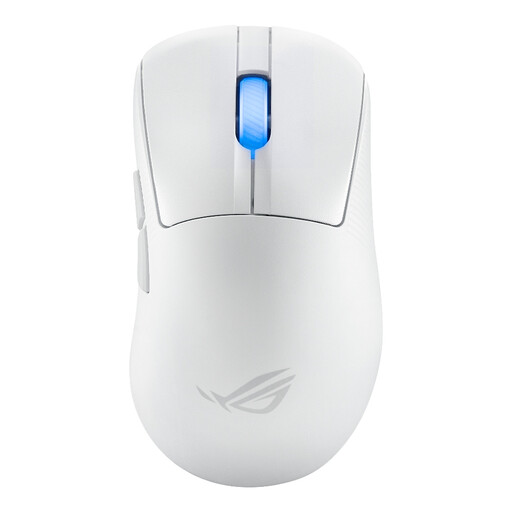
Why It Stands Out: Engineered for the highest levels of competition, the ROG Harpe II Ace is an ultralight esports mouse weighing a mere 48 grams. Developed with input from esports professionals, its shape is optimised for precision and control. The standout technology is its 8000 Hz polling rate in both wired and 2.4GHz wireless modes, delivering exceptionally smooth and responsive tracking that can provide a tangible edge in fast-paced games.
Pros:
Who is it for?: Serious and competitive FPS and MOBA players who prioritise minimal weight, maximum sensor accuracy and the lowest possible latency to achieve peak performance.
View the ASUS ROG Harpe II Ace
The models above represent a range of specialised options. If your needs fall somewhere in between, or you're looking for a more traditional layout, there are many other excellent choices available.
If you're searching for a model with a classic layout, explore our curated selection of wireless gaming mouse with two side buttons to find more options.
Yes, for the vast majority of players. Modern low latency wireless mouse technology using 2.4GHz RF connections has advanced to the point where the performance is virtually indistinguishable from wired counterparts. Top-tier models from brands like ASUS ROG often feature polling rates and response times that match or even exceed those of many wired mice.
While many products are marketed as a high DPI mouse, most professional and enthusiast gamers use a setting between 400 and 1600 DPI. A high maximum DPI (e.g., 19,000 or more) is an indicator of a high-quality sensor, but the most important factor is finding a sensitivity level that allows you to aim comfortably and consistently. It's better to have a precise sensor than an unnecessarily high DPI setting.
This depends entirely on your gaming habits. For FPS games like Valorant or Counter-Strike, two side buttons for abilities or communication are usually sufficient. For an MMO gaming mouse used in games like World of Warcraft or Final Fantasy XIV, having six or more programmable mouse buttons can be a huge quality-of-life improvement, allowing you to bind numerous skills and macros directly to your thumb for faster execution.