
24/7 Customer Support

Free returns

Same-day & Next-day Delivery

Quality Guaranteed

Unlock Your Welcome Offers: FREE Delivery | Up to 80% OFF | Free 30-day JoyPlus trial
Download the APP
For years, the debate between wired and wireless peripherals has been a central topic in PC gaming circles. The fear of input lag, signal drops and dead batteries mid-match kept many serious players tethered to their desks. However, wireless technology has advanced significantly, and today's high-performance wireless gaming mice offer the freedom of movement without compromising on the speed and accuracy required for competitive play.
Navigating the market can be challenging. With a sea of technical specifications like DPI, polling rates and switch types, finding the right tool for your playstyle is key. This guide is designed to help you understand the essential features of a modern wireless gaming mouse and highlight a few standout options available today.
Before diving into specific models, let's break down the core features that separate a standard office mouse from a true gaming peripheral.
The heart of any gaming mouse is its sensor. A high DPI mouse (Dots Per Inch) offers greater sensitivity, allowing for faster cursor movement with less physical motion. While many models boast extremely high DPI numbers, what's more important is the sensor's ability to track accurately without acceleration or smoothing. Equally critical is the connection's responsiveness. Look for models with dedicated 2.4GHz wireless technology, as this provides a low latency gaming mouse experience that is virtually indistinguishable from a wired connection, making it suitable for even the most demanding esports mouse scenarios.
Comfort is paramount during long gaming sessions. An ergonomic gaming mouse is shaped to fit naturally in your hand, reducing strain and improving control. Your preferred grip style—be it palm, claw or fingertip—will influence the ideal shape and size for you. In recent years, the trend has shifted towards the lightweight gaming mouse. Models under 80 grams can reduce fatigue and allow for quicker, more agile movements, a distinct advantage in fast-paced FPS titles.
A reliable rechargeable gaming mouse is a must. Look for models that offer substantial battery life to avoid interruptions. Many now feature convenient USB-C charging and some even support wireless charging systems for continuous power. Furthermore, a programmable gaming mouse with customisable buttons can be a game-changer, especially in MMOs or strategy games where complex macros can be assigned for quick access.
Here are a few recommendations that balance performance, features and design for different types of gamers.
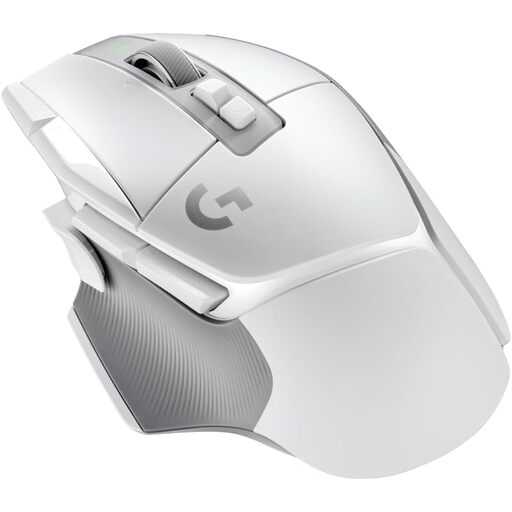
Why It Stands Out The Logitech G502 X builds upon a legendary design, refining it for the modern era. It strikes an excellent balance between weight, features and comfort. The introduction of LIGHTFORCE Hybrid Optical-Mechanical Switches provides the satisfying tactile click of a mechanical switch with the speed and durability of optical technology. Its versatility is its greatest strength, making it a superb all-rounder.
Pros
Who is it for? This mouse is ideal for the gamer who plays a wide variety of genres. Its wealth of programmable buttons is perfect for MMO and RPG players, while its accurate sensor and comfortable shape make it a solid choice for FPS and general use. At approximately 102g, it suits those who prefer a mouse with a bit more substance.
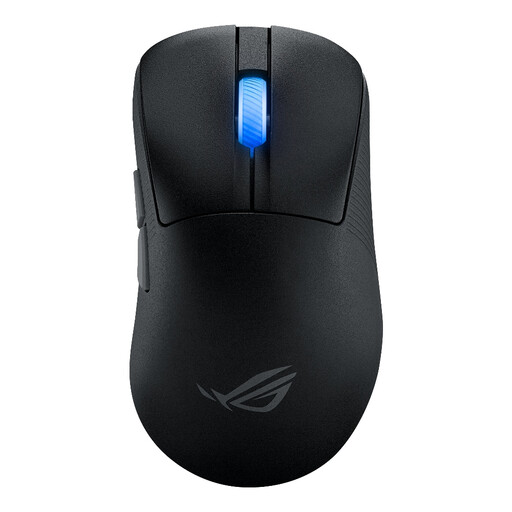
Why It Stands Out Engineered for the competitive elite, the ASUS ROG Keris II Ace is all about raw performance. Weighing an astonishingly light 54 grams, it feels almost non-existent in the hand, allowing for maximum agility. Its standout feature is the ROG Polling Rate Booster, which can elevate the wireless polling rate to 4000 Hz—four times the industry standard—for exceptionally smooth and responsive cursor movement.
Pros
Who is it for? This is the ultimate esports mouse for the serious FPS or battle royale player. If your primary goal is to gain every possible competitive advantage through minimal weight and near-instantaneous response times, the Keris II Ace is built for you.
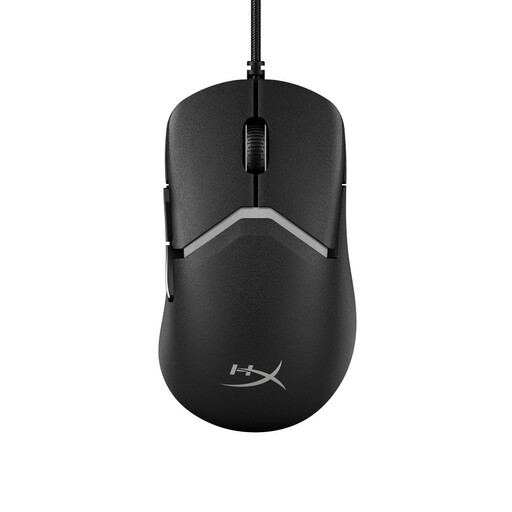
Why It Stands Out The HyperX Pulsefire Saga Pro is a master of versatility. Its key advantage is the dual-mode wireless connectivity, allowing you to switch seamlessly between a high-performance 2.4GHz connection for gaming and a power-efficient Bluetooth connection for work or travel. This makes it an excellent single-mouse solution for users who move between multiple devices.
Pros
Who is it for? This PC gaming mouse is perfect for the practical gamer who needs a device that can do it all. If you use the same mouse for your gaming rig, work laptop and perhaps even a tablet, the Pulsefire Saga Pro’s dual-mode functionality offers unmatched convenience without sacrificing gaming-grade performance.
The models highlighted here represent some of the strong choices in a constantly evolving market. If your needs are different or you're simply curious about other designs and feature sets, there are many more peripherals to discover.
To see a broader selection of models, feel free to explore our complete collection of USB wireless computer mouse options.
Is a wireless gaming mouse really as good as a wired one for competitive gaming? Yes. Modern 2.4GHz wireless technologies, such as Logitech's LIGHTSPEED and ASUS's SpeedNova, have reduced latency to a point where it is imperceptible to humans. Many professional esports athletes now use wireless mice in top-tier competitions, confirming their viability for high-stakes gaming.
How important is DPI in a gaming mouse? While a high maximum DPI indicates a capable and precise sensor, most competitive players use much lower settings, typically between 400 and 1600 DPI. This allows for more controlled and consistent aiming. Think of a high DPI ceiling as a sign of a quality engine, even if you never drive it at its top speed.
What is the difference between optical and mechanical mouse switches? Traditional mechanical switches rely on a metal contact to register a click, which can suffer from physical wear and a slight delay known as "debounce." Optical switches use a beam of light for actuation. When you click, a shutter blocks the light, sending an instant signal. This generally results in faster response times, eliminates debounce issues and often leads to a longer lifespan.