Multi-device home-office workers
If you charge headphones alongside a laptop, phone or tablet, a multi-port USB station gives those devices a shared charging point. Check its port types and how output changes when several ports are in use.


Choose a multi-port USB station if your headphones or their case charge by cable, particularly when other desk devices need power too. Choose a Qi or Qi2 stand only if the earbud case explicitly supports wireless charging; USB-charged over-ear headphones need a compatible wired or model-specific solution. Check the required connector, shared power output and a safe place for the charger before buying.
If you charge headphones alongside a laptop, phone or tablet, a multi-port USB station gives those devices a shared charging point. Check its port types and how output changes when several ports are in use.
A Qi stand offers a place to set down an earbud case between calls, but only if that particular case supports wireless charging. Confirm the case model before choosing the stand.
If your headphones charge through a USB port, prioritise the correct cable and power connection rather than a Qi pad. Bose documents USB-C charging for its QuietComfort Headphones, but your own model’s instructions determine what it needs.
Choose when: Your headphones or case charge by cable and other desk devices need USB power.
Allow for: Suitable cables and power shared between occupied ports; the headline wattage is not available from every port at once.
Choose when: Your earbud case explicitly supports Qi charging and you want to set it down without connecting a cable.
Allow for: The stand’s earbud position may not suit a different case, and it will not directly charge USB-only over-ear headphones.
Choose when: Your headset requires a particular charging cradle or manufacturer-specified accessory.
Allow for: A dedicated dock may not charge your other desk devices; a headphone stand is not necessarily a charger.
| Concern | What to check | Who this matters to |
|---|---|---|
| Charging compatibility | Check the exact headphone or case instructions for its charging connector, dock or Qi support. | If my over-ear headphones charge by cable, I need a station that can actually connect to them; around 40% of consumers put charging-method compatibility first. |
| Shared desk charging | Count the devices charged together, then check port types and the station’s multi-port output table. | When my laptop and headphones share a desk, I want one charging point that works for both; roughly 30% of consumers make desk consolidation their primary concern. |
| Cable-free placement | Confirm Qi support for the specific earbud case and an appropriate charging position on the stand. | With a Qi-capable earbud case, I want to set it down between calls without plugging it in; around 30% of consumers primarily value that cable-free charging spot. |
A Qi pad cannot directly charge headphones that require a USB cable. An earbud case may support Qi even when an over-ear model from the same broad category does not.
Check the charging instructions for your exact headphones or case before deciding between a wired station and a Qi stand.
A desktop station’s stated total output is shared across connected devices, so charging a laptop, phone and headphones together can change the power available at each port.
Read the manufacturer’s output table for the combination of ports you intend to use.
A charging setup needs an appropriate place on the desk. Electrical Safety First advises charging devices on a hard, flat surface rather than a bed or sofa.
Set the station on a hard, flat surface and follow the device manufacturer’s charger instructions.
A wired USB desktop-station route for charging headphones alongside other desk devices.
A multi-port USB route for workstations where a laptop may charge alongside headphones and smaller devices.
A wireless-stand route for a compatible earbud case and phone, rather than USB-only over-ear headphones.
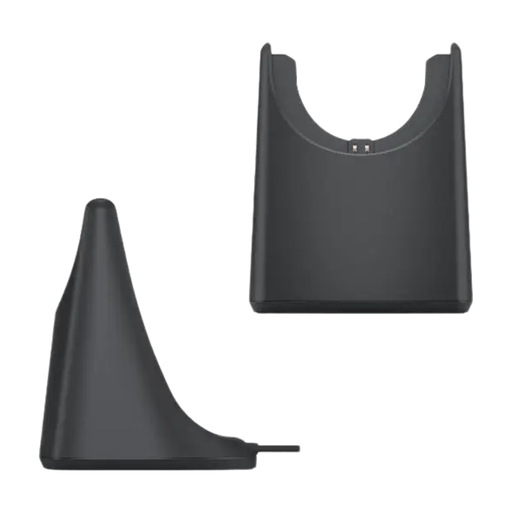
For a Dell Pro Plus Wireless ANC Headset WL5024, a model-specific charging stand is an alternative to a general USB station or Qi pad. Check your headset model before ordering.
 No image available
A dedicated desk-charging option for the Dell Pro Plus Wireless ANC Headset WL5024. Confirm the exact headset model and follow Dell’s power-connection instructions; do not assume compatibility with other headsets.
No. Wireless audio does not mean wireless charging: a Qi stand requires a case or device that supports Qi. Apple lists Qi charging for the AirPods 5 Wireless Charging Case, whereas Bose specifies a USB-C connection for its QuietComfort Headphones.
Look up the exact model in the Wireless Power Consortium’s Qi Certified Products listing. Check the model identity rather than treating the words “Qi compatible” as confirmation of certification, and separately confirm that your earbud case supports Qi charging.
Use a hard, flat surface rather than a bed or sofa, as Electrical Safety First advises. Follow the charging instructions for your devices and keep the station positioned so its cables and connectors can be used as intended.