
24/7 Customer Support

Free returns

Same-day & Next-day Delivery

Quality Guaranteed

Unlock Your Welcome Offers: FREE Delivery | Up to 80% OFF | Free 30-day JoyPlus trial
Download the APP
Buying wireless headphones can look straightforward until you compare battery claims, noise-cancelling modes, microphone specifications and connection types. A low-priced pair may suit occasional listening, while a more advanced model could be worthwhile for commuting, flights or daily online meetings.
The key is to match the design with how you actually use it, rather than paying for features that will rarely be switched on.
Battery-life figures are usually measured under particular conditions. ANC headphones often last fewer hours with active noise cancellation enabled, while high-volume playback, voice calls and multipoint connections may also affect endurance.
Check both figures where available. For example, some models quote separate battery life with ANC on and off. A long-battery-life headphones listing should also explain charging speed, charging port and whether a short charge provides useful playback time.
Active noise cancellation (ANC) uses microphones and electronic processing to reduce surrounding sound. It is generally more useful against continuous low-frequency noise, such as train engines, aircraft cabins or air-conditioning. It may be less effective against sudden voices, nearby conversations or traffic hazards.
Passive isolation is different. Over-ear cushions and a secure in-ear fit physically reduce sound entering the ear. A product described as “noise cancelling” may only provide passive isolation, so check whether ANC is specifically listed.
A stylish design can become inconvenient if the headband creates pressure, the earcups become warm or the earbuds do not stay secure. Similarly, Bluetooth headphones may not be ideal for every device. Confirm Bluetooth compatibility, multipoint support and whether a wired fallback is included.
For laptops, tablets and phones without a 3.5mm port, USB-C earbuds or USB-C audio may provide a direct connection. A wired model can also avoid battery concerns during long study sessions or work calls.
Look for separate playback figures for wireless use, ANC use and immersive audio modes. A fast-charge figure is also practical: a short charge that provides several hours of listening can be more useful than a larger headline figure with slow charging.
USB-C is now a convenient standard for many headphones and earbuds. However, check whether the product includes a charging cable and whether wired USB audio is supported, as charging through USB-C does not always mean audio can be played through the same connection.
If you need headphones with a microphone or headsets for work, examine the microphone arrangement rather than relying on “clear calls” wording. A dedicated boom microphone can sit closer to the mouth, while built-in microphones depend more heavily on software noise reduction and positioning.
For busy offices, cafés and home-working spaces, look for microphone noise reduction, mute controls and compatibility with platforms such as Microsoft Teams or Zoom. A 3.5mm headset is simple to set up, but some laptops may require an adaptor or separate audio and microphone connections.
For travel, consider folding hinges, a carry case, weight and whether the headphones can operate through a cable if the battery is empty.
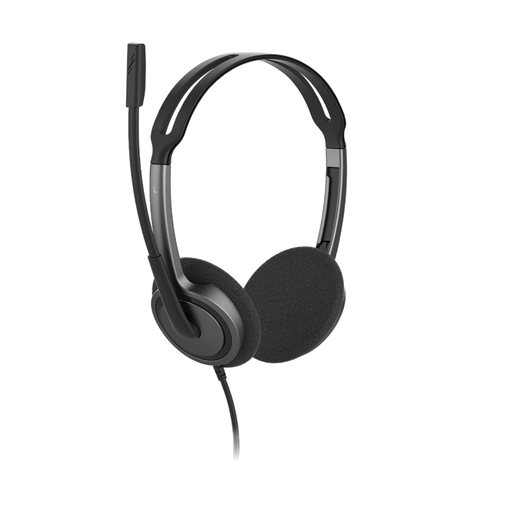
Why This Fits Their Persona: A straightforward option for students, home users and office callers who want a simple wired connection without charging or Bluetooth pairing.
It does not rely on an inflated wireless battery claim. The 3.5mm plug-and-play design and 270° rotating noise-cancelling microphone make the main use clear.
72.5g weight, adjustable headband, 1.8m cable and compatibility with Windows, macOS, iOS, Android and ChromeOS.
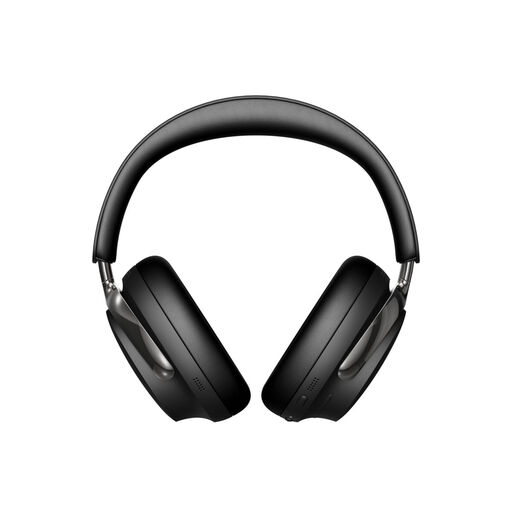
Why This Fits Their Persona: Suited to listeners who prioritise adjustable listening modes, over-ear comfort and a premium feature set for commuting, flights and home use.
The listing separates battery figures for Quiet/Aware mode and Immersive Audio, helping buyers judge realistic usage rather than one headline number.
Up to 30 hours in Quiet/Aware mode, Bluetooth multipoint, USB-C audio, a carry case and included 3.5mm-to-2.5mm cable.
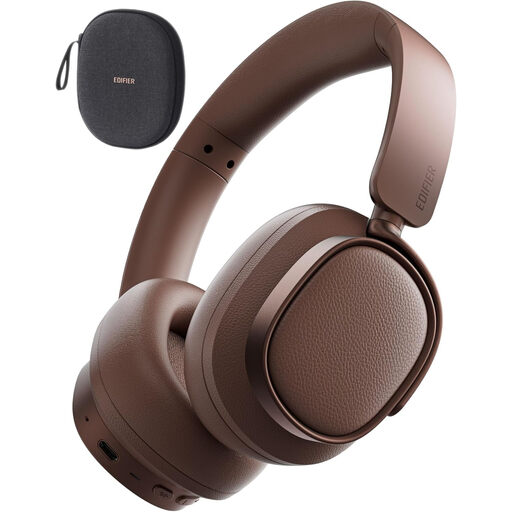
Why This Fits Their Persona: A practical match for frequent travellers, hybrid workers and listeners who move between a phone and laptop throughout the day.
Its specifications state separate normal and ANC playback figures, while multipoint connectivity addresses the common phone-and-laptop switching problem.
Up to 92 hours in normal mode, up to 53 hours with ANC, Bluetooth 5.4, foldable construction and four ANC modes.
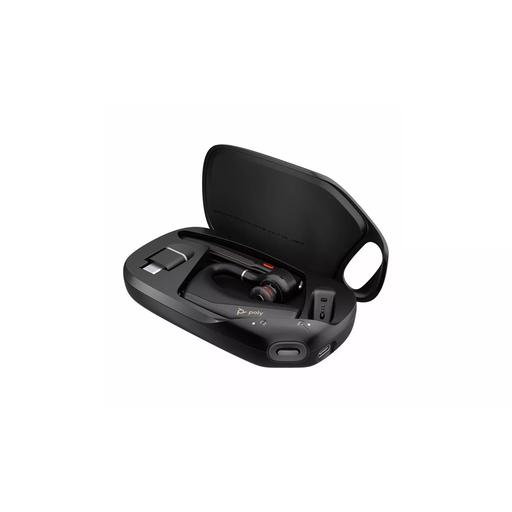
Why This Fits Their Persona: Designed around professional calls, making it suitable for hybrid workers, customer-service users and people who need hands-free communication.
The microphone boom, WindSmart and Poly NoiseBlock features are specified for voice communication, rather than leaving call performance to generic earbud microphones.
USB-C rechargeable design, on-ear call controls, Bluetooth pairing and stated optimisation for Microsoft Teams and Zoom.
We have compiled a complete, real-time list of products that fully satisfy these strict selection criteria and UK safety regulations.
Yes, provided the model has a suitable microphone and is compatible with your computer or meeting platform. For frequent meetings, prioritise microphone positioning, mute controls, Bluetooth multipoint or a reliable USB connection.
Battery performance gradually reduces with charging cycles, but lifespan also depends on hinges, ear cushions, cable condition and care. Store headphones in a dry place, avoid extreme heat and do not pull wired earbuds from the cable. Replaceable cushions or a wired fallback can extend practical use.
Wireless headphones need regular charging, but electricity use is generally modest. The more important ongoing consideration is battery ageing. Wired headphones avoid charging altogether, while wireless models offer easier movement and fewer cable-related inconveniences. Choose the connection type that fits your daily routine.