
24/7 全天候客户支持

免费退货

当日/次日达

品质保障

开启新人专享福利: 全场免邮 | 低至 2 折 | 免费试用 30 天 JoyPlus 会员
下载 Joybuy
If you run a home office, a small business or simply have a busy household, you know the frustration. The printer, a device meant to make life easier, often becomes a source of recurring expense and inconvenience. The cycle of buying costly, low-yield ink cartridges that seem to run out at the most critical moments is a common pain point.
This is where the wireless ink tank printer comes in. These devices replace traditional cartridges with large, refillable reservoirs, fundamentally changing the economics of printing. By purchasing ink in bottles, you can dramatically lower your running costs and print thousands of pages before needing a top-up.
As the Joybuy Product Recommendation Officer, my role is to help you navigate the options. This guide will explain the key features to look for in a modern printer and provide our top recommendations to help you find a reliable, cost-effective solution for your printing needs.
Making the right choice involves looking beyond the initial price tag and considering features that will save you time and money in the long run. Here are a few key factors to consider.
The most significant advantage of a refillable ink printer is its exceptionally low cost per page. While the initial purchase price may be higher than a basic cartridge printer, the savings on consumables are substantial. When comparing models, look at the page yield of the included ink bottles. A printer that comes with thousands of pages' worth of ink in the box offers incredible value and means you might not need to buy refills for years, depending on your usage.
For a busy home or office, efficiency is key. A 3-in-1 multifunction printer that combines printing, scanning and copying into a single unit saves valuable desk space. To further streamline your workflow, consider these features:
A modern home office printer should connect seamlessly to all your devices. Wi-Fi connectivity is standard, but look for models with dual-band Wi-Fi (2.4 GHz and 5 GHz) for a more stable connection in crowded wireless environments. Mobile printing apps, Apple AirPrint and Wi-Fi Direct (for guest printing) are all features that add a layer of convenience to your daily tasks.
Based on functionality, long-term value and user-friendly features, here are our recommendations for your home or small office.

Why It Stands Out: The Brother DCP-T780DW is a prime example of a high yield printer designed for cost-conscious users. The standout feature is the sheer amount of ink included in the box: two black ink bottles yielding a total of 15,000 pages and colour bottles yielding 5,000 pages each. Brother's innovative refill system is also noteworthy; the bottles are designed to be mess-free, automatically stopping when the tank is full.
Pros:
Who is it for? This printer is an excellent fit for home offices, small businesses and families who print frequently in both black and colour. If your primary goal is to minimise printing costs over the long term without sacrificing features, this model is a strong contender.

Why It Stands Out: While not an ink tank model, the DCP-L3520CDWE is a compelling alternative for those who prioritise speed and the crisp text quality of laser printing. It delivers both colour and mono documents at a swift 18 pages per minute. It is also compatible with Brother's EcoPro subscription service, which automates toner delivery and provides ongoing warranty coverage for predictable monthly costs.
Pros:
Who is it for? Small offices or professionals who need to produce high-quality colour business documents quickly and value the convenience of a toner subscription service.
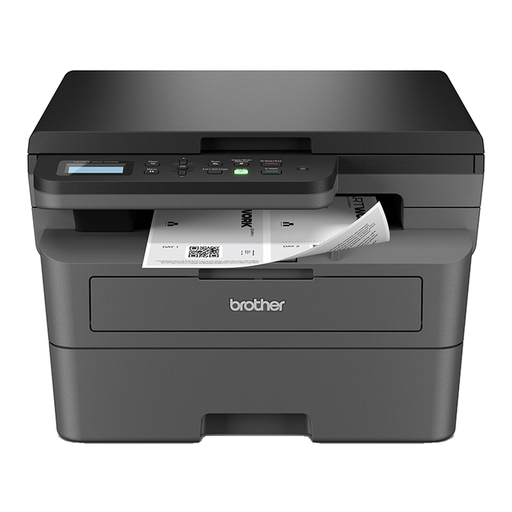
Why It Stands Out: If your printing needs are almost exclusively black and white, this mono laser printer offers impressive performance. With a rapid print speed of 32 pages per minute and a large 50-sheet ADF, it is built for productivity. Like the colour laser model, it is compatible with the EcoPro subscription, ensuring you never run out of toner while keeping costs predictable.
Pros:
Who is it for? Users who primarily print text-based documents, such as reports, invoices or academic papers, and require speed, efficiency and reliable performance.
The models highlighted here serve a range of common needs, but every user is different. If you're looking for different features or price points, there are many other choices available.
Explore our full range of printer inkless solutions to find the perfect match for your home or office.
For anyone who prints more than a few pages per week, the answer is generally yes. The long-term savings from inexpensive ink refills typically outweigh the higher initial purchase price when compared to traditional cartridge-based printers. The convenience of not having to constantly shop for cartridges is another significant benefit.
This depends entirely on your printing volume and the model you choose. However, a key feature of these printers is their high page yield. For example, the Brother DCP-T780DW includes enough ink to print up to 15,000 black pages. For an average household, this could last for several years.
The primary consideration is the higher upfront cost compared to many cartridge printers. Additionally, like other inkjet technologies, the print heads can be susceptible to clogging if the printer is left unused for extended periods. Performing a print head clean or simply printing a page once every couple of weeks can help prevent this issue.